Chapter 5. Setup Menu
5-28
5
Setup Menu
Click
1.
Click
3.
Enter
2.
Click
1.
Click
3.
Enter
2.
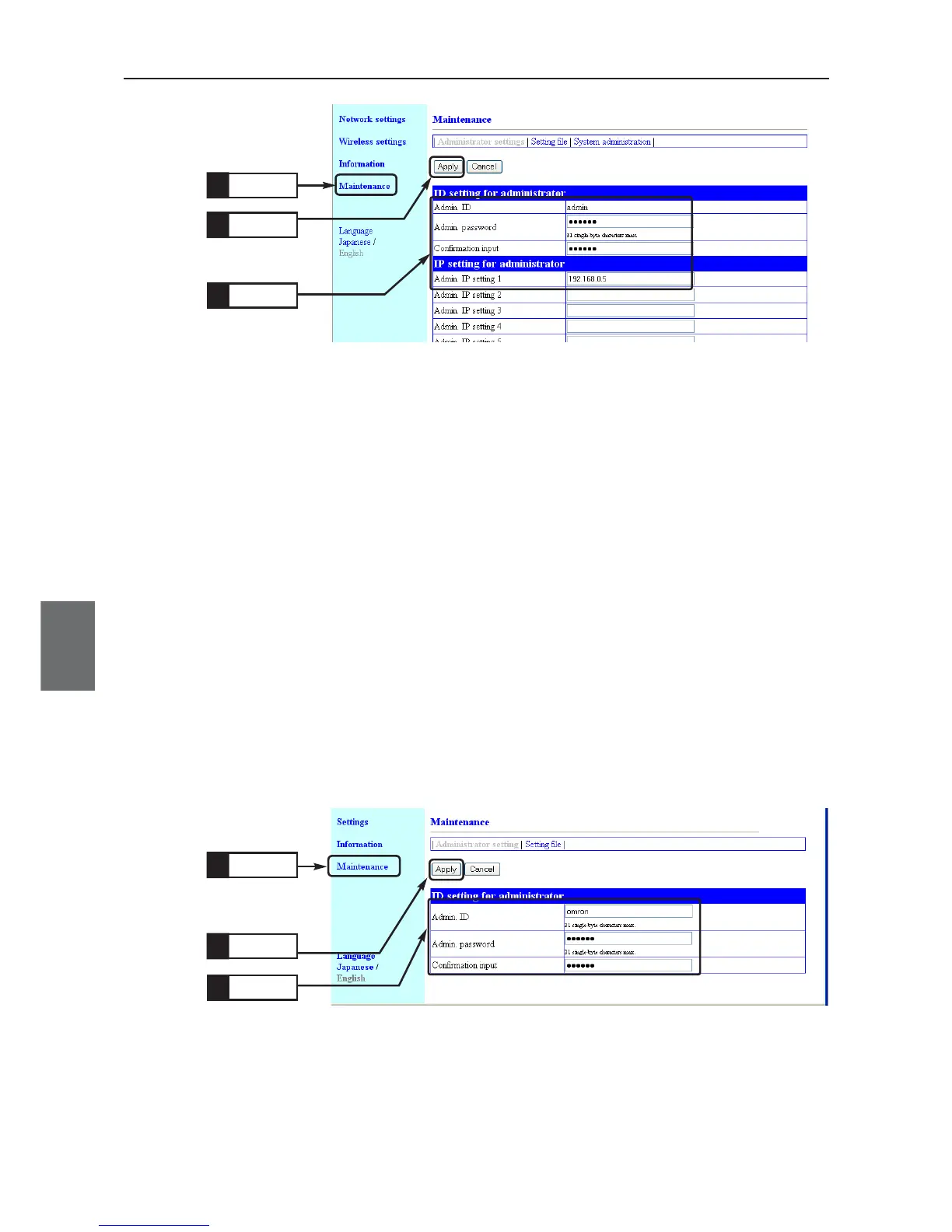
<To Configure>
Setup on WE70-CL
(1) Click "Maintenance" menu.
• An "Administrator settings" screen is displayed.
(2) Enter an administrator ID with any alphanumeric character string (within
31 characters) in [Admin. ID] of the [ID setting for administrator].
(Example: omron)
(3) Enter an administrator ID with any alphanumeric character string (within
31 characters) in [Admin. password] and [Confirmation input] fields of the
[ID setting for administrator].
(Example: uspass, Display Example: ••••••)
Entered character is displayed as "•(black circle)".
(4) Click <Apply>.
• Setup is now being enabled.
A screen asking user name and password will be displayed. Enter these
administrator ID and password.



 To Next Page