EasyManua.ls Logo

Omron WE70-AP - LAN Cabling

Omron WE70-AP
146 pages
Print Icon
To Next Page IconTo Next Page
To Previous Page IconTo Previous Page
Loading...
Chapter 2. Installation & Connection
2-8
2
Installation & Connection
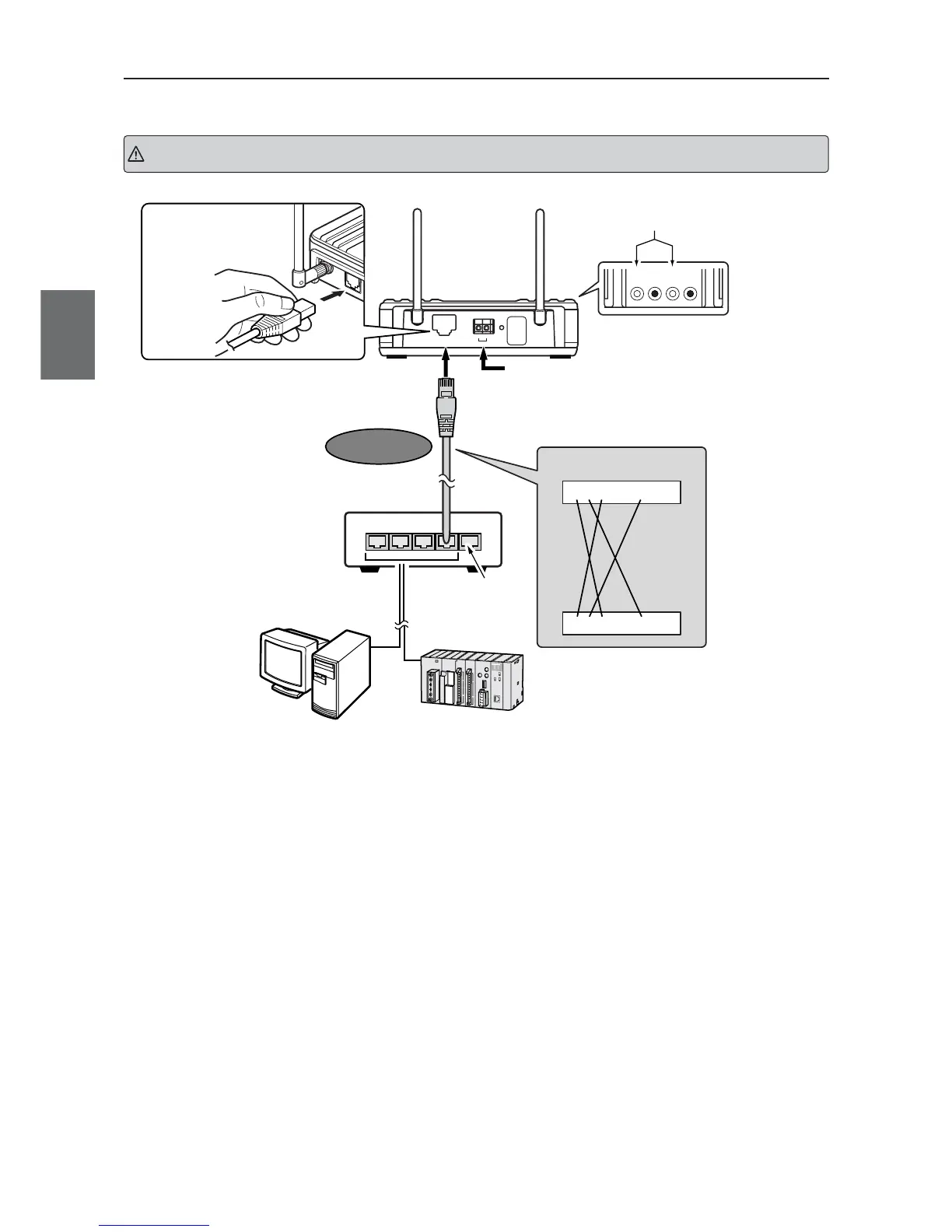
LAN Cabling
LANMODEPOWER WIRELESS
Check if the indicator
is on after connection.
A Crossed LAN cable is required between a wireles
s
12345678
12345678
To LAN port
To 24VDC Power
Crossed
LAN cable
Straight
LAN cable
Uplink port
is not used
Ethernet
WE70-AP
xxxx
Connection Diagram
(Cross connected)
Make sure that you hear a
click sound when you insert
a cable.
ETHERNET
INIT
+–
24V
PC
Turn off power of a wireless unit and connected devices before cabling.
Caution
* A straight LAN cable can be used for direct connection of PLC or PC to a wireless unit for setup.
Use a crossed LAN cable for a connection between a wireless unit and a hub.
* STP LAN Cable must be used.

Table of Contents