Chapter 4. Advanced Setup
4-4
4
Advanced Setup
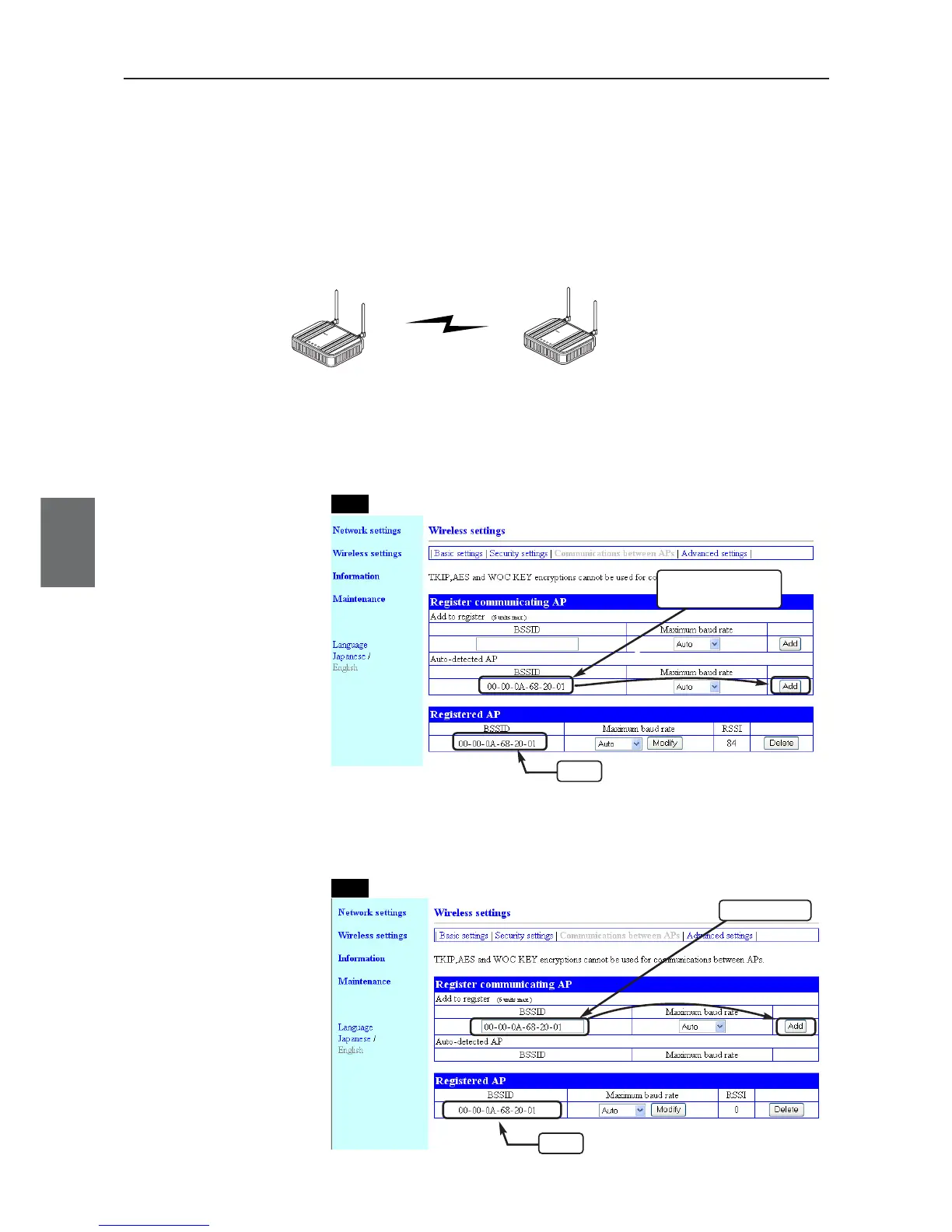
● Manual Input
Verify BSSIDs for AP-to-AP bridging from "Information" menu, "Wireless settings" setup screen, and
configure AP-2 BSSID by manual input. If SSIDs of access points AP-1 and AP-2 are unmatched, enter
it manually for registration.
Detecting a partner
BSSID.
"Wireless Settings" Menu > "Communications between Aps" Setup Screen
If SSIDs and channels are the same, the screen displays a BSSID, which
can be registered by clicking "Add".
■ To Register BSSID
A BSSID can be registered in two ways; automatic detection and manual input.
●Automatic Detection
Configuring the same channel and SSID for AP-1 and AP-2 allows automatic detection of BSSID of
partner, making registration easier. Register AP-1 BSSID to AP-2 as well.
192.168.0.1
AP-to-AP Bridging
"802.11a:36CH"
WE70-AP
192.168.0.2
L
A
N
M
O
D
E
P
O
W
E
R
W
I
R
E
L
E
S
S
W
E
7
0
-
A
P
F
A
W
I
R
E
L
E
S
S
L
A
N
A
C
C
E
S
S
P
O
I
N
T
WE70-AP
L
A
N
M
O
D
E
P
O
W
E
R
W
I
R
E
L
E
S
S
W
E
7
0
-
A
P
F
A
W
IR
E
L
E
S
S
L
A
N
A
C
C
E
S
S
P
O
IN
T
BSSID: "00-00-0A-68-00-09"
SSID: "omronwe70wlan" (Factory shipment status)
BSSID: "00-00-0A-68-20-01"
SSID: "omronwe70wlan" (Factory shipment status)
AP-2AP-2
AP-1AP-1



 To Next Page