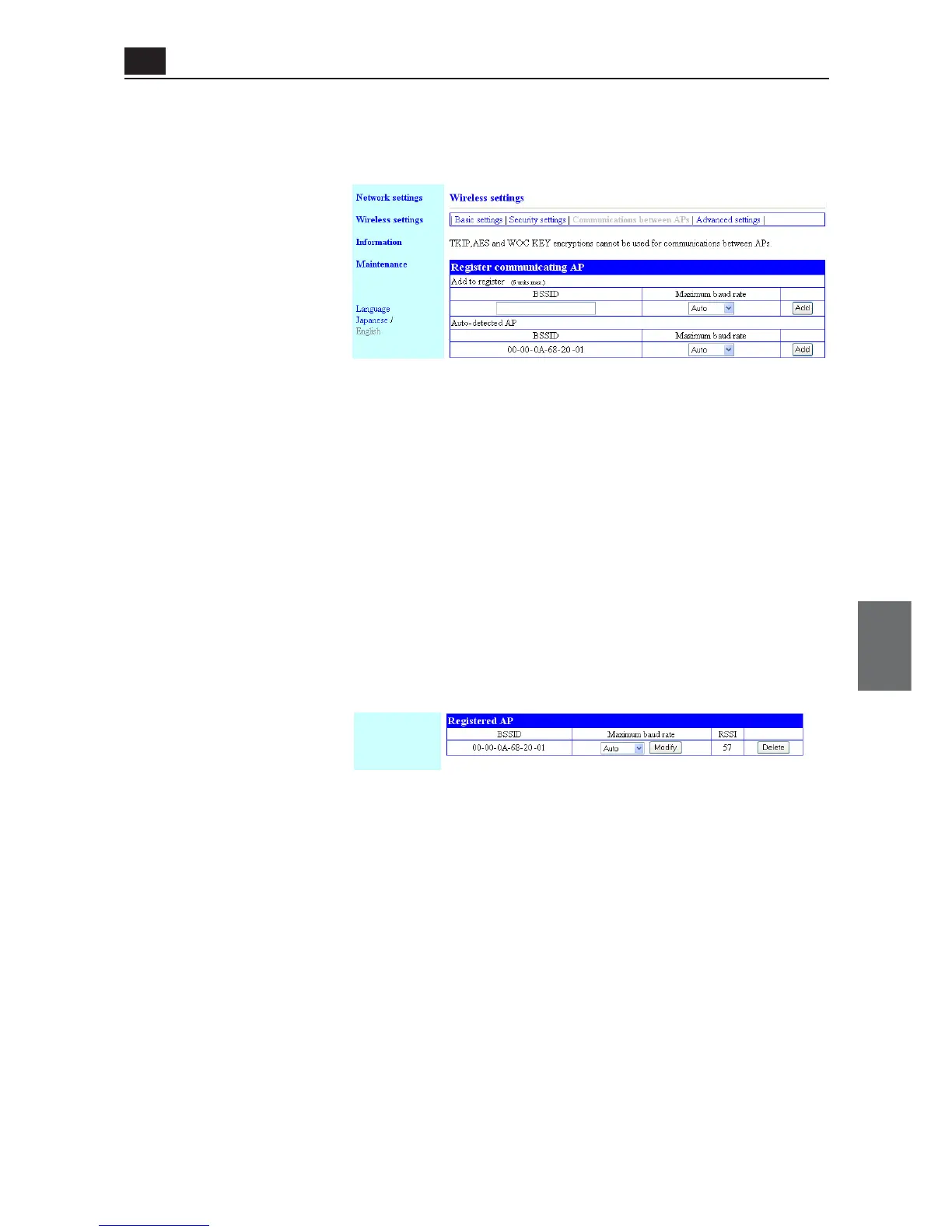
<AP-to-AP Bridging> Screen
● Register Communicating AP
You can register an AP-to-AP bridging partner's BSSID.
(1) Add to Register ............... You can enter a BSSID of an AP-to-AP bridging partner (access point).
* Specify IP addresses of access points so that they should not be duplicate.
* Clicking <Add> registers the entered BSSID to [Registered AP].
* Up to 6 units' BSSIDs can be registered.
* Use 12-digit (hex.) alphanumeric characters for BSSID.
* Entering BSSIDs as shown below is handled as the same BSSID.
(Example: 00-00-0A-68-20-01, 00000A682001)
(2) Auto-Detected AP ........... If an access point with the same channel and SSID as those of current
access point is detected, its BSSID is displayed here.
For AP-to-AP bridging with the detected device, clicking <Add> in the
right of this field registers the detected BSSID to [Registered AP].
* Up to 32 devices can be indicated if detected.
This is different from [Unit's MAC Address] in the "Network information" screen of
"Information" menu.
● Registered AP
5-9
Chapter 5. Setup Menu
AP
5
Setup Menu
(1) BSSID ............................... A BSSID registered in [Register communicating AP] is displayed here.
AP-to-AP bridging is available with Omron's wireless router or Omron's
access point, with BSSID displayed in this list, supporting AP-to-AP bridg-
ing.
* To deregister, click <Delete> in the right of the field.
* Register AP-to-AP bridging partner's BSSID only.
Registering more than one BSSID of other partners may result in decrease in communi-
cation speed.
(2) Maximum baud Rate ....... Indicates maximum speed between registered access points.
(3) RSSI.................................. Indicates a radio intensity received from a registered access point.
(1)
(2)
(1) (2) (3)



 To Next Page