Chapter 4. Advanced Setup
4-18
4
Advanced Setup
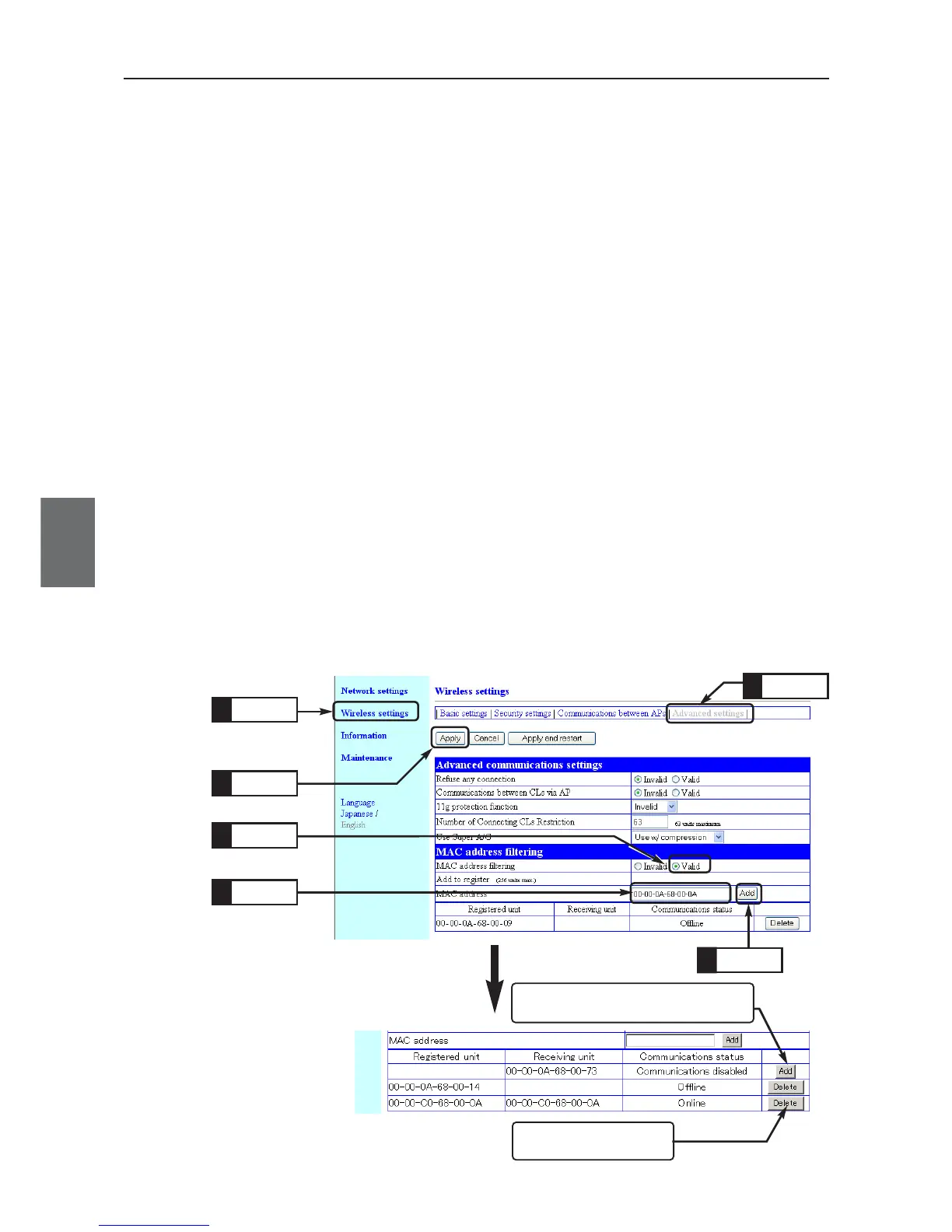
A button to delete a regis-
tered MAC address.
<Example of Current Registration Display>
A button to register a MAC address of a
client (slave) without access qualification.
4-5. To Set up MAC Address Filtering
MAC address filtering is a function to communicate with a specified partner using a MAC address. An access
point communicates with a client (slave) only with a registered terminal MAC address. This section describes
steps to register a terminal MAC address of a client (slave) to an access point.
* Some wireless LAN devices may calls this function as "MAC address security", which is same as MAC address filtering.
<To Configure>
(1) Open a setup screen of the access point (see Chapter 2-3. Checking
Connection, Opening Setup Screen (P.2-13)) and click Wireless settings
menu > Advanced settings.
• An "Advanced settings" screen is displayed.
(2) Select [Valid] radio button in the [MAC address filtering] field.
(3) Click <Apply>.
(4) Enter a terminal MAC address of a client to communicate with an access
point in [Add to register (MAC address)] using alphanumeric characters.
(Example:00-00-0A-68-00-0A)
To connect to PLC, enter a terminal MAC address of PLC.
(5) Click <Add> in the right of [Add to register] field.
•Verify that entered terminal MAC address is displayed in [Registered
unit] field.
* Clicking <Add> in the right of [Registered unit] field allows communication with the client
(slave).
* When MAC address is displayed in [Receiving unit], clicking <Add> in the right of
[Receiving unit] field allows communication with the client (slave).
Click
1.
Enter
5.
Click
5.
Click
4.
Click
3.
Click
2.



 To Next Page