Chapter 4. Advanced Setup
4-24
4
Advanced Setup
Step 1. Configuring IP Address
Change access point AP-2 IP address.
Leave AP-1 [192.168.0.1] and CL-1 [192.168.0.254] as they are.
<To Configure>
(1) Open a setup screen of AP-2 (see Chapter 2-3. Connection Check,
Opening Setup Screen (P.2-13)) and click Network settings menu.
(2) Change the IP address to "192.168.0.2".
(3) Click <Apply and restart>.
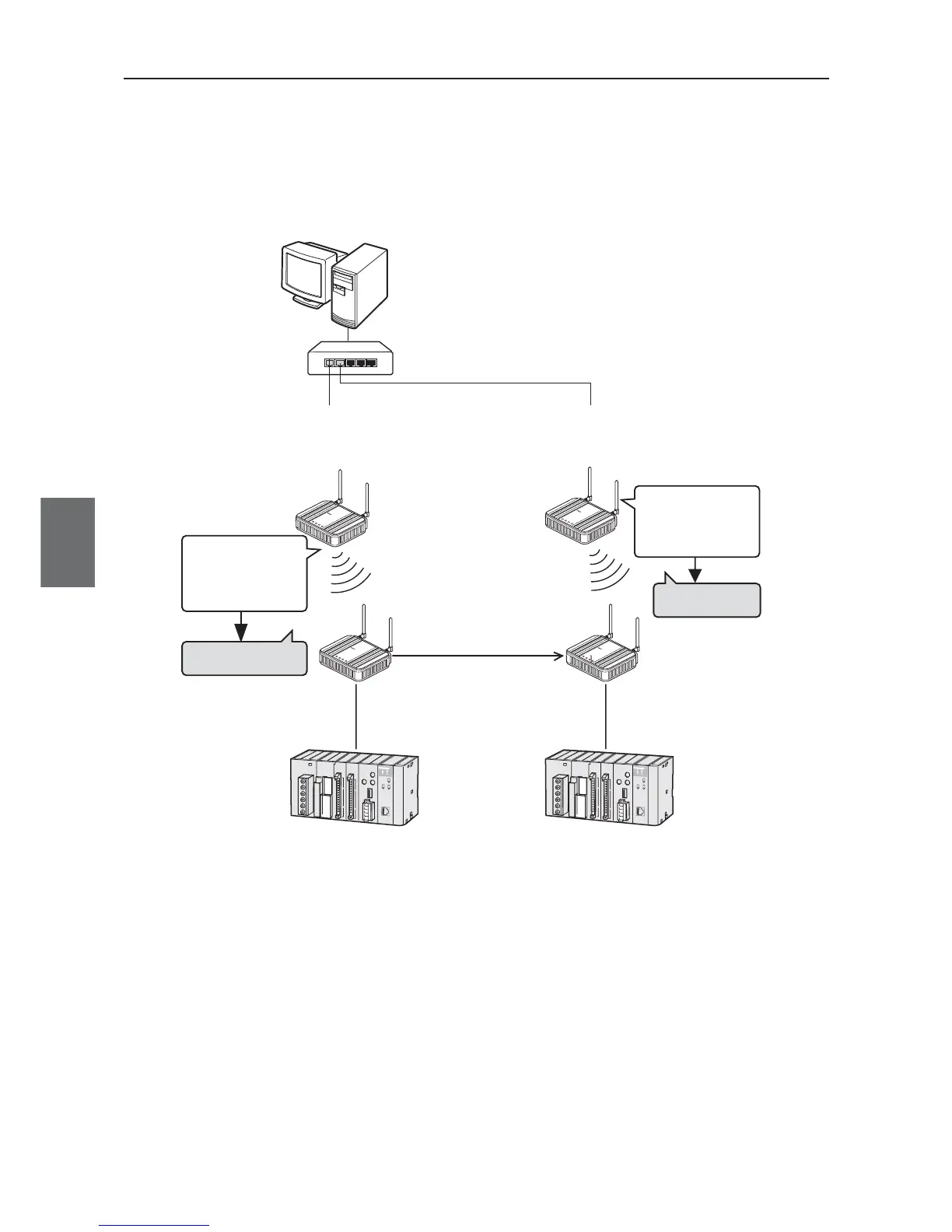
4-10. Configuring Smart Roaming
Roaming is a function of communication for a moving client (slave) switching paths with more than 1 wired
access point. If there are 2 access points, connect PC, hub, wireless units, and PLC as shown below.
"802.11a:36CH" (Factory Shipment Setting)
WE70-AP
802.11a : 40CH
802.11a : 36CH
(Factory
Shipment
Status)
192.168.0.1
(Factory
Shipment
Status)
L
A
N
M
O
D
E
P
O
W
E
R
WI
R
E
L
E
S
S
W
E
7
0
-
A
P
F
A
W
I
R
E
L
E
S
S
L
A
N
A
C
C
E
S
S
P
O
I
N
T
WE70-AP
L
A
N
M
O
D
E
P
O
W
ER
WI
R
E
L
E
S
S
W
E
7
0
-
A
P
F
A
W
I
R
E
L
E
S
S
L
A
N
A
C
C
E
S
S
P
O
I
N
T
BSSID: "00-00-0A-68-20-01"
SSID: "omronwe70wlan" (Factory Shipment Status)
BSSID: "00-00-0A-68-00-09"
SSID: "omronwe70wlan" (Factory Shipment Status)
SSID: "omronwe70wlan"
(Factory Shipment Status)
192.168.0.254(Factory
Shipment Status)
L
A
N
MO
D
E
P
O
W
E
R
WI
R
E
L
E
S
S
W
E
7
0
-
CL
F
A
W
I
R
E
L
E
S
S
L
A
N
A
C
C
E
S
S
P
O
I
N
T
L
A
N
MO
D
E
P
OW
E
R
WI
R
E
L
E
S
S
W
E
7
0
-
C
L
F
A
W
I
R
E
L
E
S
S
L
A
N
A
C
C
E
S
S
P
O
I
N
T
WE70-CL
PLC
Shift
CL-1



 To Next Page