3-15
Chapter 3 Basic Setup
3
Basic Setup
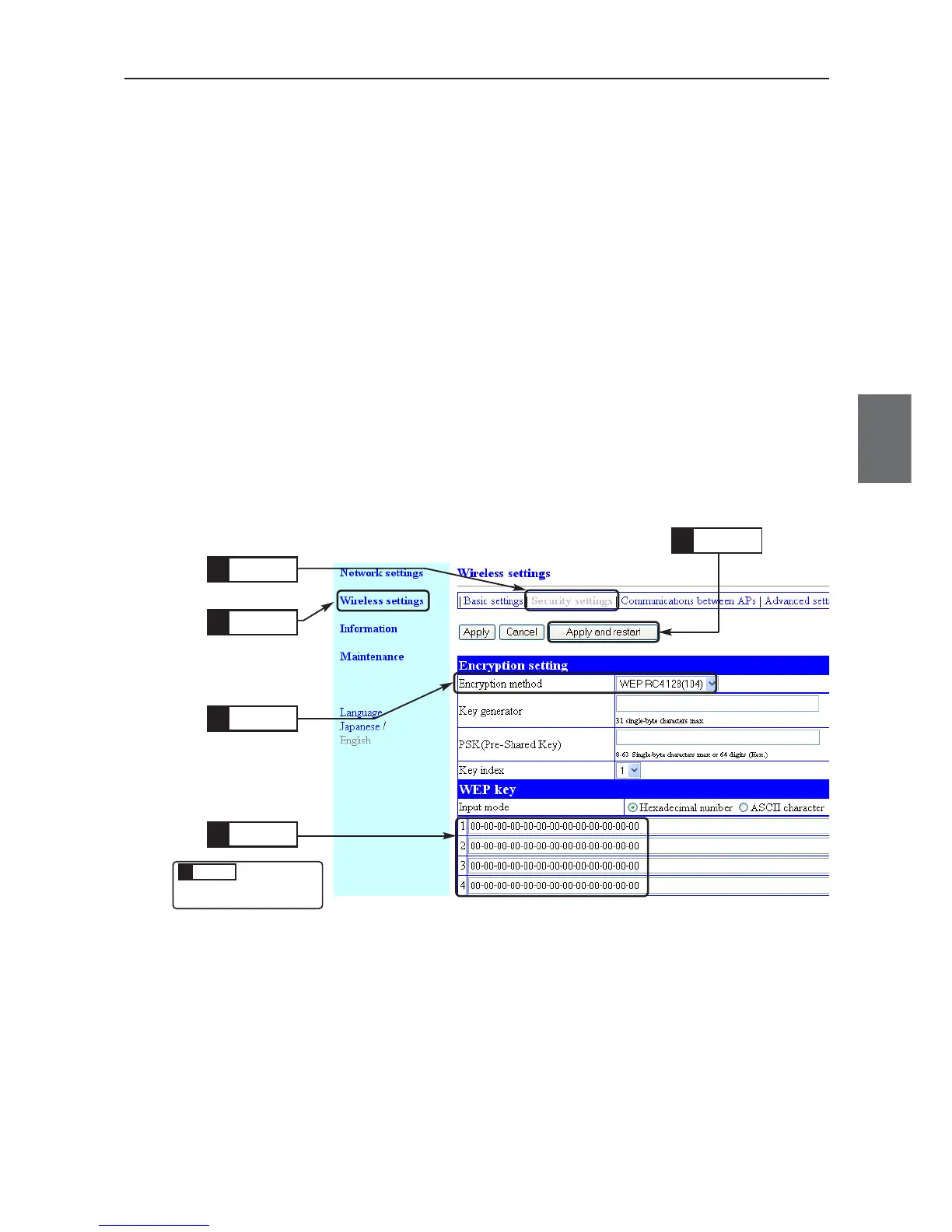
■ To Enter Encryption Key Using hexadecimal number
Suppose following conditions to configure.
◎ Encryption Method: WEP RC4, 128 (104) bits
◎ Key Index: 1 (Factory Shipment Setting)
◎ Input Mode: Hexadecimal number (Factory Shipment Setting)
* Some wireless LAN devices may use names authentication mode and key ID, which are same as network authentication and key
index.
<To Configure>
The same setup must be applied to a client (slave) for communication.
(1) Open a setup screen of the access point (see Chapter 2-3. Connection
Check, Opening Setup Screen (P.2-13)) and click Wireless setting menu
> Security settings.
• A Security settings screen is displayed.
(2) Set Encryption method as WEP RC4 128 (104).
* If None (Factory Shipment Setting) is set, data will not be encrypted.
Select
3.
Click
1.
Enter
4.
Click
2.
This is
described in
the next page.
Enter
4.
Click
5.



 To Next Page