3-17
Chapter 3 Basic Setup
3
Basic Setup
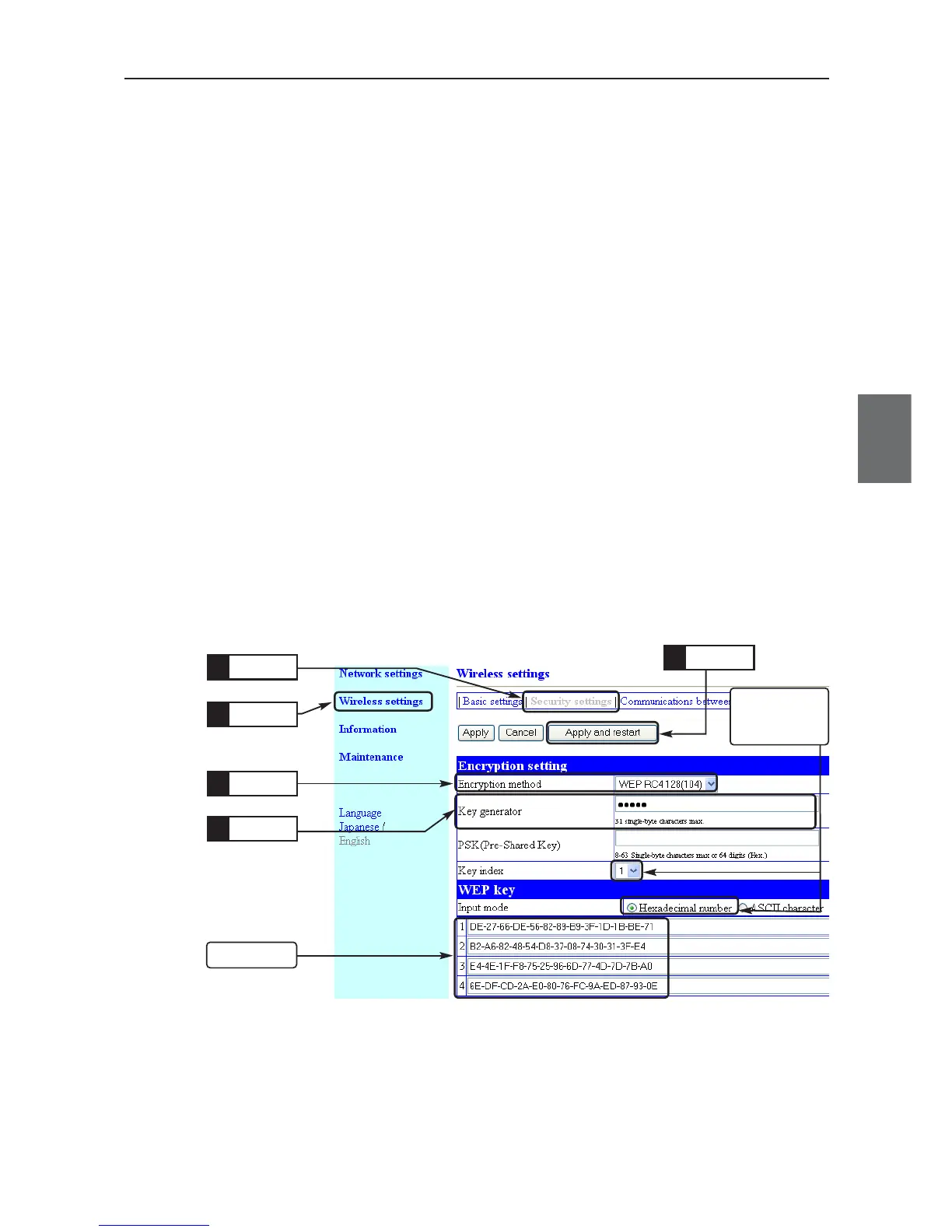
■ To Generate Encryption Key Using Key Generator
This function can be used to set "Hexadecimal number" (factory shipment setting) to Input Mode field of
WEP Key.
* Entering any character string into the key generator automatically generates encryption keys in WEP Key text boxes.
* The key generator is incompatible with other manufacturers' products than Omron's.
Suppose following conditions to configure.
◎ Encryption method: WEP RC4, 128 (104) bits
◎ Key generator: OMRON
◎ Input Mode: Hexadecimal number (Factory Shipment Setting) * ASCII characters cannot be used.
* Some wireless LAN devices may use names authentication mode, which is same as network authentication.
<To Configure>
(1) Open a setup screen of the wireless unit (see Chapter 2-3. Connection
Check, Opening Setup Screen (P.2-13)) and click Wireless settings menu
> Security settings.
• An Encryption method screen is displayed.
(2) Set Encryption method as WEP RC4 128 (104).
* If None (Factory Shipment Setting) is set, encryption security is
disabled.
(3) Enter an alphanumeric numbers or symbols (within 31 characters) in Key
generator field.
(4) Click <Apply and restart>.
Click
2.
Click
1.
Select
3.
Check that
configuration is
same as factory
shipment setting.
Enter
4.
Check
Click
5.



 To Next Page