4-29
Chapter 4. Advanced Setup
4
Advanced Setup
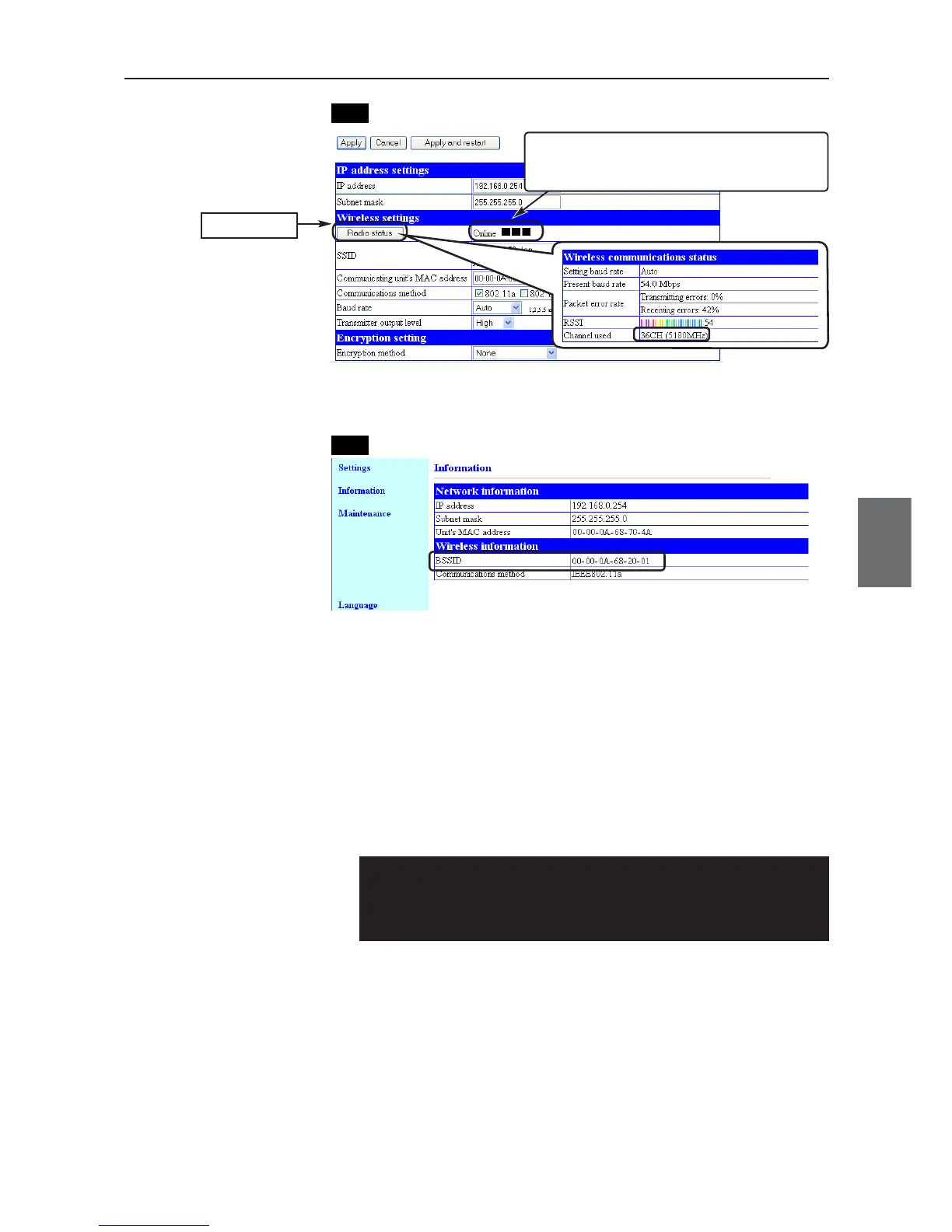
(6) Check if communication is available between PC and PLC.Test the
roaming in the opposite direction and verify that access points should be
switched from AP-2 to AP-1 and that communication should be available
between PC and PLC.
CL-1
CL-1
(5) From CL-1 Setup screen "Information" menu, "Wireless information",
"BSSID", verify that BSSID should be AP-2 value.
Step 8. Checking PC-PLC Communication
Execute the Ping command to PLC from PC connected to AP-1 and verify its response.
(1) Execute a ping command from your PC at command prompt.
Example:Ping 192.168.0.10 (Partner's IP address)
C:¥>ping 192.168.0.10
Pinging 192.168.0.10 with 32 bytes of data:
Reply from 192.168.0.10: bytes=32 time<1ms TTL=250
* If no response is returned, follow the steps below:
• Execute "arp -d" command.
• Verify if security settings are the same.
Click
If the client has different SSID and/or encryp-
tion setup from the access point, "Communi-
cation Unavailable" is displayed.



 To Next Page