Chapter 6. Replacement Procedure
6-4
6
Maintenance
■ Writing Saved Setup Data
This section describes how to write a setup file saved by "Saving Setup Data" to a wireless unit.
Writing a setup file can help reducing setup work for wireless unit replacement.
Key generator, WEP key, and SSID data cannot be written for client (slave) replacement only.Writing to a
client (slave) after initialization instead of replacement, however, allows all setup data to be written.
* Before starting the following steps, make sure that other terminals on the wireless unit network that are used to write data are not
communicating.
<How to Write>
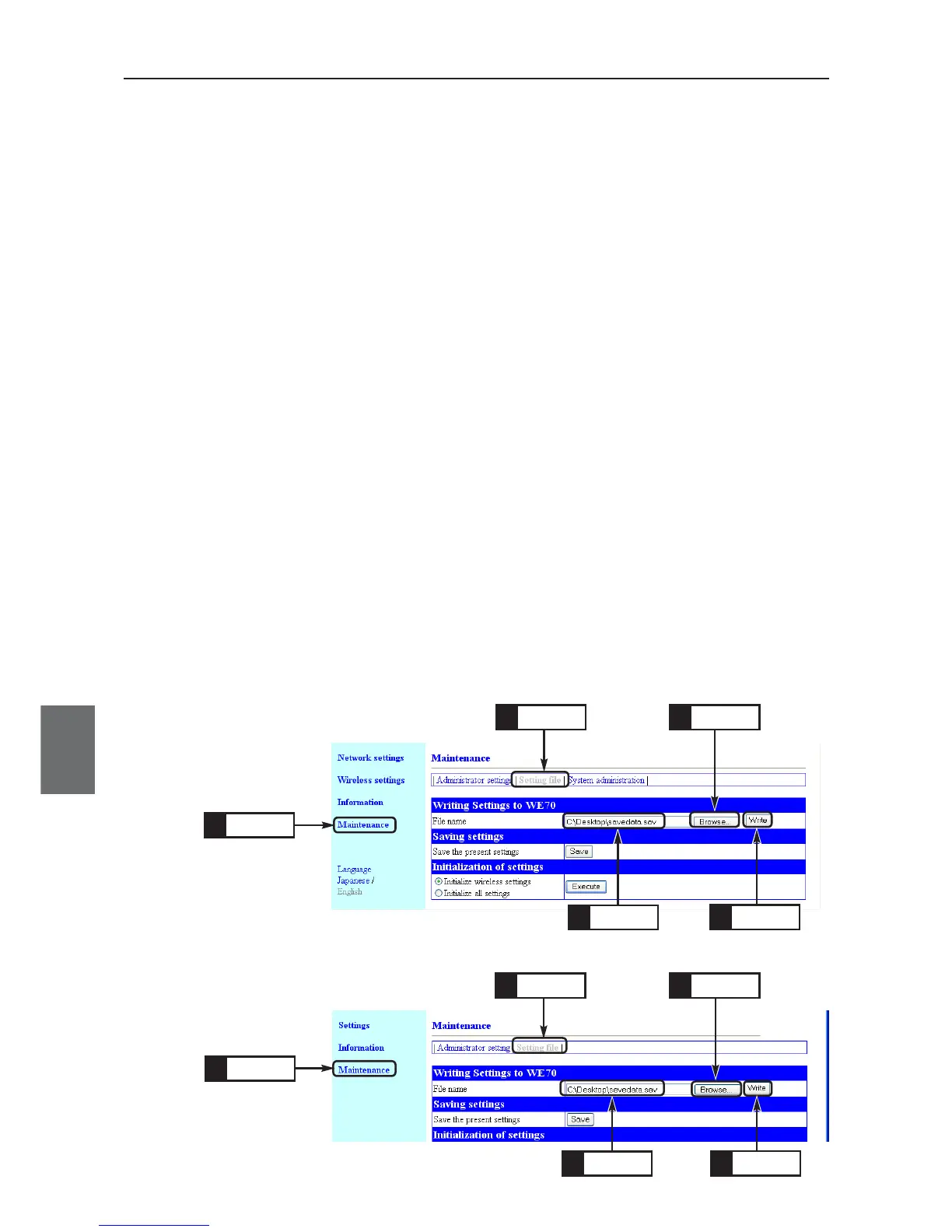
(1) Open a setup screen of the wireless unit (see Chapter 2-3. Connection
Check, Opening Setup Screen (P.2-13)) and click Maintenance menu >
Setting file.
•A Save Setup screen is displayed.
(2) To specify a link to a saved setup file, click <Browse> in Writing of
settings.
(3) Specifying a saved setup file and clicking <Open> in the screen displays
its file name in the File Name text box.
(4) Click <Write>.
• Setting file data is now written to the wireless unit.
(5) After data is written, close the setup screen and open a new Setup
screen.
* Current Setup screen cannot reflect written setup file data.
For WE70-AP
For WE70-CL
Click
1.
Click
2.
Click
1.
Click
3.
Click
2.
Check
4.
Click
5.
Click
3.
Click
5.
Check
4.



 To Next Page