4-7
Chapter 4. Advanced Setup
4
Advanced Setup
Click
1.
Click
2.
BSSID to be reg-
istered to AP-2.
AP-1
AP-2
Click
1.
Click
2.
BSSID to be reg-
istered to AP-1.
Step 5. Checking Partner BSSID
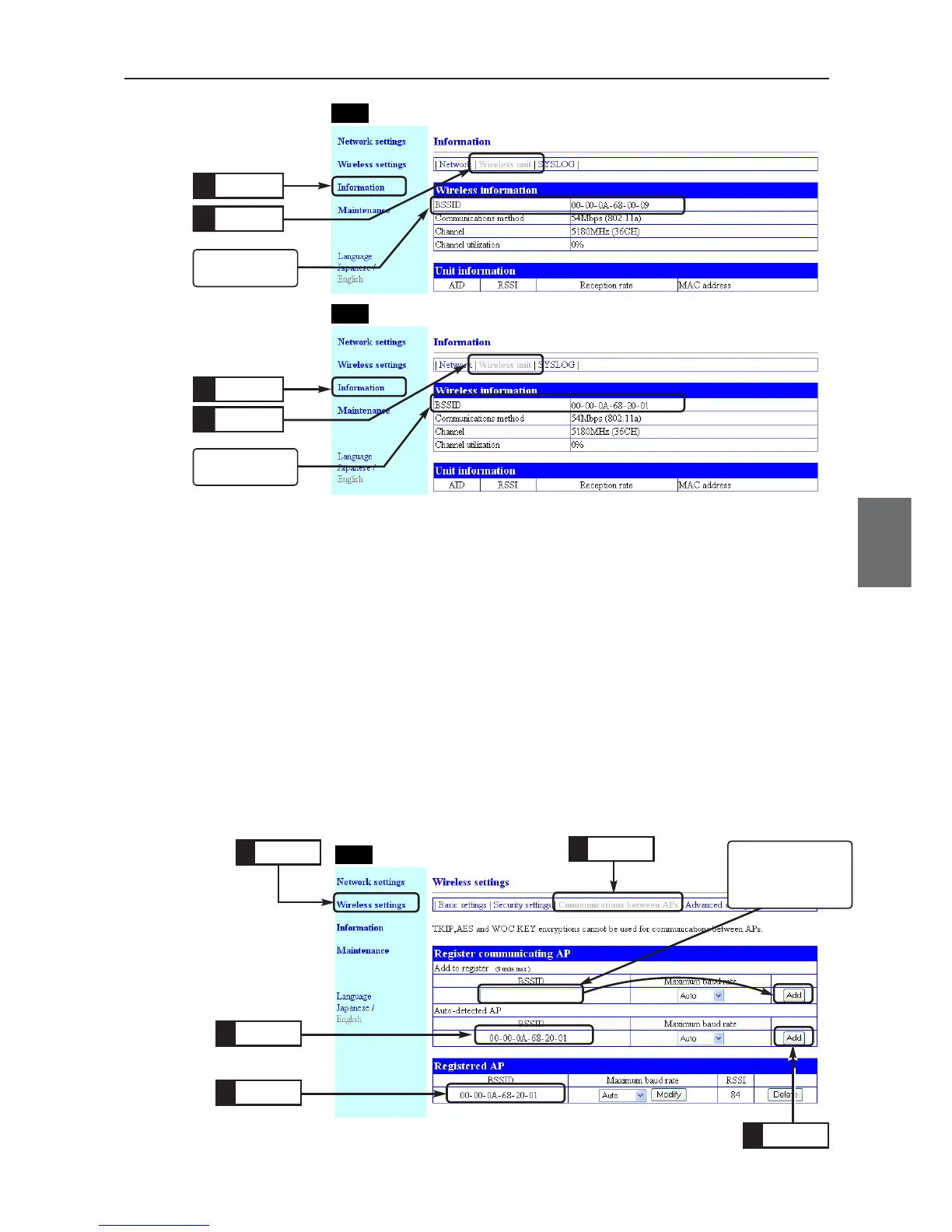
Communication through AP-to-AP bridging can be made by registering each other's BSSID to a wireless
unit.
Register AP-to-AP bridging partner's BSSID to [Registered AP].
<To Register>
(1) Select "Wireless settings" menu, "Communications between APs".
• A "Communications between APs" screen is displayed.
(2) If a BSSID is displayed in the [Auto-detected AP] field in [Register com-
municating AP] (e.g. 00-00-0A-**-**-**), click <Add> in the right of the
field.
(3) If partner's BSSID is not displayed, enter a BSSID to be registered and
click <Add>.
• The BSSID is registered and displayed in the [Registered AP] field.
Click
1.
Click
2.
Check
3.
Check
5.
Click
4.
AP-1
Enter here if partner's
BSSID cannot be
detected by the con-
figured SSID.



 To Next Page