4-19
Chapter 4. Advanced Setup
4
Advanced Setup
4-6. Using Spanning Tree Function
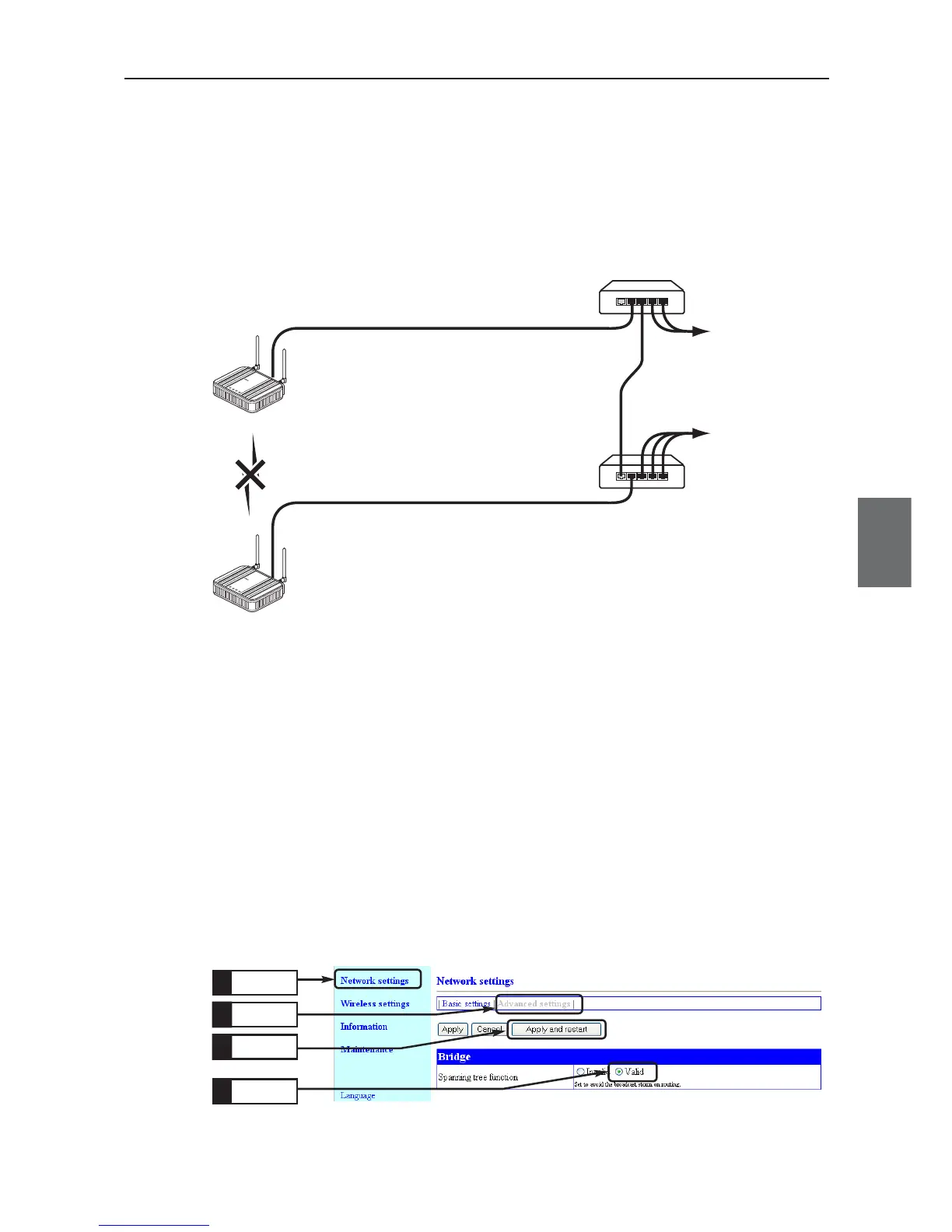
Configuring the spanning tree function prevents endless looping of packets in a looped communication path.
In an example shown below, a wireless LAN port with low priority is being stopped if no obstacle exists in
wired LAN paths. To construct a network using the spanning tree function, you must choose a switch or a
hub that supports IEEE802.1d spanning tree protocol.
* This section describes how to configure for communication using the spanning tree function,assuming wireless units of AP-1 and AP-
2.
L
A
N
M
O
D
E
POWER
W
I
RELES
S
WE7
0
-
AP
FA W
IREL
E
S
S
L
A
N
A
C
C
ES
S
P
O
IN
T
WE70-AP
L
A
N
M
O
D
E
P
O
WE
R
W
IR
E
LE
S
S
W
E
7
0
-
A
P
F
A
W
I
R
E
L
E
S
S
L
A
N
AC
C
E
S
S
P
O
I
N
T
WE70-AP
AP-2
AP-1
192.168.0.2
BSS ID : 00-00-0A-68-20-00
Main Unit MAC Address:00-00-0A-68-20-01
192.168.0.1
BSS ID : 00-00-0A-68-20-01
Main Unit MAC Address:00-00-0A-68-20-00
HUB
HUB
Wired LAN
To wired LAN
To wired LAN
Wireless LAN
IEEE802.11a
"36CH"
"36CH"
■ Configuring Spanning Tree Function
Set the spanning tree function in access points AP-1 and AP-2.
<To Configure>
(1) Open a setup screen of the access point (see Chapter 2-3. Connection
Check, Opening Setup Screen (P.2-13)) and click Network settings
menu, Advanced settings .
•A "Bridge" screen is displayed.
(2) Select [Valid] radio button in the [Spanning tree function] field.
(3) Click <Apply and restart>.
Click
1.
Click
2.
Click
4.
Click
3.



 To Next Page