Chapter 6. Replacement Procedure
6-6
6
Maintenance
■ Using Setup Screen
If an IP address specified for a wireless unit is known and a setup screen can be opened with the IP address,
all setup data can be restored to its factory shipment status from wireless unit setup screen.
<To Initialize>
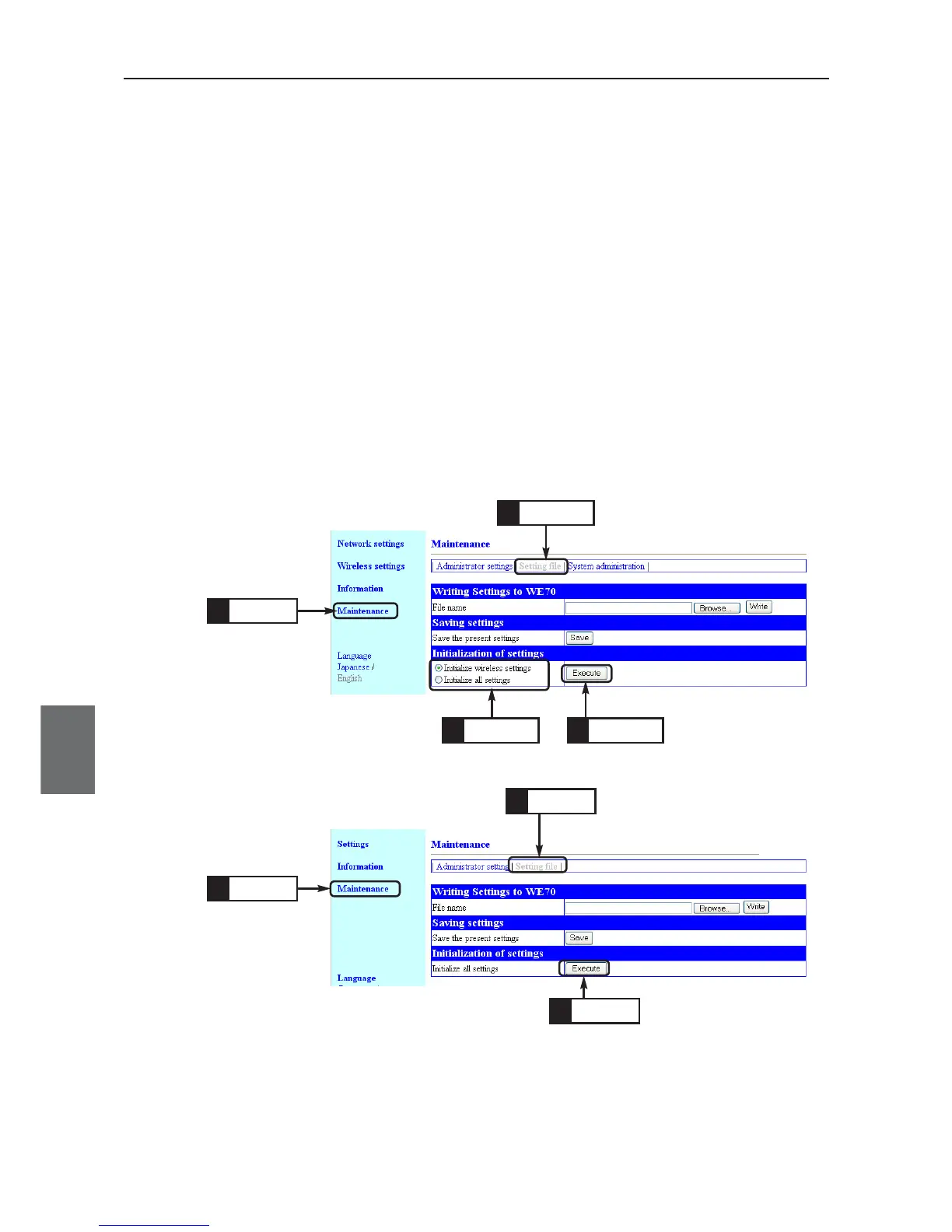
(1) Open a setup screen of the wireless unit (see Chapter 2-3. Connection
Check, Opening Setup Screen (P.2-13)) and click Maintenance menu >
Setting file.
• An Initialization of settings screen is displayed.
(2) Click a radio button in Initialization of settings field.
Initialize wireless settings: All of setup items in Wireless settings menu
are restored to factory shipment status.
Initialize all settings : All of wireless unit setup items are restored to
factory shipment status.
(3) Click <Execute>.
(4) When a next screen is displayed, initialization of the wireless unit is com-
pleted.
The unit is being restarted.
(5) If you want to configure setup right after initialization, close the current
screen, reconfigure an IP address of PC, and open a new Setup screen.
For WE70-AP
For WE70-CL
Click
1.
Click
2.
Click
1.
Click
2.
Click
3.
Click
3.
Click
4.



 To Next Page