Chapter 3 Basic Setup
3-10
3
Basic Setup
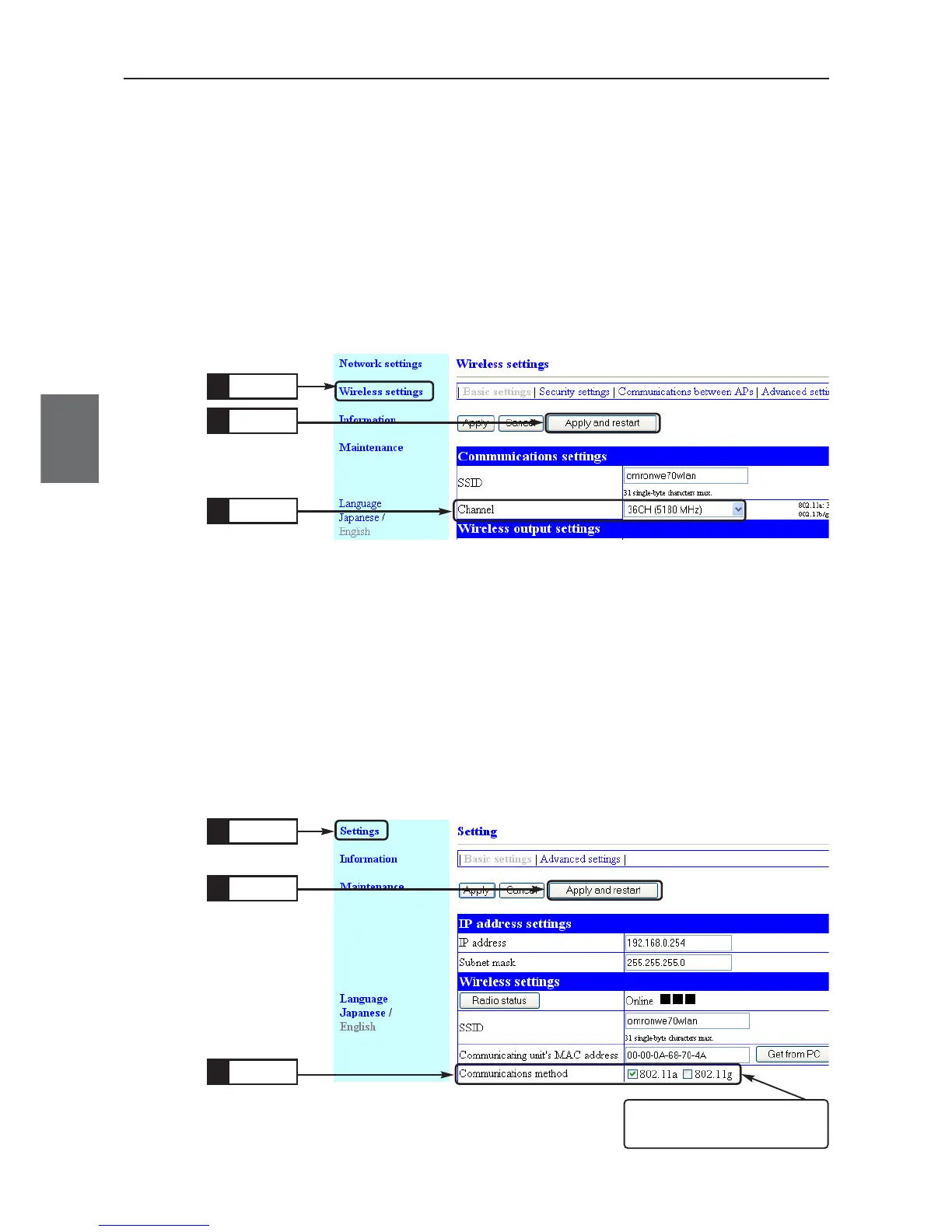
● Client (Slave) Setup
(1) Open a setup screen of the client (slave) (see Chapter 2-3. Checking
Connection, Opening Setup Screen (P.2-13)) and click Settings menu.
• A Settings screen is displayed.
(2) Select a communication method.
Example 802.11a
(3) Click <Apply and restart>.
• Communication becomes available through IEEE802.11a standard with
an access point.
● Access point setup
(1) Open a setup screen of the access point (see Chapter 2-3. Checking
Connection, Opening Setup Screen (P.2-13)) and click Wireless settings
menu.
• A Wireless settings screen is displayed.
(2) Select a channel.
Example: 36CH
(3) Click <Apply and restart>.
• Communication becomes available through IEEE802.11a standard with
a client (slave).
Click
1.
Select
2.
Click
3.
Click
1.
Select
2.
Click
3.
Verify that communication method
802.11a checkbox is on.Both
checkbox cannot be unchecked.



 To Next Page