Chapter-5
Interface
The following commands are provided for the setting ACK/NAK timeout.
ACK/NAK timeout Indefinitely
E) ACK/NAK No Response
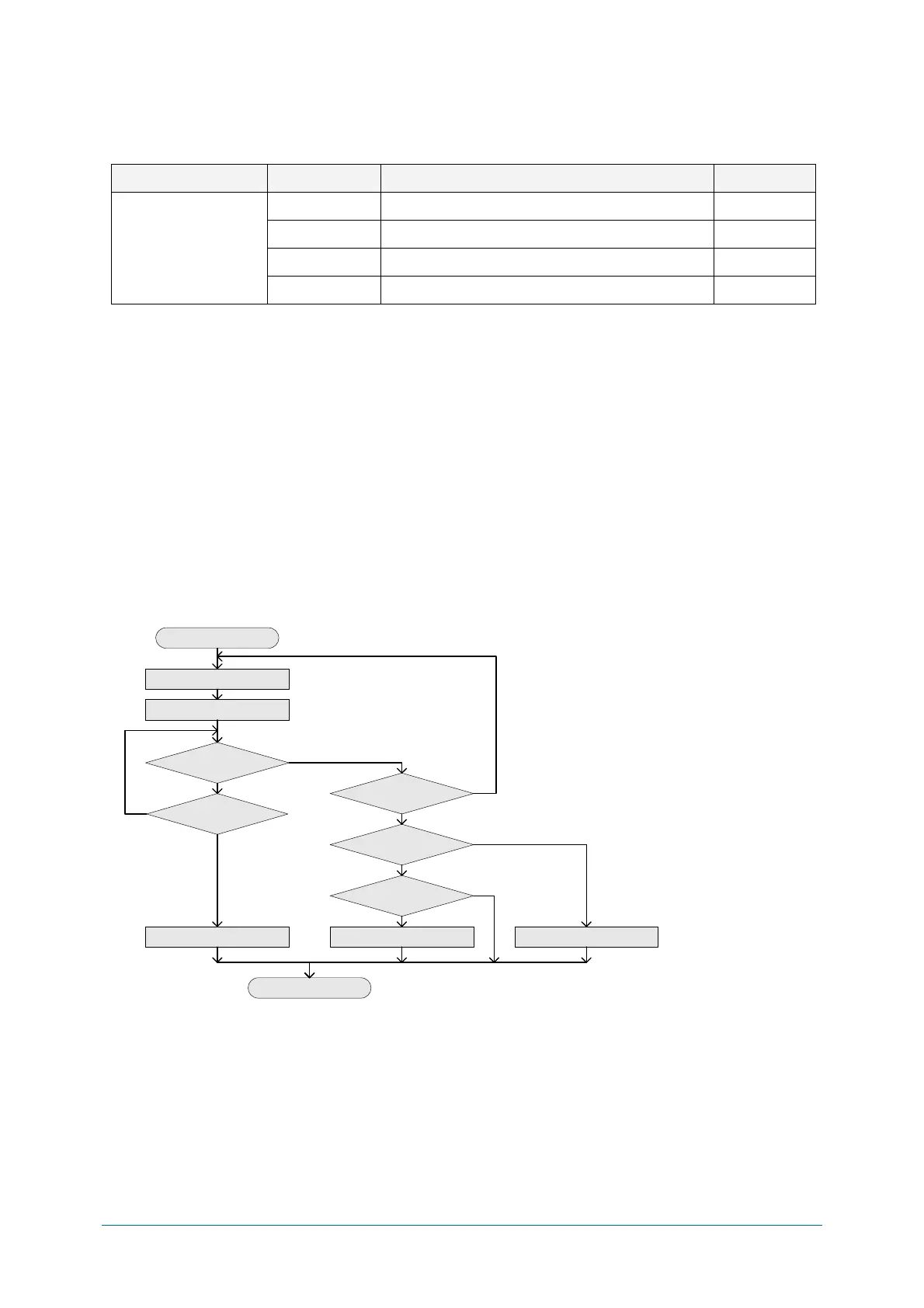
The difference from the ACK/NAK mode is that when no response from the host is received within
100ms, the scanner assumes that the data has been received correctly by the host.
Response: "ACK" (ASCII:0x06)
The scanner terminates transmission with the good-read buzzer.
Response: "NAK" (ASCII:0x15)
The scanner sends the data again.
Response: "DC1" (ASCII:0x11)
The scanner terminates transmission without a good-read or error buzzer.
Timeout
If there is no response within 100 ms then the scanner terminates transmission with the good read
buzzer.
<ACK/NAK No Response Flow Chart>
Start of transmission
Transmit data
Start 100 ms. timer
Response received
Timer ended
Response = NAK
Response = ACK
Response = DC1
GOOD READ Buzzer ERROR Buzzer GOOD READ Buzzer
END
Yes
Yes
Yes
Yes
Yes
No
No
No
No
No


 To Next Page