range Pi User Manual Copyright reserved by Shenzhen Xunlong Software Co., Ltd
328
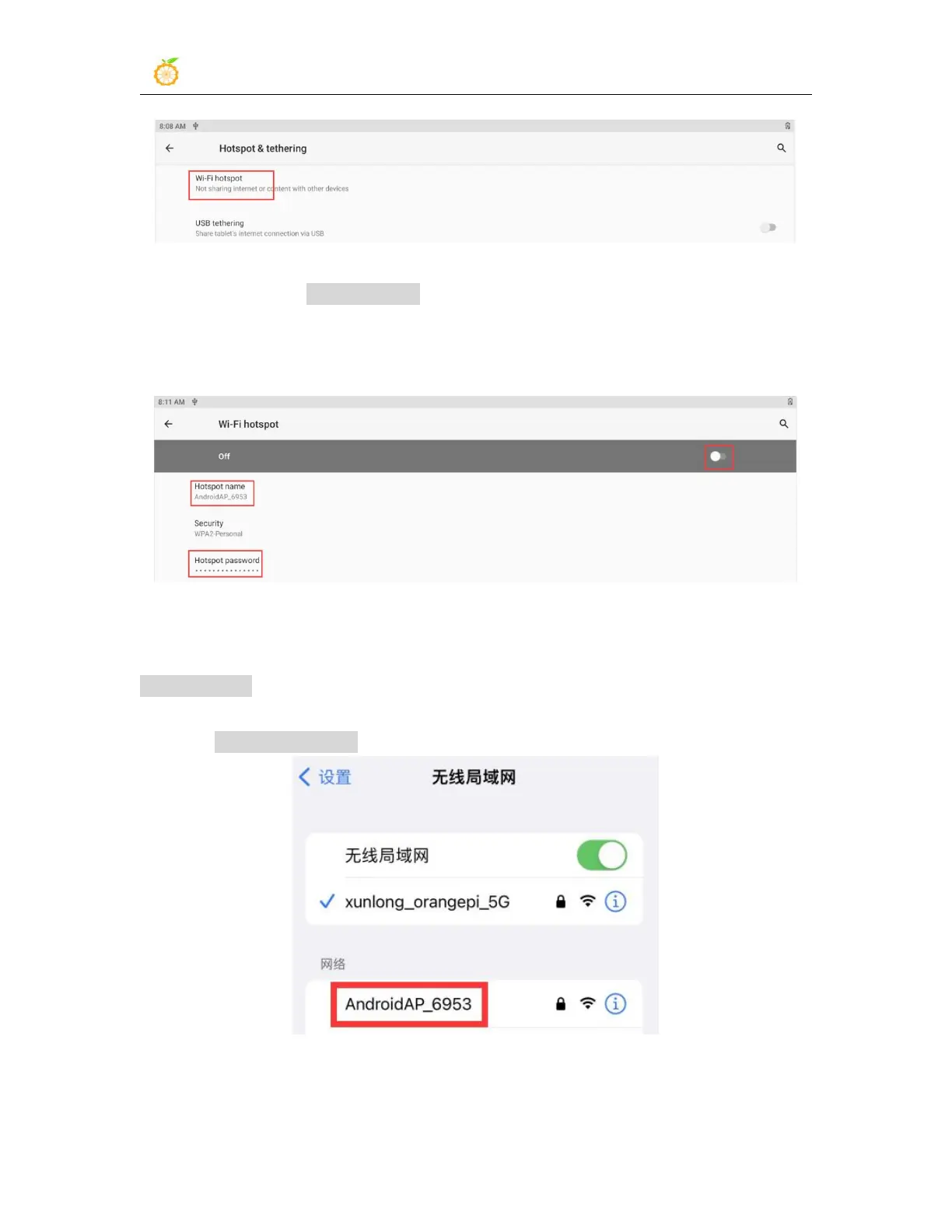
6) Then turn on the Wi-Fi hotspot, you can also see the name and password of the
generated hotspot in the figure below, remember them, and use them when connecting to
the hotspot (If you need to modify the name and password of the hotspot, you need to
turn off the Wi-Fi hotspot first, and then you can modify it)
7) At this time, you can take out your mobile phone. If everything is normal, you can
find the WIFI hotspot with the same name (here AndroidAP_6953) displayed under the
Hotspot name in the above picture in the WI-FI list searched by the mobile phone. Then
you can click AndroidAP_6953 to connect to the hotspot, and the password can be seen
under the Hotspot password in the above picture
8) After the connection is successful, it will be displayed as shown in the figure below
(the interface of different mobile phones will be different, the specific interface is subject



 To Next Page