23
NOTE
MULTI-SIZE
FEED
USER
PRESET
SORT/
FINISH
ENERGY
SAVER
INTERRUPTMANUAL RESET
1 32
4 65
7 98
0
A3
FLS•B4
A5
A4
A4
∗
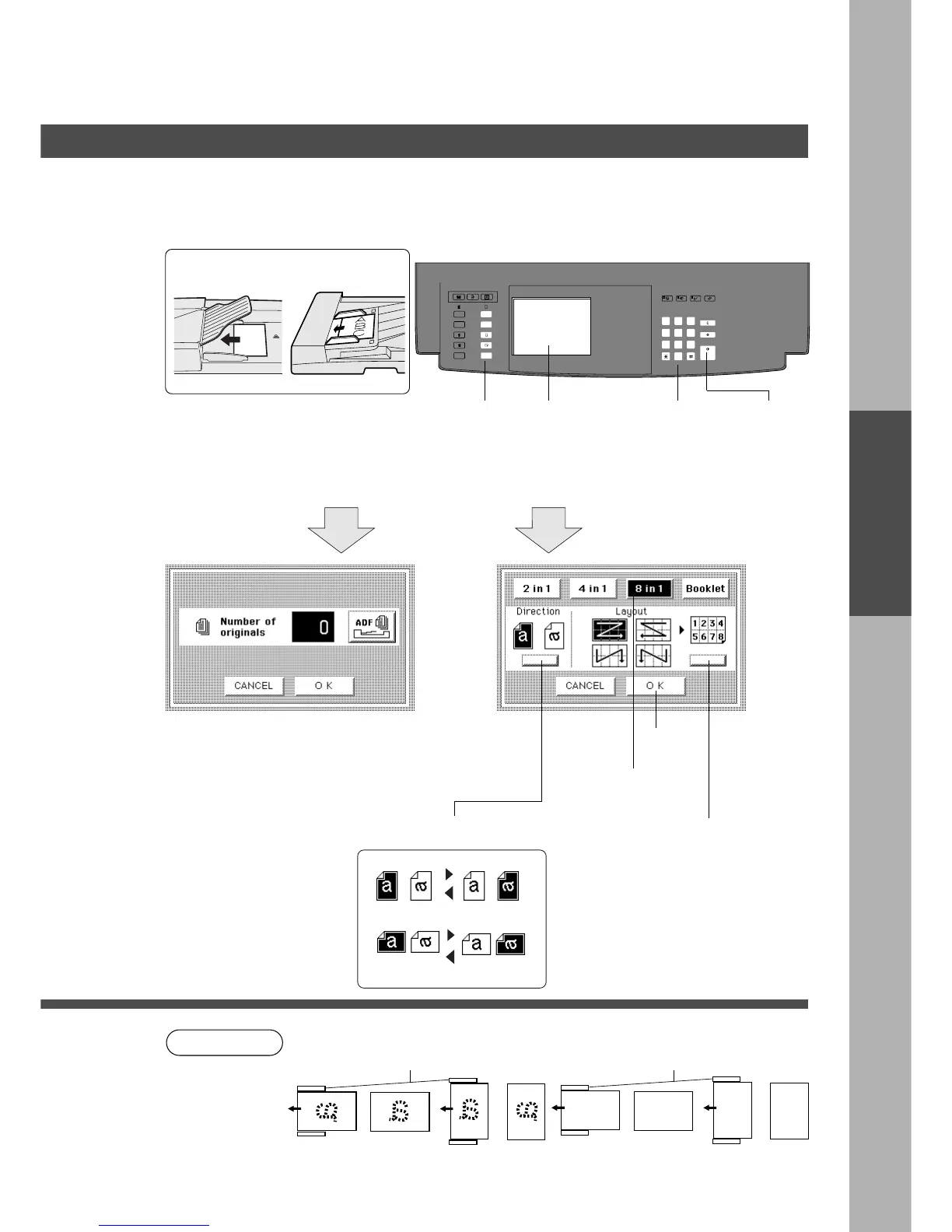
Original direction should be placed as follows:
C The ADF/i-ADF is required for N in 1 copy.
a
a
a
a
(For ADF)
Original Guide (Rear)
(For i-ADF)
Original Guide (Rear)
or or or or
N in 1 copy
Duplex/Original
HH
HH
H Copy
Duplex/Original
HH
HH
H Copy
■■
■■
■ 8 in 1 Copy
From eight single sided originals, side by side, to single sided pages.
$ Select original direction % Select the copy layout (See page 20)
&
■■
■■
■ Procedure
ADF i-ADF
Face-Down Face-Up
2
Place originals*
3
Count originals
Copy size
1
Touch N in 1 mode
and make selection
4
Number of
copies
(Up to 999)
5
Press Start
# Touch ADF key or input the number of originals
with Key Pad.
$ After originals are counted, touch the OK key.
% When the ADF key is touched in the step #,
re-position originals in document feeder.
# Touch 8 in 1 key










 To Next Page