79
A
Handling
1
2
ATTENTION
1
2
1
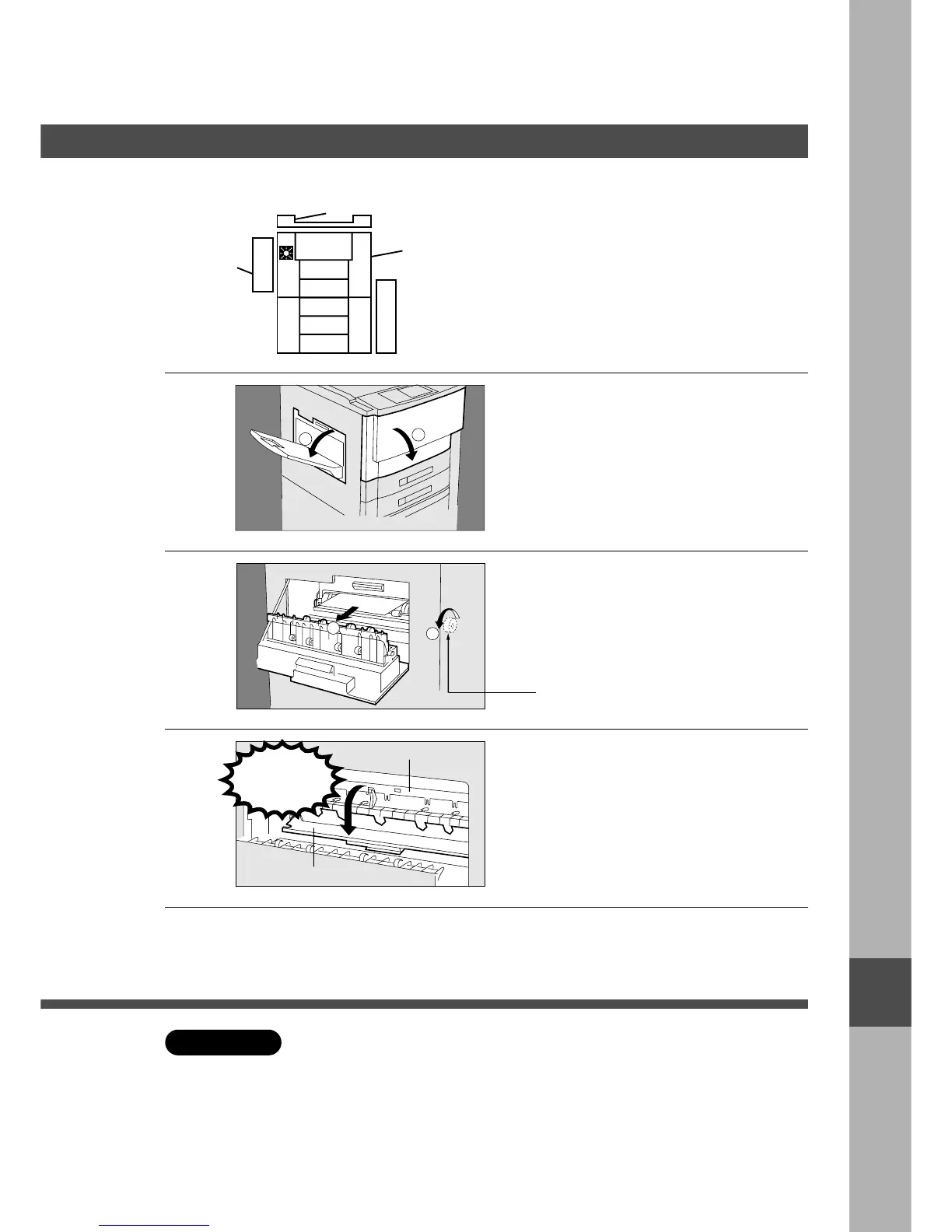
# Open front panel.
$ Open exit cover.
Note:If Finisher or Inverting shift tray is
installed, move from the machine
before above operation.
2
# Turn the left paper clearing knob.
$ Remove the misfed paper.
3
Caution: This fuser area will be hot.
# Open the fuser guide.
$ Check that no misfed paper is
remaining.
% Close the fuser guide.
4
# Close exit cover.
$ Close front panel.
Fusing Area
Left Paper Clearing Knob
Caution
heated
surface
Fuser Guide
C The fusing area may be hot, so use caution when removing misfed paper.
C The front panel must be opened prior to opening the exit cover.
C Make sure that the misfeed indicator goes off after removing all misfed paper.
C After removing misfed paper, close front panel as soon as possible.
I
■■
■■
■ Paper exit area










 To Next Page