37
Job memory
Basic Menu
ZOOM/EFFECTS
INSERTION JOB
Job memory
JOB STATUS
TEXT
PAPER TRAY
PHOTO
BASIC MENU
ZOOM/
EFFECTS
INSERTION
JOB
JOB
MEMORY
LIGHT
DARK
DUPLEX/
ORIG. --> COPY
Ready to Copy
AUTO
2
TEXT/PHOTO
MULTI-SIZE
FEED
USER
PRESET
SORT/
FINISH
ENERGY
SAVER
INTERRUPTMANUAL RESET
1 32
4 65
7 98
#0
A3
FLS•B4
A5
A4
A4
MULTI-SIZE
FEED
USER
PRESET
SORT/
FINISH
ENERGY
SAVER
INTERRUPTMANUAL RESET
1 32
4 65
7 98
#0
A3
FLS•B4
A5
A4
A4
NOTE
Other Features
■■
■■
■ Operation
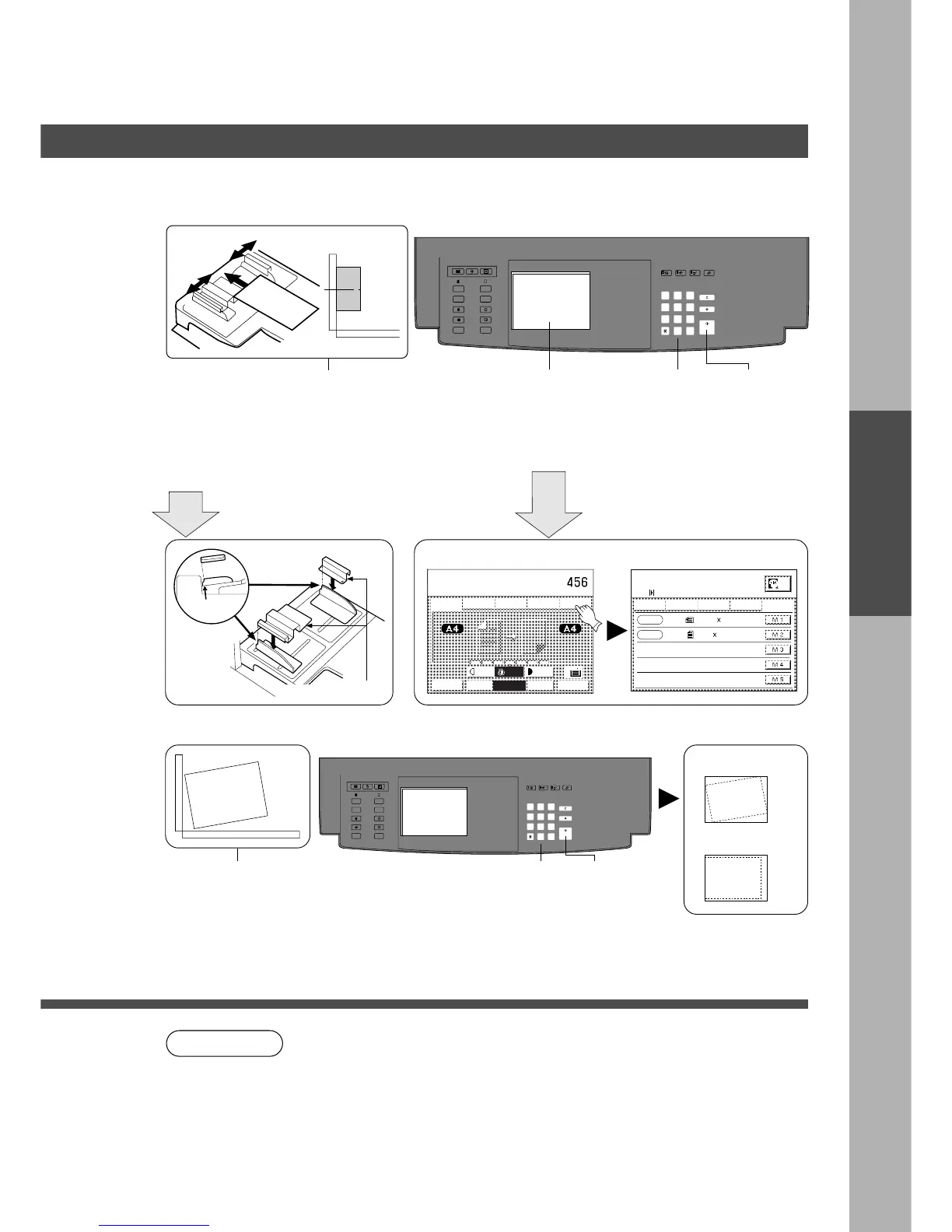
For Manual Skyshot Mode:
12
i-ADF Platen
Install the
check feeder
(Option)
(1) Position original
(2) Adjust the guides
(i-ADF)
Align
edges to
the arrow.
Touch Job Memory key. Touch M1 or M2 key.
For Digital Skyshot Mode:
1
Position original
on the Platen
Original
Check Feeder
3 4
Number of
copies
5
Press Start*
Select M1 or M2
Example M1: i-ADF
M2: Platen
Basic Menu
DUPLEX
ORIG. --> COPY
ZOOM/EFFECTS
INSERTION JOB
Job memory
Memory
in
JOB memory
select Mem. in or Mem. #
= more settings
SIZE 1
SIZE 2
95
mm
220
mm
160
mm
70
mm
Digital Skyshot Modes
2
Number of
copies
3
Press Start
Free shape
Parallel
∗
In the manual skyshot mode, A4 size paper is selected automatically.
C When using the manual skyshot mode (M1 and M2 are turned ON), the
other job memory cannot be used.
C To reset the manual skyshot mode, press Reset key.
C To reset the digital skyshot mode, close the ADF/i-ADF or platen.
Automatically turns On or Off by opening/closing.
Copy
Copy
Make copies with ADF/i-ADF
or platen cover open.
Digital Skyshot Modes










 To Next Page