5.1.4. Menu Settings -System Setup - Password-
1020 Indicator
Setting in the DAC Test menu
Sets the DAC output to the minimum value.
Enter a percentage of the DAC output level.
Sets the DAC output to the maximum value.
Password
In this menu, a password to block access to certain parts of the menu can be set.
Enter Password. This is default turned off so press Enter to go to the Password
menu. If there is a password set up fill it in here and press Enter.
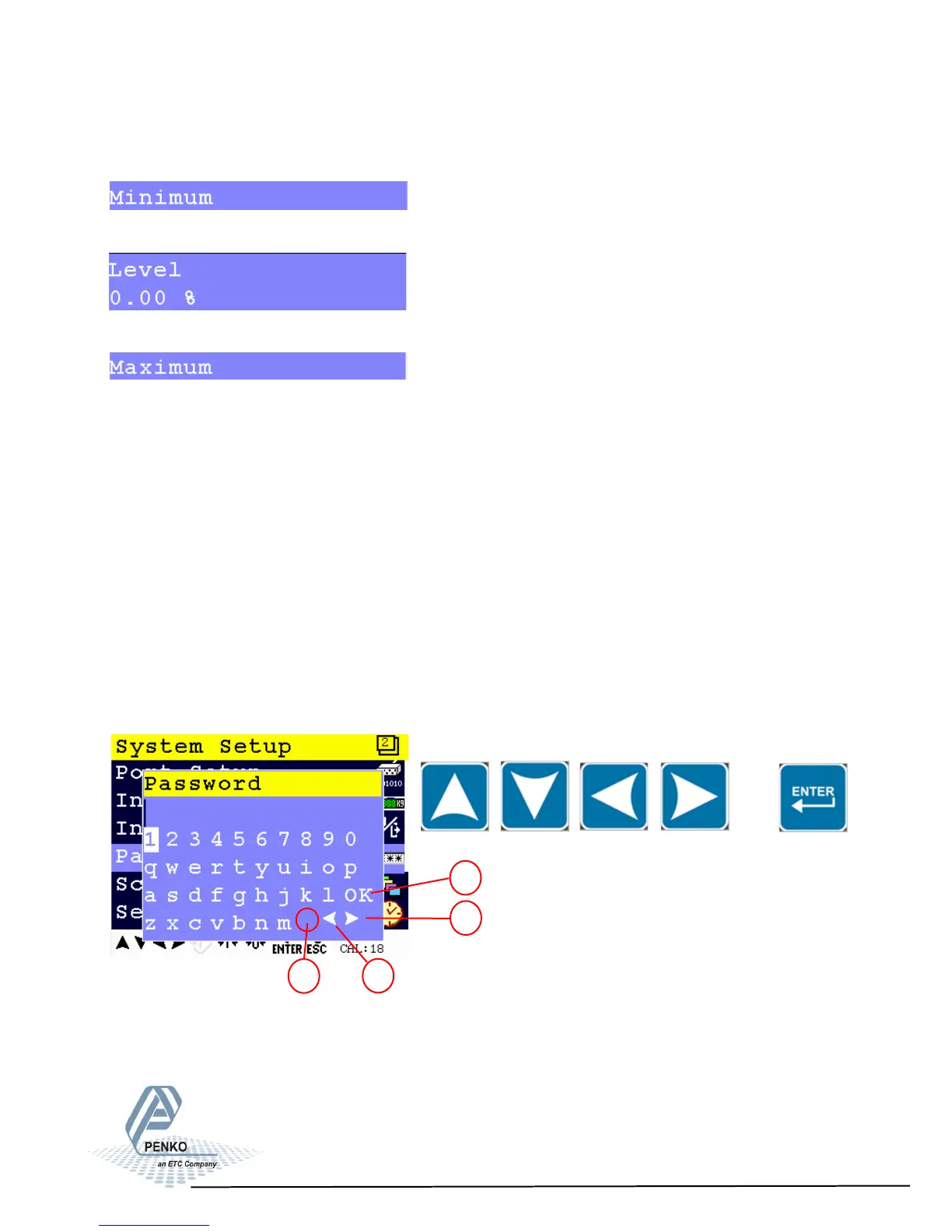
Use the UP, DOWN, LEFT and RIGHT key to enter the password. The UP and
DOWN keys are used for changing from line, the LEFT and RIGHT key is used
for changing the position of the cursor within the line. When the correct character
is chosen, press Enter. Confirm the complete password by pressing Enter when
the cursor is set on OK.
62
1. OK for confirming password
2. Walk through password going right
3. Walk through password going left
4. Space
2
1
3
4


 To Next Page