138
3
Taking Pictures
4
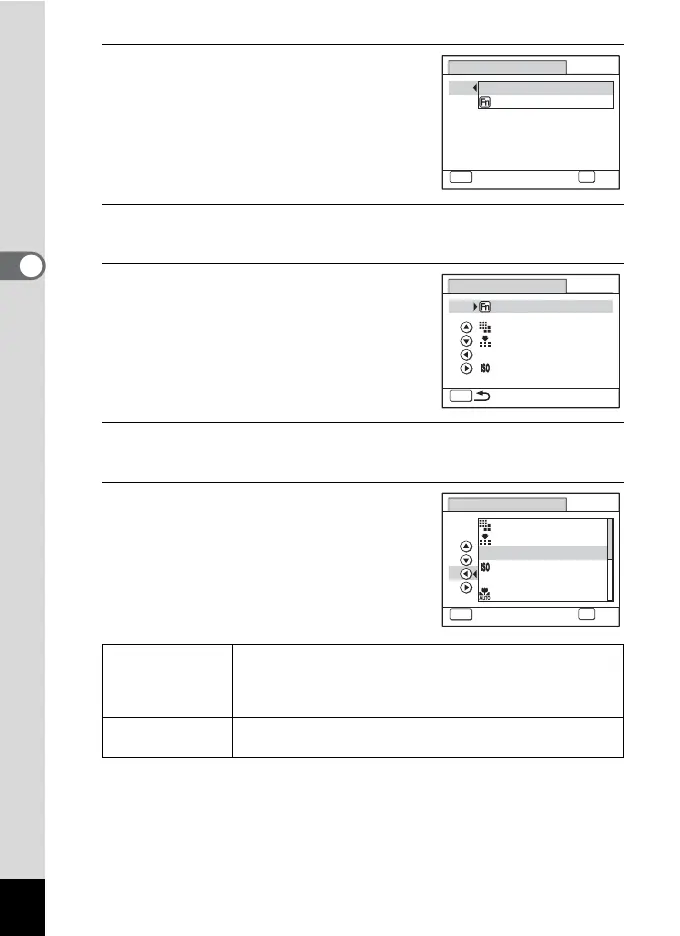
Use the four-way controller (23)
to select the function you want to
register.
When [Green Mode] is selected, proceed to
Step 9.
5
Press the 4 button.
The Fn Setting screen appears.
6
Use the four-way controller (23)
to select a key to which to assign a
function.
7
Press the four-way controller (5).
A pull-down menu appears.
8
Use the four-way controller (23)
to select the function you want to
register.
The following functions can be registered.
*1 When [Bright] or [Natural] is selected for [Image Tone] on the [A Rec.
Mode] menu, [Saturation] is displayed, and when [Monochrome] is
selected, [Tone Adjustment] is displayed.
Still picture mode
functions
Recorded Pixels/Quality Level/White Balance/Sensitivity/
Focusing Area/Auto Macro/AE Metering/Highlight
Correction/Shadow Correction/Shake Reduction/
Sharpness/Saturation (Tone Adjustment)
*1
/Contrast
Movie mode
functions
Recorded Pixels/Movie SR/White Balance/Focusing Area/
Sharpness/Saturation (Tone Adjustment)
*1
/Contrast
Green Button
Q
9
MENU
Cancel
OK
OK
Fn Setting
Green Mode
Recorded Pixels
Green Button
Q
MENU
Quality Level
Sensitivity
White Balance
WB
+
+
+
+
Fn Setting
Green Button
Q
MENU
Cancel
OK
OK
Quality Level
White Balance
Focusing Area
Auto Macro
Recorded Pixels
Sensitivity
+
+
+
+
WB
AF



 To Next Page