8
Polyend Play+ Manual Rev 2
Overview
1
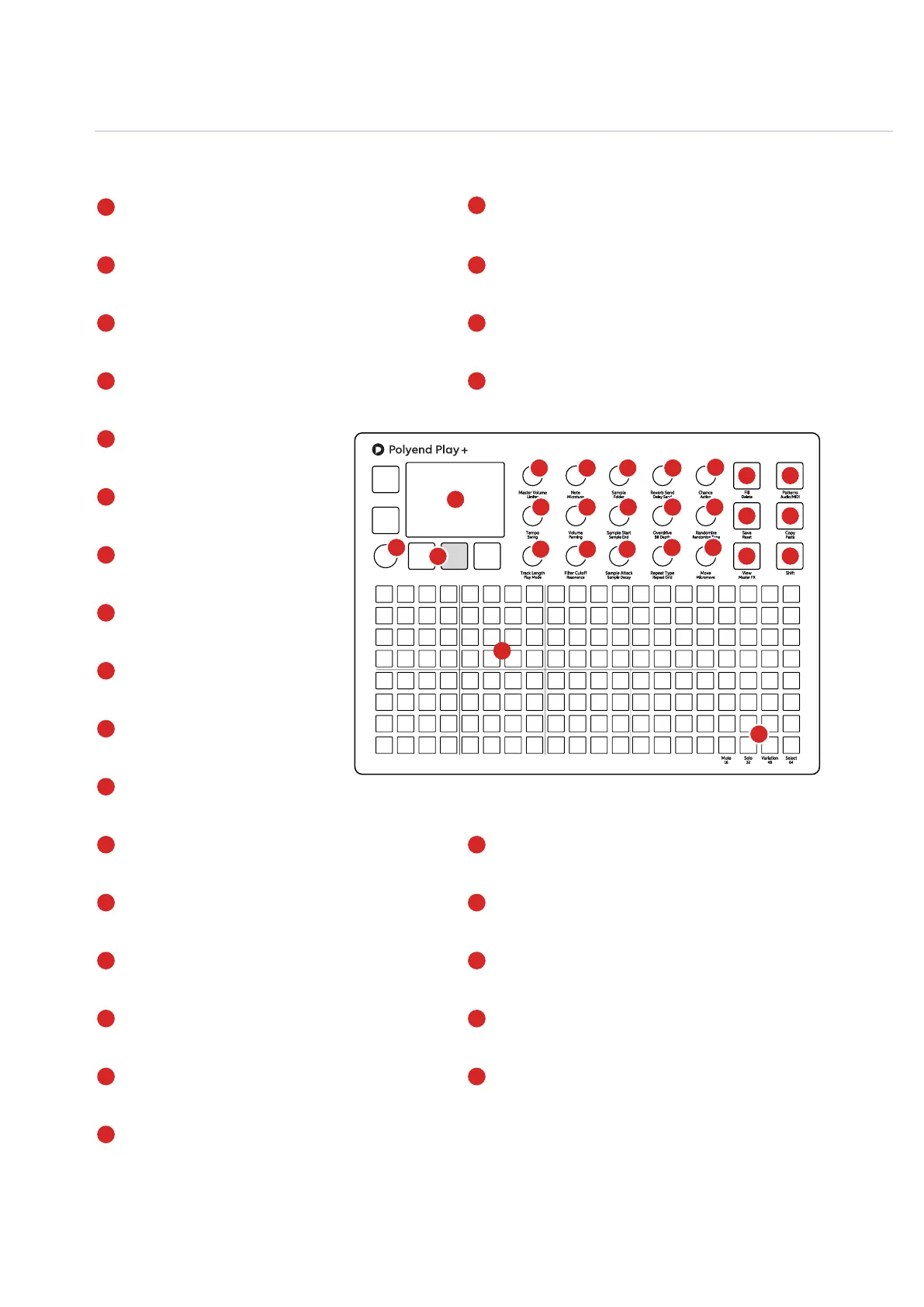
LCD Display
Hi Resolution Display.
Screen Buttons
5 Dynamic [Screen buttons]. Dependant on the
function displayed for each button.
Multi-Functional Screen Knob
Clickable encoder.
Function Pads
8 x 4 Silicone Pads. Multifunction columns used for
Mute, Solo, Variation, Select and chromatic mode.
Track Sequencer Pads
8 x 16 Silicone Pads. Track step columns used for
sequencing, performing and arranging.
Master Volume & Limiter
Control of primary master volume dB level and the
secondary limiter threshold option.
Note & Microtune
Note pitch adjustments relative to a C4 note sample and
micro tuning -100 to +100 cents
Randomize & Randomize Type
Percentage randomization and type determines
which step parameters are affected.
Sample Attack & Decay
Sample start attack, fade-in time and the end of
sample fade-out time
Move & Micromove
Move a step placement on the grid left or right
and in smaller adjustments with micro move.
Patterns & Audio/MIDI Button
Pattern selection mode. Toggle between MIDI /
Synth tracks and Audio sampling tracks
Copy & Paste Button
Copy and Paste various functions.
Shift Button
Hold shift plus another knob or button to access it’s
secondary function.
Reverb & Delay Sends
Reverb and Send levels to adjust the
effect intensity.
Chance & Action
Determines if / when an action
occurs. Special action after a step.
Tempo & Swing
Adjusts global or track BPM Tempo
and swing value.
Sample Volume & Panning
Sample volume level deviation from
0dB original sample. Pan Left/Right.
Sample Start & End
Trims the start and the end point of
the sample.
Overdrive & Bit Depth
Overdrive grit and amplication or
reduces bit resolution.
Sample & Folder
Sample selection from sample pool. Select sample
folder. Sets device and patch in MIDI/Synth mode.
Track Length & Play Mode
Track length in steps between 1-64. Selects one
of 35 play modes
Filter Cutoff & Resonance
Adjusts the DJ style lter cutoff or resonance
Repeat Type & Grid
Selects the step repeat type from the list of options.
Step repeat density is selected with grid.
Fill & Delete Button
Fill utility for generating and populating sequences.
Delete option for various functions.
Save & Reset Button
Save current state of pattern and also recall using shift to
restore the saved state.
View & Master FX Button
Changes the function pads to a chromatic input
controller. Access audio processors using shift.
The 8 x 20 gird pads are not velocity sensitive.
Some knobs change functionality when in MIDI / Synth
mode. Audio Sampling mode is the default state.
1
4
5
10
15
20
24
5
7
15
16
18
20
24
22
26
9
10
11
12
13
14
6
11
16
21
25
7
12
17
22
8
13
18
26
9
14
19
23
8
17
19
21
23
25
6
4
2
2
3
3
1



 To Next Page