191
Polyend Play+ Manual Rev 2
NOTES
10.5 Typical MIDI Congurations.
There are many congurations that can be set up with MIDI gear. Some are
complex and involve multiple devices while a simple set up can have two
devices communicating. Some typical examples are shown.
Filter Cutoff
Resonance
Track Length
Play Mode
Sample Attack
Sample Decay
74 22
71 75
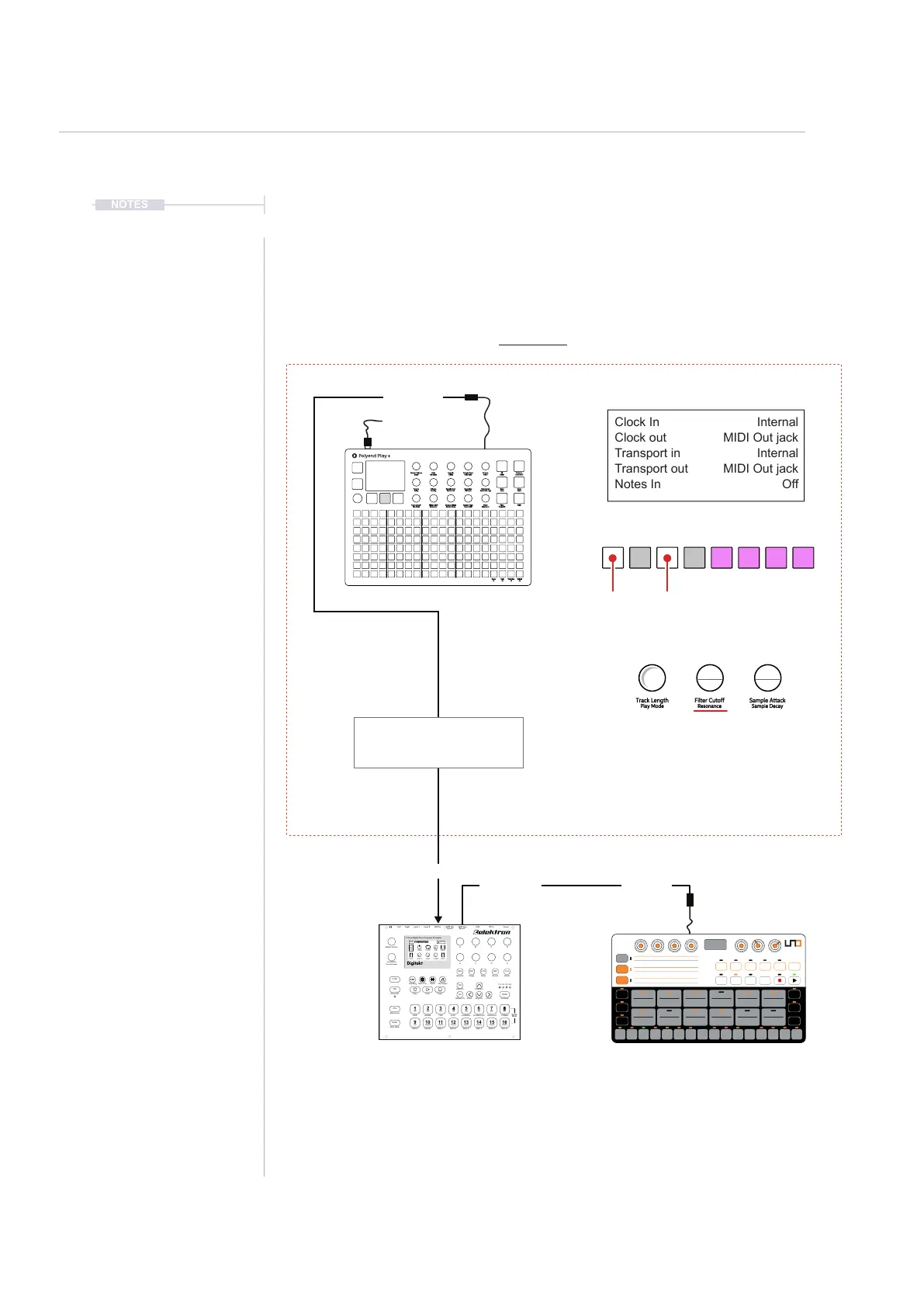
Play+: Menu > MIDI
Play+: Per Step Set for MIDI Output
Play+: MIDI CC# Assigned to Knobs
USB MIDI
Each step can have MIDI note data
applied including the channel out.
CC congurations can be set in the
settings menu and assigned to knobs.
CC#74 is Filter Cutoff for Digitakt.
Each knob has 2 parameters.
Illustration shows default settings.
Parameters are reset when changing
MIDI Out Channel.
Clock In
Clock out
Transport in
Transport out
Notes In
Internal
MIDI Out jack
Internal
MIDI Out jack
Off
16
MIDI H
15
MIDI G
14
MIDI F
13
MIDI EMIDI D
1211
MIDI C
10
MIDI B
9
MIDI A
CYMBAL
8
OPEN HAT
7
CLOSED HAT
6
COWBELL
54
CLAP
3
TOMSNARE
2
KICK
1
BANK
Mute Mode
Metronome
PTN
Chromatic
TRK
Copy Clear Paste
FUNC
Fill/Scale
PAGE
uTime- Rtrg/Oct- uTime+
Rtrg/Oct+
Reload Ptn
Save Ptn
Quantize
TRIG
Assign
SRC
Delay
FLTR
Reverb
AMP
Master
LFO
Imp/Exp. Save Proj Direct Tap Tempo
A
E
B
F
C
G
D
H
Level/Data
Sound Browser
Master Volume
Digitakt
8 Voice Digital Drum Computer & Sampler
AO1
12O.O
SMP
5
18
LEV STRT LEN LOOP LEV
TUNE PLAY BR SAMP
CYBERSPACE
CYBERSPACE
CYBERSPACE
CYBERSPACE
1:4 2:4 3:4 4:4
Sync A Sync B
Left Right Input L Input R MIDI In MIDI Out MIDI Thru USB DC In Power
Quick
Mute
Transport control e.g. Play, Stop
and Clock is dictated by Play and
its current Tempo.
Digitakt will follow the lead of
Play+ as will other devices.
Devices should be congured to receive clock and transport and the MIDI Channel which
Play+ communicates out, for example, Channel 1. CC 74 In Digitakt represents the Filter
Cutoff frequency in this example notes are played per step and the knob controls lter.
UNO Drum for example as an extended
part of the MIDI Network.
Example Conguration 1: Play+ as the primary lead connected to Elektron Digitakt. MIDI Mode On.
MIDI IN
MIDI OUT
MIDI THRU MIDI IN
MIDI
10



 To Next Page