5-39
PFC-6006 • 5403559 • REV D • 11/17
System E-mail Functions
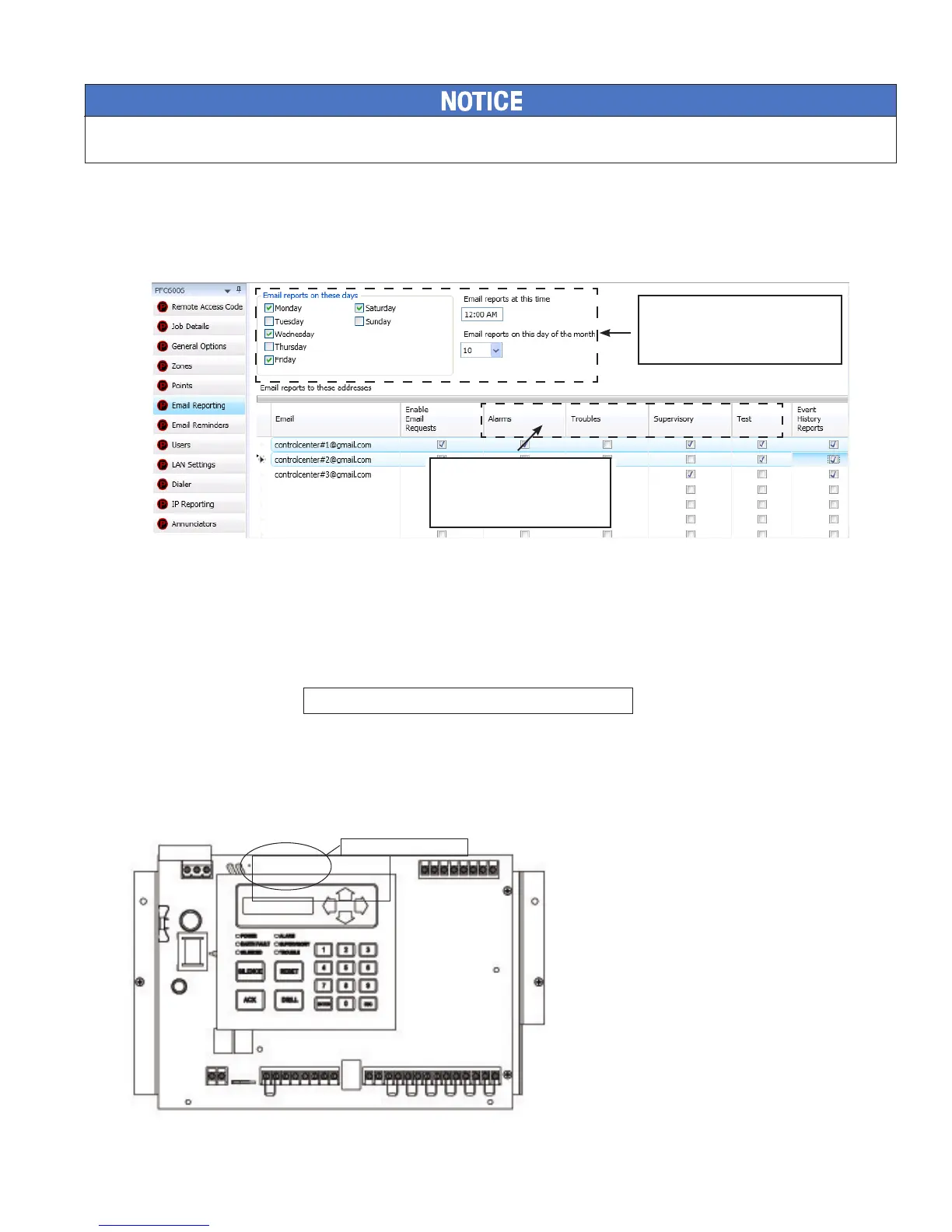
The PFC-6006 comes with built-in e-mail capabilities. The panel automatically sends status e-mails, including Alarms, Troubles,
Supervisory and Test events, to the e-mail addresses designated on the "E-mail Reporting" window as shown below.
Figure 41. E-mail Reporting Window
Event History reports may be scheduled to be sent on specic days of the week, time or day of the month. Up to twenty (20)
e-mail addresses may be programmed on this screen. After the “E-mail Reporting” section is completed and downloaded into the
panel, the panel will start sending e-mails according to programming.
The panel is capable of sending automatic and on-demand reports because it has a designated outgoing e-mail address comprised
of its model and serial numbers. On-demand reports can be requested directly from the panel's "Data Transfer" function or
remotely from a PC, if the user has a valid e-mail address programmed on the "E-mail Reporting" window.
The panel address is structured as: PFC6XXXXXXXXXXX@potterlink.com where "PFC6XXXXXXXXXXX" refers
to the “panel serial number". The serial number is the same as the NetBIOS name, and is located on the panel as shown
below.
Note: Outgoing panel e-mails are routed through a dedicated Potter server. You must make a notation of your panel's outgoing
e-mail address in order to send e-mail requests remotely.
Figure 42. Panel Serial Number Location
System e-mail communications and functions are intended for informational reporting purposes only. They are intended to be used as a
convenience function. E-mail communications should NOT be used as a primary means of reporting emergency information.
Ifselected,EventHistoryRe-
ports will be sent based on the
weekly schedule, time and day
of the month indicated here.
Panel Serial Number
BAR CODE
PFC6xxxxxxxxx
DWG #559-11
Alarm,Trouble,Superviso-
ryandTestEventsaresent
immediately as they occur!



 To Next Page