6-61
PFC-6006 • 5403559 • REV D • 11/17
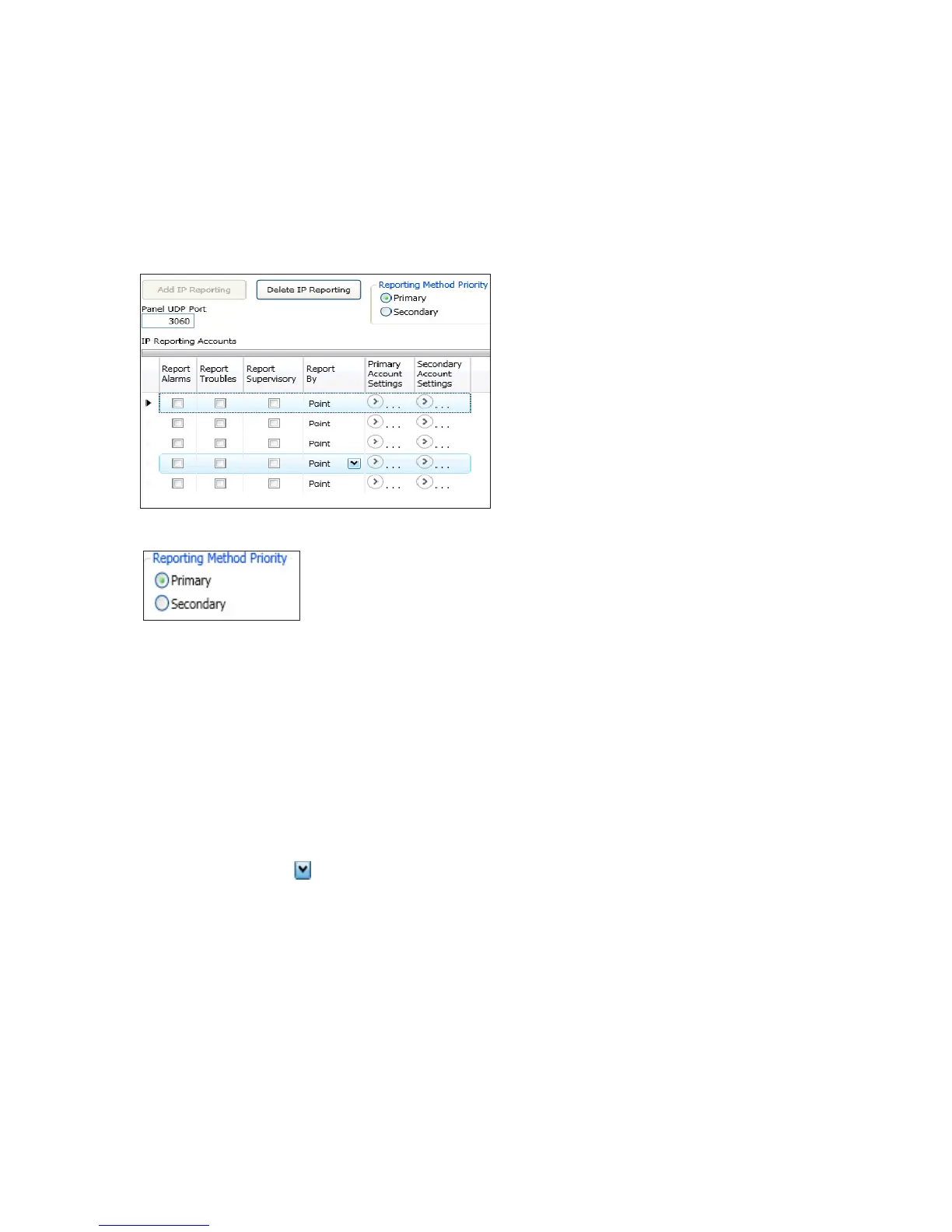
IP Reporting Accounts
The "IP Reporting Accounts" section is used to program the IP Communicator operations and to customize the format of the
reporting accounts. You may choose different settings for Alarms, Troubles and Supervisory conditions. Up to ve (5) primary
or secondary accounts may be congured.
To add and congure a IP Dialer:
1. Select IP Dialer from the system panel, and click the Add IP Reporting button.
The "IP Reporting" window displays.
Figure 72. Example of the IP Reporting Window
2. In the Reporting Method Priority eld select the applicable priority.
Primary – IP Reporting account is used as the rst path of communication to the remote monitoring station.
Secondary – IP Reporting account is used as the alternate path of communication to the remote monitoring station.
3. In the Panel UDP Port eld, click to enter an ingoing and outgoing UDP Port. The UDP or User Data Protocol is the
pathway for which data is sent and received between the panel and the remote monitoring station.
Note: The default UDP Port is 3060; however, an alternate port number may be used. Check with your Network
Administrator to determine if an alternate port number for FACP IP Reporting should be assigned.
4. In the "IP Reporting Accounts" section, make the necessary selections for the primary and secondary reporting accounts:
Select the Report type(s): Alarms, Troubles, Supervisory
Click on the Report By drop-down arrow to choose an option: Panel, Zone or Point



 To Next Page