5-45
PFC-6006 • 5403559 • REV D • 11/17
Creating E-mail Reminders
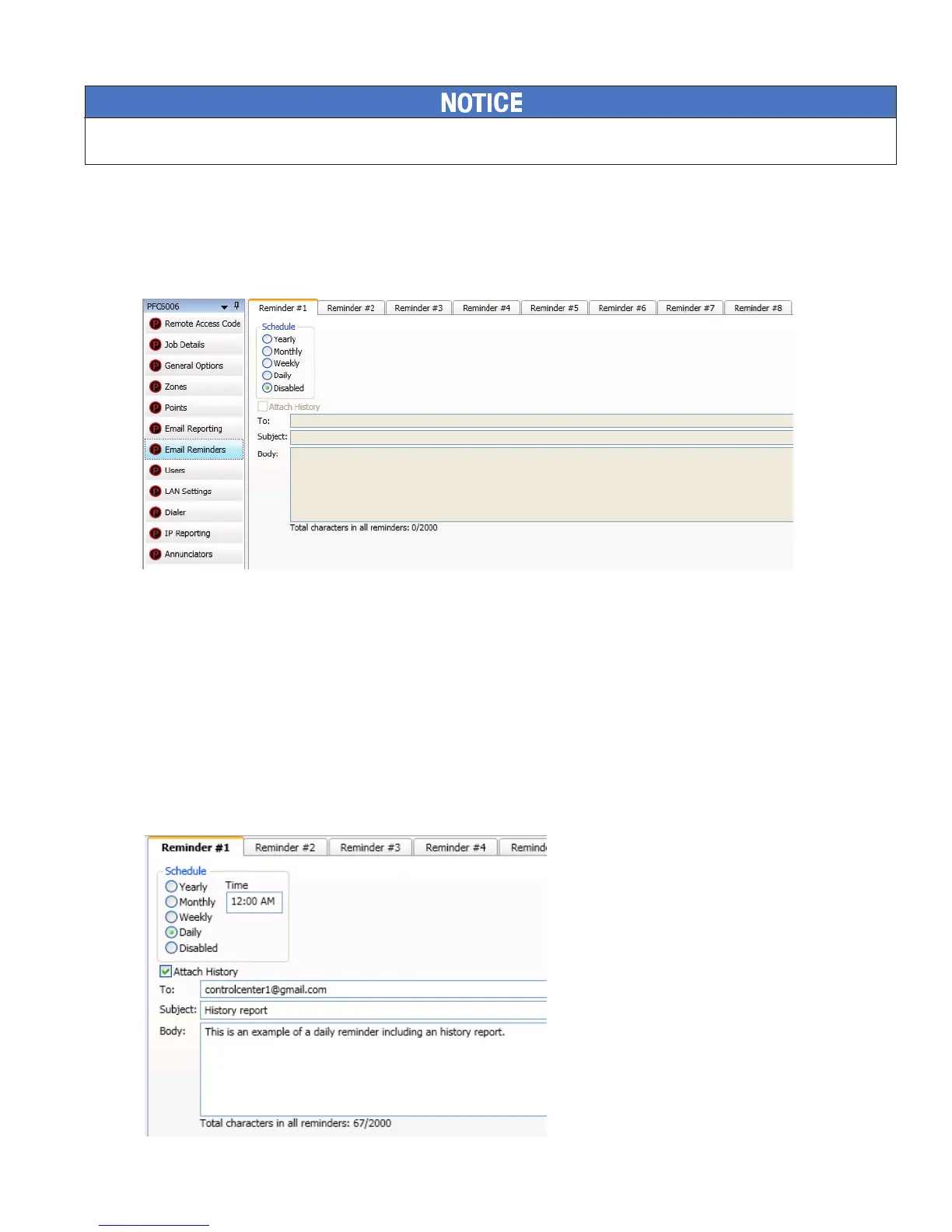
E-mail reminders are fully customizable e-mail messages that may be sent based on a predened schedule. The e-mail subject
and body are dened by the installer, and they may choose to attach the History reports. Up to eight separate e-mail reminders
can be created to be sent on a daily, weekly, monthly or yearly schedule.
Figure 50. Example of the Email Reminder Window
To create Reminder emails:
1. Select the Email Reminders option on the panel menu.
2. Click a Schedule option, i.e., Yearly, Monthly, Weekly or Daily.
3. Select the specic scheduling frequency, i.e., "Days to send" for a Weekly reminder or "Time" for a Daily reminder.
4. Click in "Attach History" selection box, if needed.
5. Complete the following information:
• In the "To" eld, enter up to 20 addressees.
• In the "Subject" eld, enter an applicable subject.
• In the "Body" eld, enter up to 2000 characters, if needed.
Figure 51. Example of Creating a Daily Reminder
6. Continue setting up additional "Reminders", if needed.
System e-mail communications and functions are intended for informational reporting purposes only. They are intended to be used as a
convenience function. E-mail communications should NOT be used as a primary means of reporting emergency information.



 To Next Page