5-43
PFC-6006 • 5403559 • REV D • 11/17
3. In the “Subject” eld, enter one or more of the following keywords:
• History to send a current event history report back to sender.
• Conguration to send a current conguration le back to sender.
• Unsubscribe to stop the current e-mail settings for the sender until panel is reset or that e-mail address sends a
“Subscribe” to the panel.
• Subscribe to activate e-mail settings for the sender.
Note: Keywords are NOT case sensitive and more than one can be entered in the subject line of the e-mail.
4. There are no restrictions on contents entered into the body of the e-mail.
Important Reminders!
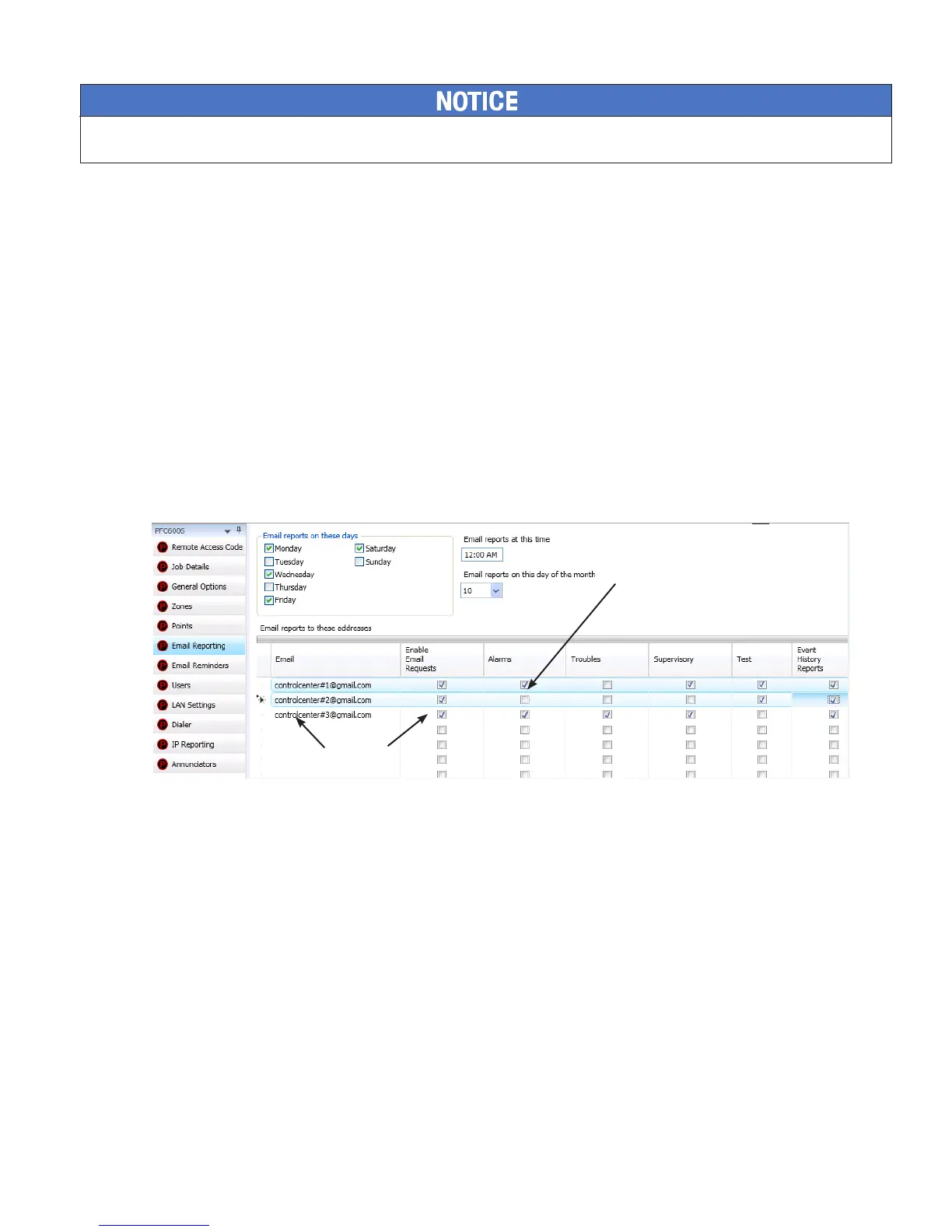
• The person sending the e-mail must be added to the e-mail list in the “E-mail Reporting” section of the software as
shown below. If the sender is not in the list, the panel will not respond.
• The “Enable E-mail Requests” option must also be checked for the sender to receive e-mails when requested from the
panel or a remote PC.
Figure 47. E-mail Reporting Window
System e-mail communications and functions are intended for informational reporting purposes only. They are intended to be used as a
convenience function. E-mail communications should NOT be used as a primary means of reporting emergency information.
Note: You may choose not to select
aspeciceventtypeorreportforan
e-mail address.
If so, choose Browse List from the
Data Transfer panel menu option.
Then scroll through e-mail addresses
and select one or more recipients.
Sender's e-mail must be in
the e-mail list and the Enable
E-mail Requests box must be
checked!



 To Next Page