6.2 DISPLAY PAST FIRES.
• Function : This option allows the last 1000 events from the ‘Fire Historic log’ to be viewed.
• Selecting option : To select this option, press the number ‘1’ key from the ‘Display events’ menu options.
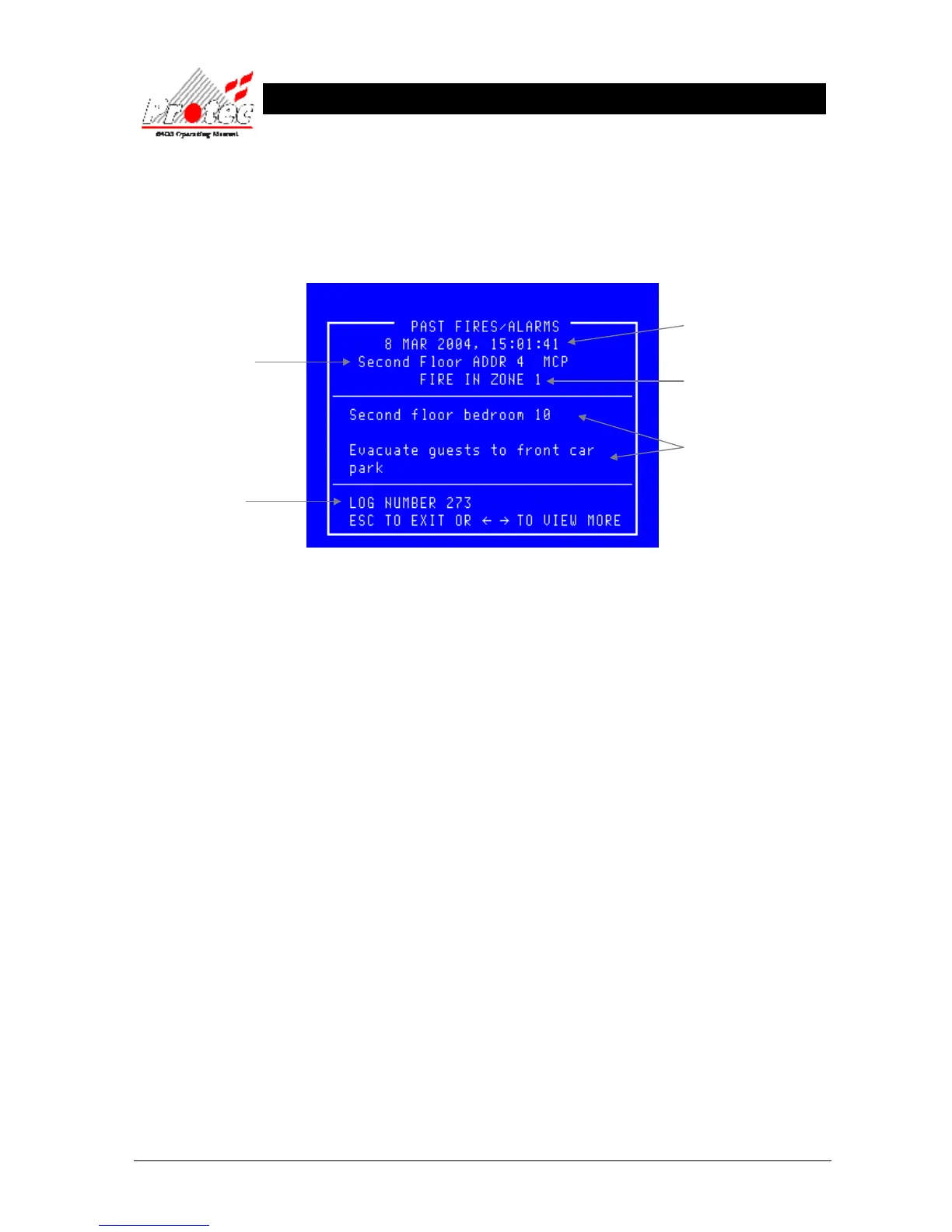
Once selected, the LCD will display the following information :-
• Viewing events : When the ‘Display past fires’ is selected, the most recent event is displayed first.
To view events further back in the ‘Historic log’ use the ← arrow key, each key press will
cycle one event at a time through the ‘Historic log’. Each time the ← arrow key is
pressed the ‘Log number’ on the bottom left hand side of the screen will change by on digit.
• Exiting option : To EXIT the ‘Display past fires’ options and return to the ‘Display’ sub-menu
options, press the ‘ESC’ key.
Displays the Node /
Loop / address and type
of the device in alarm
Note - If text has been
assigned to the node, then
the text will be displayed
rather than the node &
loop No
Displays the date & time of
the activation
Displays the ‘Zone’ number in
which the event occurred
Displays the ‘Location’ and ‘alarm’
text for the device that has alarmed.
This is an option and may NOT be
available in some cases.
Displays the log number
(0 - 999)



 To Next Page