3-3
VIBXPERT II 05.2012
Measurement - Multimode
Multimode: Measurement, Analysis, Diagnosis
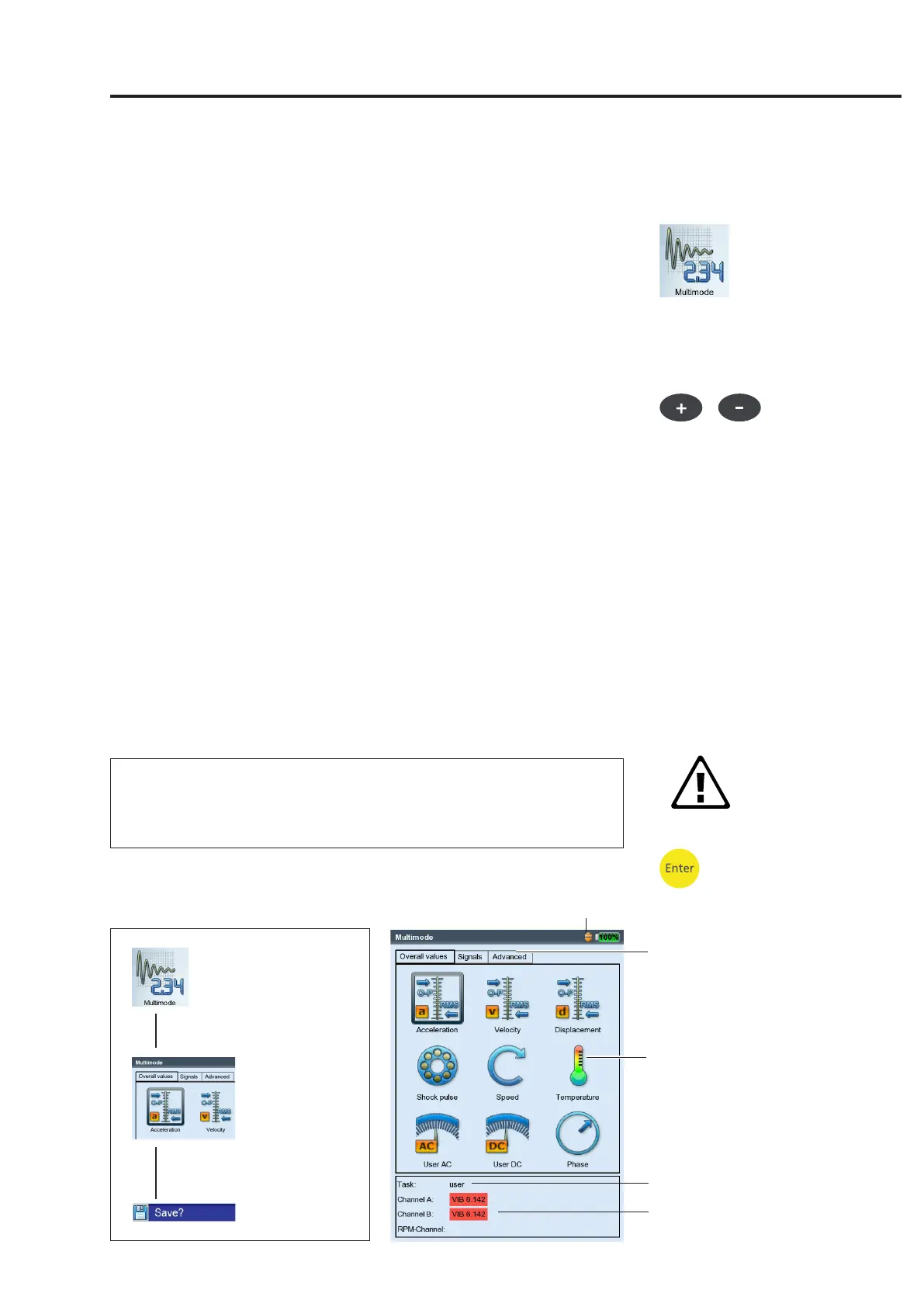
To activate the 'Multimode' mode, click on the corresponding symbol
in the start screen. The measurement tasks appear in the selection
screen (see below). The measurement task for the selected icon is
displayed below the icon field.
The measurement tasks are grouped into three tabs: Overall (charac-
teristic)Values,Signals,Advanced(measurements).Certainmeasure-
ment tasks only appear if the corresponding module is registered.
The current tab sheet is highlighted with a black frame. To change
the tab sheet, press the '+/-' key or highlight the tab sheet with the
navigation keys.
Typical workflow of a measurement
This section shows you how to carry out a measurement in multimode
mode if the preparations have already been made. A schematic of the
workflow of a measurement is shown below.
The setting options that are available before, during and after a mea-
surement are described in the following section. The evaluation of the
resultsontheinstrument*isdescribedinChapter4.
Starting a measurement:
• Highlightthemeasurementiconintheselectionscreen.
• Connectthesensor.
Sensorandmeasurementchannelaredisplayedintheinfoeld.
Standardsensorisactivewhenthesensoriconatthetopleftisor-
ange and the sensor type in the info field is marked red! The sensor
setup is overwritten with the standard sensor.
• Press'Enter'tostartthemeasurement.
* Multimode measurements can also be
imported and evaluated in OMNITREND.
Select
operating mode
Select task, start
measurement
Save result
Multimode selection screen
for overall value measurements
Measurement quantity
(icon)
Measurement task
Info field
Sensor type:
VIB 6.142 (here: default sensor)
Tab
Attention!
Default vibration sensor enabled


 To Next Page