4-1
VIBXPERT II 05.2012
Results
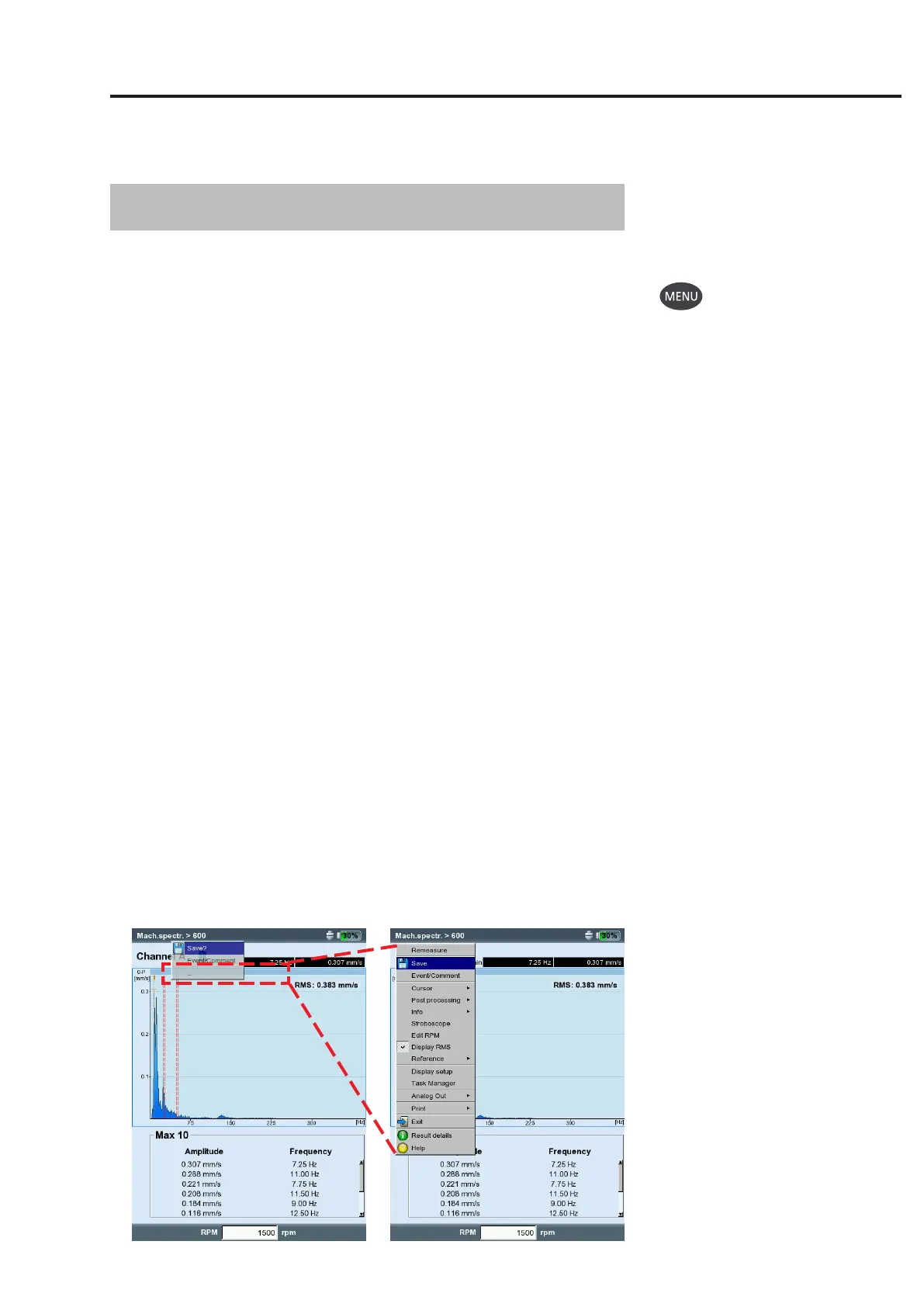
Results screen in the route
with concealed menu.
Click on ‘...’ to open the full menu.
Chapter 4: Results
After each measurement, it is possible to save the results and to evalu-
ate them on the device. Numerous functions that can be called up
with the MENU key in the results screen are available for this purpose
(see below).
Multimode
Results from the ‘Multimode’ operating mode can be found in the ‘Re-
sults’directoryintheFileManager(P.6-3).
Route/template
Results of a route or a machine template are usually stored automati-
cally(p.2-18)tospeedupthedatarecording.Theresultsonlythen
remain in the display if ...
... the menu is opened within the selected waiting time,
...the‘AutoSave’optionisdeactivated,
... a stored result is opened.
... the measurement has exceeded a threshold value.
To open a result of a route / template measurement, proceed as fol-
lows:
• Opentheroute/template.
• Selecttherelevantmeasurementtask.
• PresstheMENUkeyandclickon‘DisplayResult’.
The following sections show the options that your VIBXPERT provides
for evaluating the results on the device.


 To Next Page