3-36
VIBXPERT II 05.2012
Recording
With the ‘Recording’* function, you can perform measurements de-
pendent on time or rotational speed. For example, this method can
be used to record measurement values under certain operating condi-
tions (= rpm range) or at fixed time intervals.
Availability and restrictions
Recording is available in 'Multimode' for every measurement, with the
following exceptions:
-
coastdown curve
- impact test
- time waveform recorder
- phase - cross channel
Restrictions also apply to the following measurements:
-
spectrum: Averaging is not possible for rpm-controlled recordings.
-
time waveform: The 'time synchronous' averaging type is not per-
missible.
-
multi measurement tasks: rpm-controlled recording is not possible.
-
shock pulse measurement (roller Bearing condition): rpm-controlled
recording is only possible without normalization.
Configuration
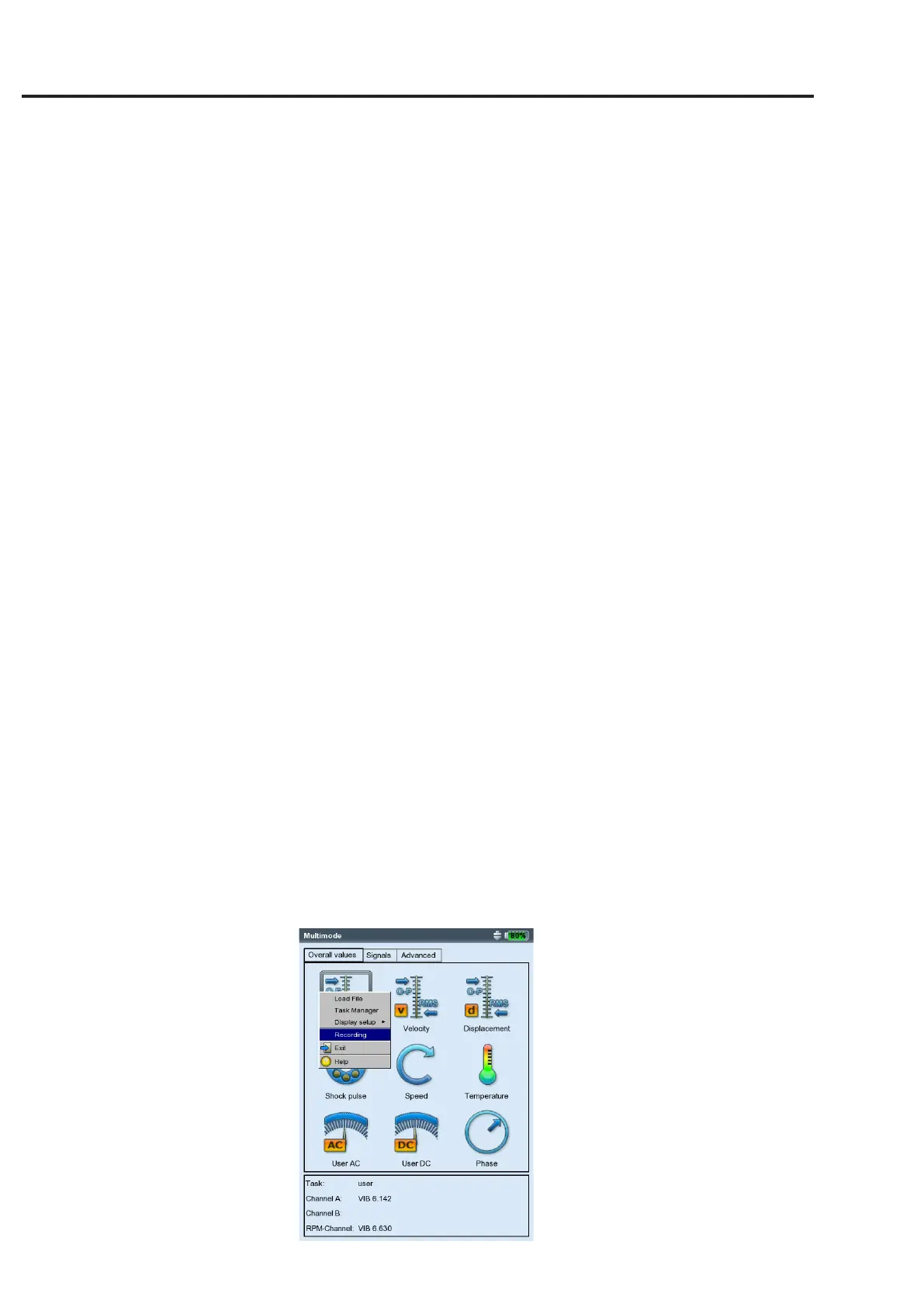
• Clickon'Multimode'inthestartscreen.
• Selectthemeasurementforwhichyouwanttosetuprecording.
• PresstheMENUkeyandclickon'Recording'(seebelow).
* Firmware module ‘Recording’ (VIB
5.385) must be registered.
Opening the recording
configuration window
Recording


 To Next Page