to modify, refer to chapter 4.2.2 please.
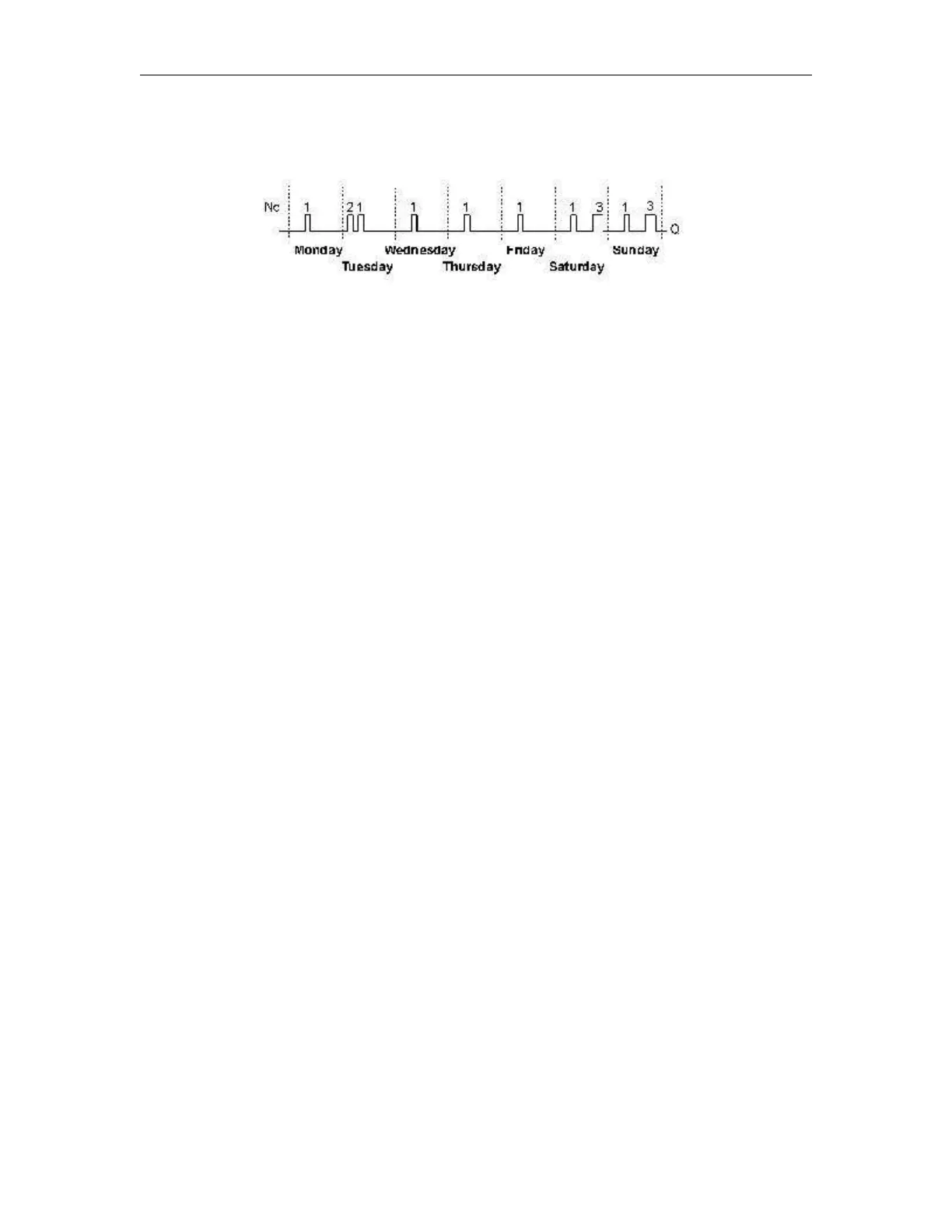
Timing diagram (three practical examples)
No1: Daily: 06:30 h to 08:00 h
No2: Tuesday: 03:10 h to 04:15 h
No3: Saturday and Sunday: 16:30 h to 23:10 h
Description of the function
Each weekly timer is equipped with three cams. You can configure a time hysteresis for each individual cam.
At the cams you set the on and off hysteresis. The weekly timer sets the output at a certain time, provided
it is not already set.
The output is reset at a certain time, provided it is not already reset. A conflict is generated in the weekly
timer when the set on time and the set off time at another cam are identical. In this case, cam 3 takes priority
over cam 2, while cam 2 takes priority over cam 1.
The switching status of the weekly timer is determined by the status at the No1, No2 and No3 cams.
Days of the week
The prefix "D=" (Day) has the following meaning:
● M: Monday
● T: Tuesday
● W: Wednesday
● T: Thursday
● F: Friday
● S: Saturday
● S: Sunday
Uppercase letters indicate a specific day of the week. A "-" indicates no selection for the day
of the week.
On-/Off-times
Any time between 00:00 h and 23:59 h is possible. You can also configure the on time to be a
pulse signal. The timer block will be activated at the specified time for one cycle and then the
output is reset.
- -:- - means: No on-/off-times set.
Setting the weekly timer



 To Next Page