Address Binding
HF-A11 module supports the feature of binding the BSSID address of target network.
According to the provisions of 802.11 protocol, different wireless networks can have a same
network name (ie SSID / ESSID), but must correspond to a unique BSSID address (ie MAC
address). Illegal intruders can create a wireless network with the same SSID / ESSID, it will make
STAs in the network to join to the illegal AP, thereby and then network leakage happen.
Users can prevent STA from joining to illegal network by binding the BSSID address,to improve
wireless network security.
7.2 OPERATION GUIDELINE
Configuration via Web Accessing
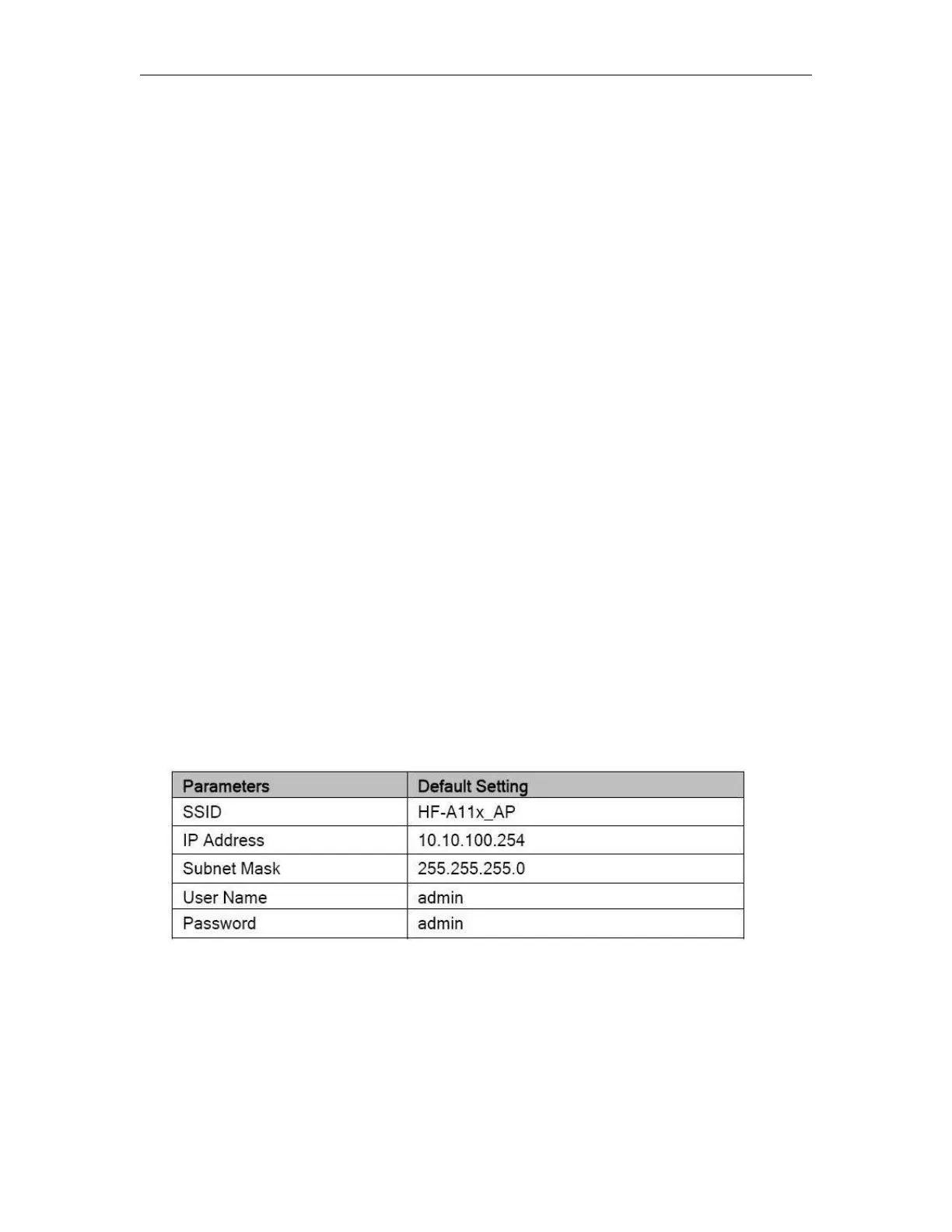
When first use HF-A11 modules(EXM WIFI CPUs), user may need some configuration. User can
connect to HF-A11x module’s wireless interface with following default setting information and
configure the module through laptop or smart phone.
Table 5
HF-A11 Web Access Default Setting
Open Web Management Interface
Step 1: Connect laptop to SSID “HF-A11_AP” of HF-A11 module via wireless LAN card;
Step 2: After wireless connection OK. Open Wen browser and access “http://10.10.100.254”;
Step 3: Then input user name and password in the page as following and click “OK” button.



 To Next Page