These two indicators is for the wifi module, not for the LAN port.
1.Indicator the WIFI module status of power on process:
“1”-Finish WIFI module boot up process;
“0”-WIFI module boot up not finish.
2.WIFI status indicator: “1”- WIFI connection available.
“0”-No WIFI connection
7.1 Functional description
Wireless Networking
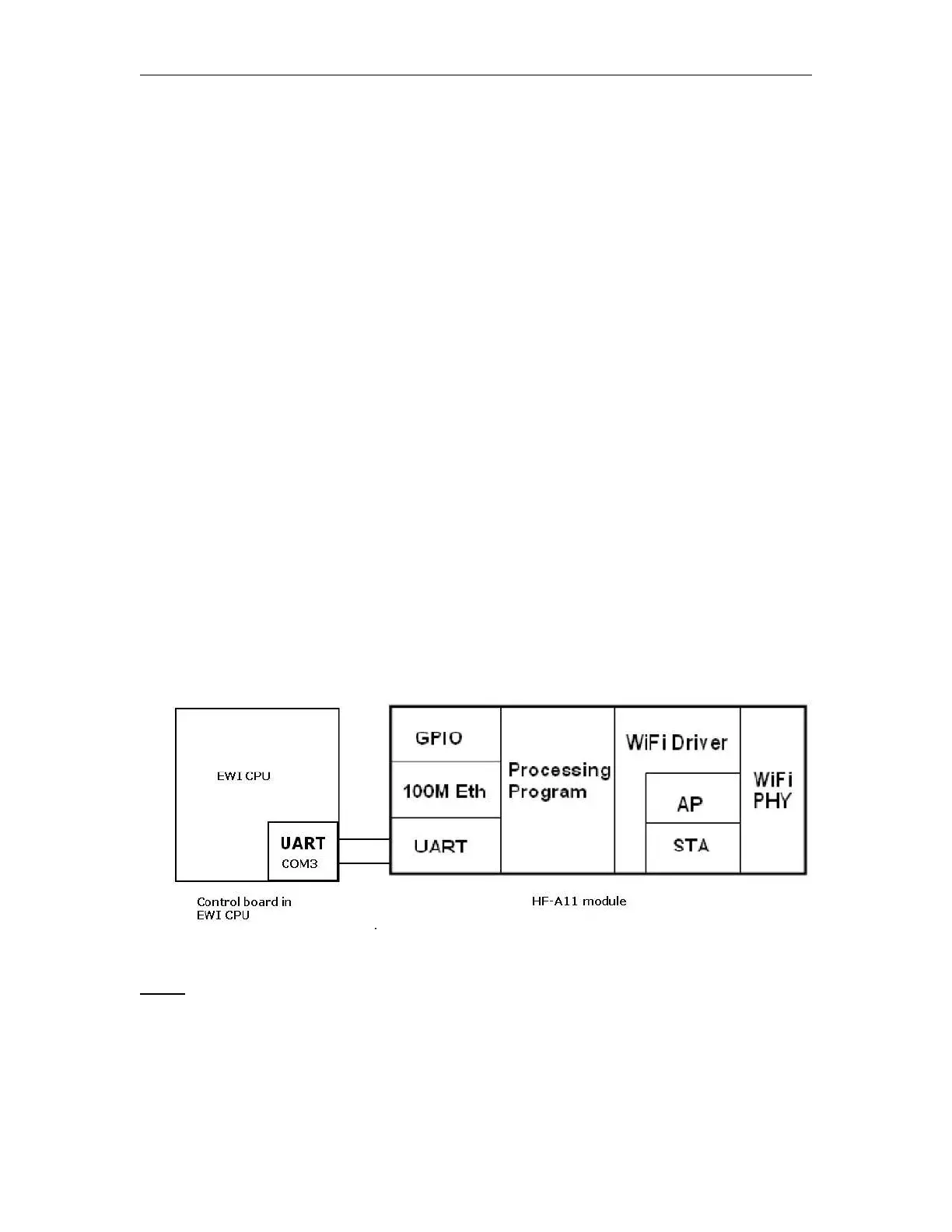
HF-A11 module can be configured as both wireless STA and AP base on network type. Logically
there are two interfaces in HF-A11. One is for STA, and another is for AP. When HF-A11 works
as AP, other STA equipments are able to connect to wireless LAN via HF-A11 module. Wireless
Networking with HF-A11 is very flexible.
Following figure shows the functional architecture of HF-A11 module:
Figure 15. Connection inside of EXM WIFI CPU between HF-A11 module and CPU board
Notes:
AP: that is the wireless Access Point, the founder of a wireless network and the center of the
network nodes. The wireless router we use at home or in office may be an AP.
STA: short for Station, each terminal connects to a wireless network (such as laptops, PDA and
other networking devices) can be called with a STA device.



 To Next Page