58 / 293 - EN -
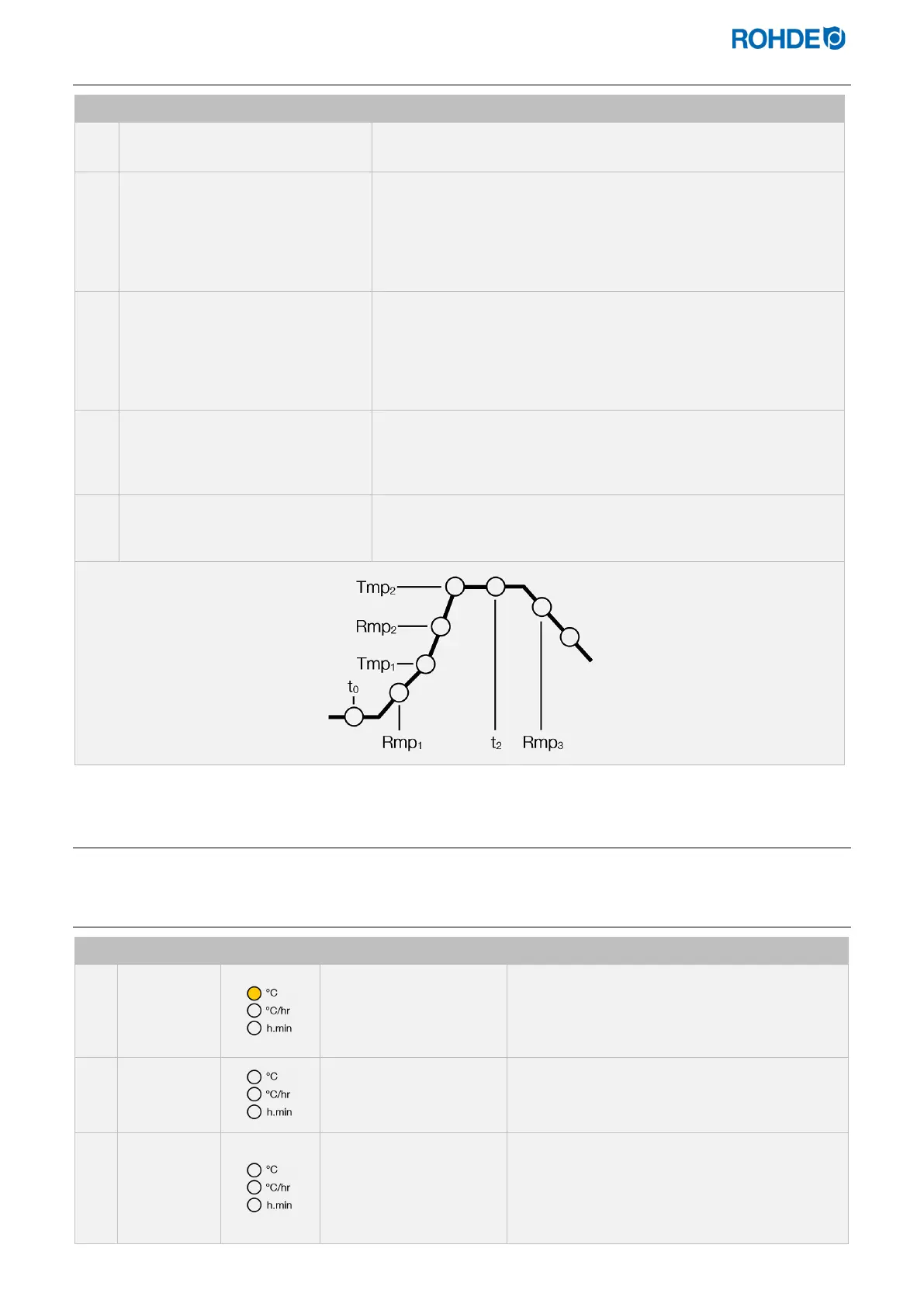
5.3.3. Firing program sequence
No. Description Remarks
After the program delay t
0
has
elapsed, the firing program starts.
If no program delay is entered, the firing program starts immediately.
The temperature rises at the first
entered, ascending ramp rate
Rmp
1
until the first switch point
Tmp
1
.
⇒
The ramp rate is settable in the range between 1 °C/h and
999 °C/h or as FULL (full load heating) or END (program end).
⇒ If the entered temperature Tmp
1
is lower than the current firing
chamber temperature, Rmp
1
and Tmp
1
are automatically
skipped in the firing program when the program starts, and the
controller starts at the second heating rate, Rmp
2
.
After the first switch point, Tmp
1
,
the kiln continues with the second
entered, ascending ramp rate
Rmp
2
(heating up) until the kiln
reaches the end temperature,
Tmp
2
.
⇒ The ramp rate is settable in the range between 1 °C/h and
999 °C/h or as FULL (full load heating) or END (program end).
⇒ The temperature is settable over the range of 0 °C to 1400 °C
(depending on the kiln model and its maximum temperature).
After reaching the end temperature
Tmp
2
, the kiln remains at this
temperature for the set soak
period t
2
.
⇒ The soak period is settable over the range 00:00 (no soak) to 99
hours 59 mins.
⇒ During soaking, the controller display alternates every 15
seconds between kiln temperature and soak period remaining.
The controller then executes the
cooling rate Rmp
3
until the end of
the program is reached.
5.4. Programming the control unit
5.4.1. Changing the firing program
No. Display Indicator Meaning Description
20
No program in operation
• If no firing is being performed, no indicators
will light up.
• The main display shows the current firing
chamber temperature.
Pr. 1
Select program memory
Press the X key to select the program memory
for the firing programs.
Pr. 2
Select program number
• Press the d and f keys to select the
desired program number.
• Press the g key to select the program
number to be changed.



 To Next Page
 Loading...
