134
Disk-Related Functions (Disk Mode)
2.
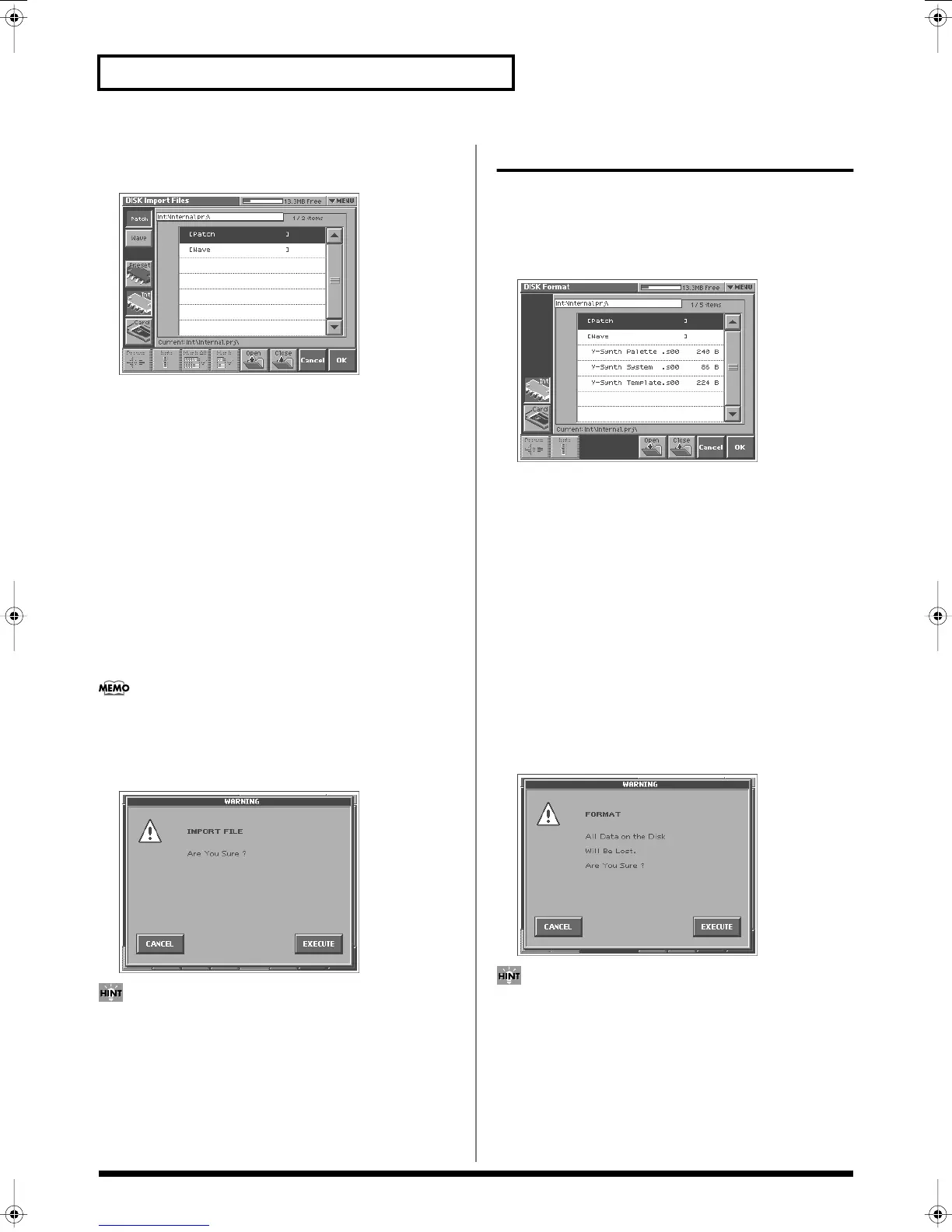
Touch <Import Files>.
The Disk Import Files screen appears.
fig.06-09_50
3.
Touch <Patch> if you want to import a patch, or touch
<Wave> if you want to import a wave.
4.
Touch <Preset> if you want to import from preset memory,
touch <Int> if you want to import from internal memory, or
touch <Card> if you want to import from a memory card.
5.
From the file list, select the file/folder that you want to
import.
Here you can use the following functions. Touch the appropriate
button to execute.
Prevw:
Preview (audition) the selected file (.w00/.wav/.aif).
Info:
View information for the selected file.
Mark All:
Mark all files/folders in the file list.
Mark:
Mark the selected file/folder in the file list.
Open:
Open the selected folder.
Close:
Move to the next higher folder.
If you have selected a patch whose oscillator type is “PCM,” the
wave used by that patch will also be imported.
6.
Touch <OK>.
A WARNING window like the following appears.
fig.06-10_50
If you want to cancel the procedure at this point, touch
<CANCEL>.
7.
Touch <EXECUTE> to execute the operation.
Initializing a Disk (Format)
You can initialize (format) a disk, erasing all data from it.
1.
Access the DISK UTILITY MENU screen (p. 131).
2.
Touch <Format>.
The Disk Format screen appears.
fig.06-11_50
3.
If you want to format the internal memory, touch <Int>. If you
want to format a memory card, touch <Card>.
Here you can use the following functions. Touch the appropriate
button to execute.
Prevw:
Preview (audition) the selected file (.w00/.wav/.aif).
Info:
View information for the selected file.
Mark All:
Mark all files/folders in the file list.
Mark:
Mark the selected file/folder in the file list.
Open:
Open the selected folder.
Close:
Move to the next higher folder.
4.
When you format a memory card, the VOLUME Name
window will appear, allowing you to assign a new volume
name.
5.
Touch <OK>.
A WARNING window like the following appears.
fig.06-12_50
If you want to cancel the procedure at this point, touch
<CANCEL>.
6.
Touch <EXECUTE> to execute the operation.
Reference_e.book 134 ページ 2005年3月10日 木曜日 午後5時6分



 To Next Page