162
COSM List
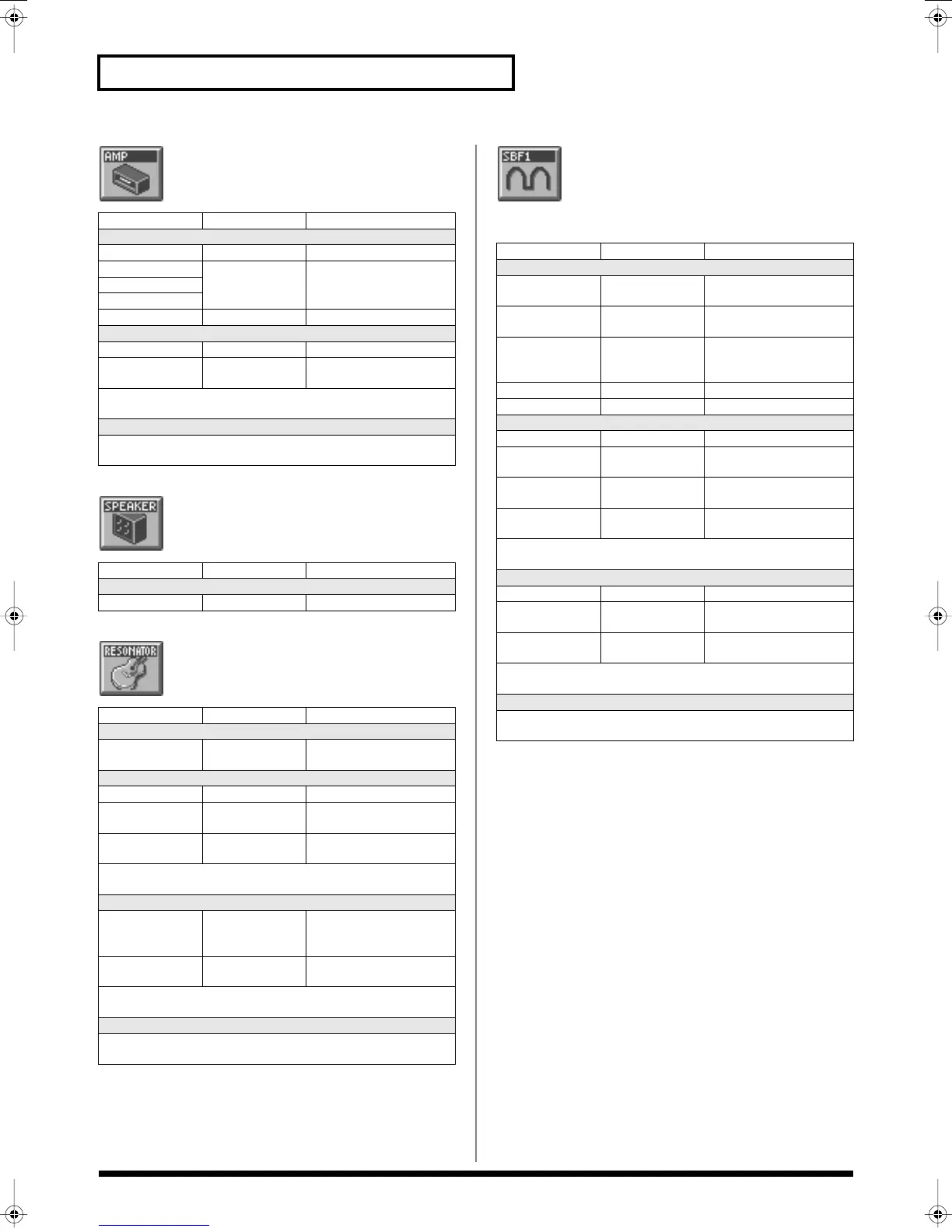
Amp Simulator
Simulates an amp.
Speaker Simulator
Simulates the speaker type.
Resonator
Simulates the resonance of a guitar body.
1st order SideBandFilter
By boosting the fundamental and overtones, you can
apply a pitch to unpitched input sounds such as a
noise or a drum phrase.
Parameter
Value Description
COSM Type
Amp Type
1–3 Type of guitar amp
Bass 0–127 Tone of the bass/mid/tre-
ble range
Middle
Treble
Output Level 0–127 Output Level
Gain
Gain #1
0–127 Degree of distortion
Gain LFO Depth
#3
-63– +63 Amount of LFO applied to
distortion
* For details on envelope settings, refer to
“Making Envelope
Settings”
(p. 94).
LFO
* For details on LFO settings, refer to
“Making LFO Settings”
(p.
95).
Parameter
Value Description
COSM Type
Speaker Type
1–12
Parameter Value Description
COSM Type
Filter Type BANJO, AC.GTR,
RE.GTR
Type of filter (guitar)
Size
Size #1 0–127 Body size
Size KF -200– +200 Key follow setting for gui-
tar body
Size LFO Depth #3 -63– +63 Amount of LFO applied to
guitar body
* For details on envelope settings, refer to
“Making Envelope
Settings”
(p. 94).
Balance
Balance #2
0–127 Volume balance between
the direct sound and the ef-
fect sound
Balance LFO
Depth #4
-63– +63 Amount of LFO applied to
the volume balance
* For details on envelope settings, refer to
“Making Envelope
Settings”
(p. 94).
LFO
* For details on LFO settings, refer to
“Making LFO Settings”
(p.
95).
Parameter
Value Description
COSM Type
HPF
0–127 Cutoff frequency of the
high pass filter
LPF 0–127 Cutoff frequency of the low
pass filter
LPF KF -200– +200 Key follow setting for cut-
off frequency of low-pass
filter
Sub -100– +100 Sub detune
Octave -2, -1, 0 Octave setting
Width
Width #1
0–127 Bandwidth
Width KF -200– +200 Key follow setting for
bandwidth
Dyn Env -63– +63 Envelope depth for the in-
put sound
Width LFO Depth
#3
-63– +63 Amount of LFO applied to
bandwidth
* For details on envelope settings, refer to
“Making Envelope
Settings”
(p. 94).
Detune
Detune #2
0–127 Detune
Dyn Env -63– +63 Envelope depth for the in-
put sound
Detune LFO
Depth #4
-63– +63 Amount of LFO applied to
detune
* For details on envelope settings, refer to
“Making Envelope
Settings”
(p. 94).
LFO
* For details on LFO settings, refer to
“Making LFO Settings”
(p.
95).
Reference_e.book 162 ページ 2005年3月10日 木曜日 午後5時6分



 To Next Page