MASTER STC
USER MANUAL
37
DISPLAYING THE SERVICE LIST OF THE CURRENT BOUQUET
Press once and release the MPEG SERVICE LIST
[B] key once.
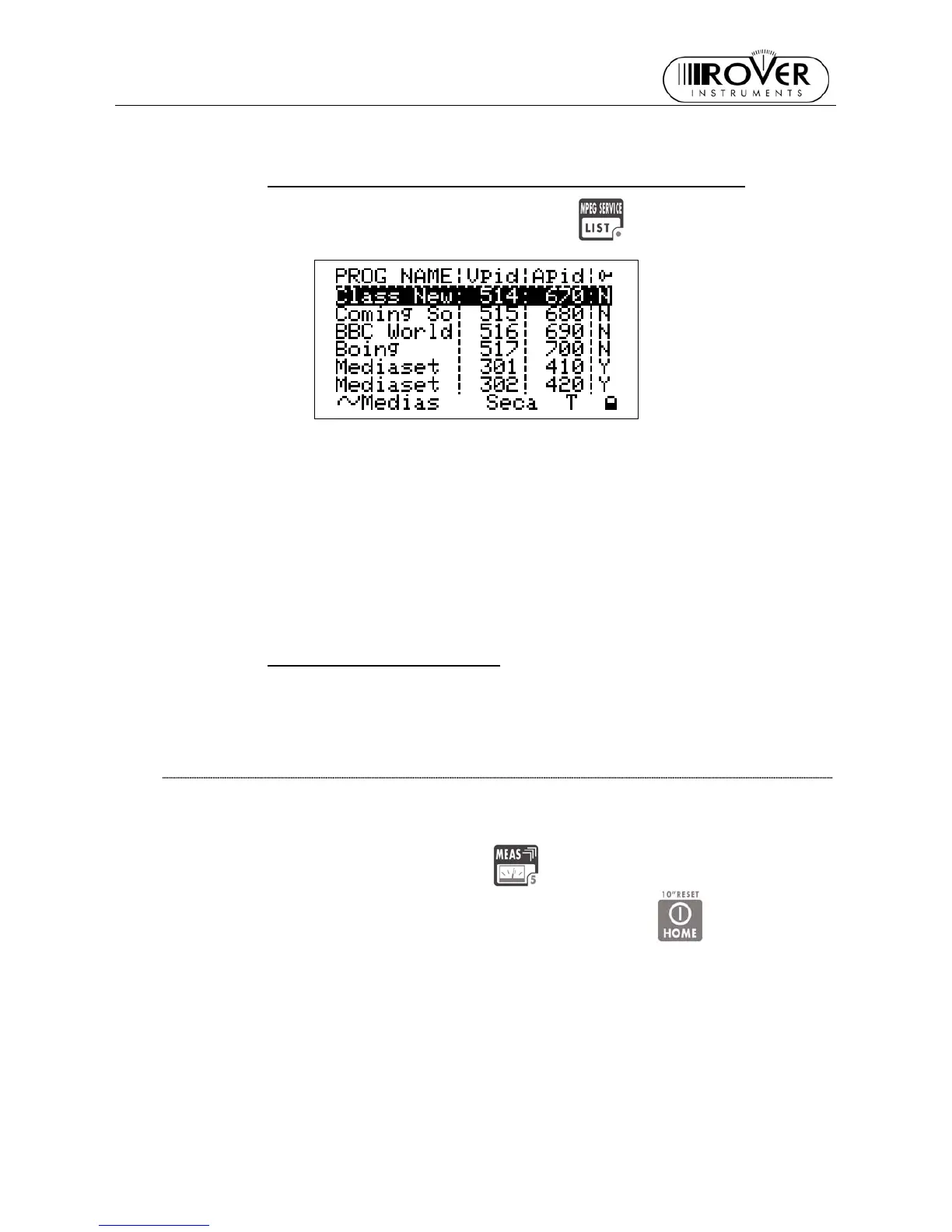
The LCD [C] will display:
• the full program list of the currently tuned bouquet;
• the relevant video (Vpid) and audio (Apid) PIDs, and
• the encryption status key (Y= encrypted, N= not encrypted/free to air).
It might take few second to get the full information displayed.
Rotate the encoder [D] to scroll down the program list (up to 64).
Press once and release the MEAS [5] key to quit to the previous measurement screen.
SPECTRUM ANALYZER MODE
Proceed as described in Chapter 12 SPECTRUM ANALYZER MODE at page 38.
THE CHANNEL IS NOT SUCCESSFULLY LOCKED (THE LOCK ON THE LCD
BOTTOM-RIGHT CORNER IS OPEN)
The meter will display as first measurement screen the channel power measurement (see
the Chapter CHANNEL POWER MEASUREMENT at page 35).
The further measurement screens, related to DTT (COFDM) signals will be cyclically
displayed by repeatedly pressing the MEAS
[5] key.
From any measurement screen press once and release the HOME
[A] key to
directly perform the channel power measurement


 To Next Page