Running Reports
the printer off and no receipt printed. T his includes all sales transactions,
any Z reports run during the day and even using the #/NS <sym> key for
no-sale rings to open the cash drawer.
T he cash register warns you when the E lectronic Journal memory is nearly
full to let you finish the current transaction. T hen you can print or save the
E lectronic Journal record to prevent any loss of information. W hen the
memory is completely full, the cash register warns you and no additional
transaction information can be saved.
You can print the entire E lectronic Journal record on the printer in the
cash register in either the X M ode or the Z M ode. Y ou can only save the
E lectronic Journal to an SD card while in Z mode.
• X -M ode: You can print the E lectronic Journal record anytime during the
day. T his prints what is currently in the E lectronic Journal memory and
does not reset the memory. You can also review the electronic journal
on the clerk screen.
• Z-M ode: You can print or save the entire E lectronic Journal record and
reset the journal memory so everything in memory is erased. O nly do
so at the end of the day, after runni
ng the standard Z R eport for the
end-of-the-day sales totals.
I f printing make sure there is a lot of paper on the receipt paper roll
so the E lectronic Journal reports can print completely.
You can also download the E lectronic Journal record to the P C using the
serial connection. For more information, see the R egisterL ink manual.
Print a Mid-Day Electronic Journal Report
You can print the E lectronic Journal report at anytime during the day
without resetting the memory. You can run an E J report for a specific date
or time period.
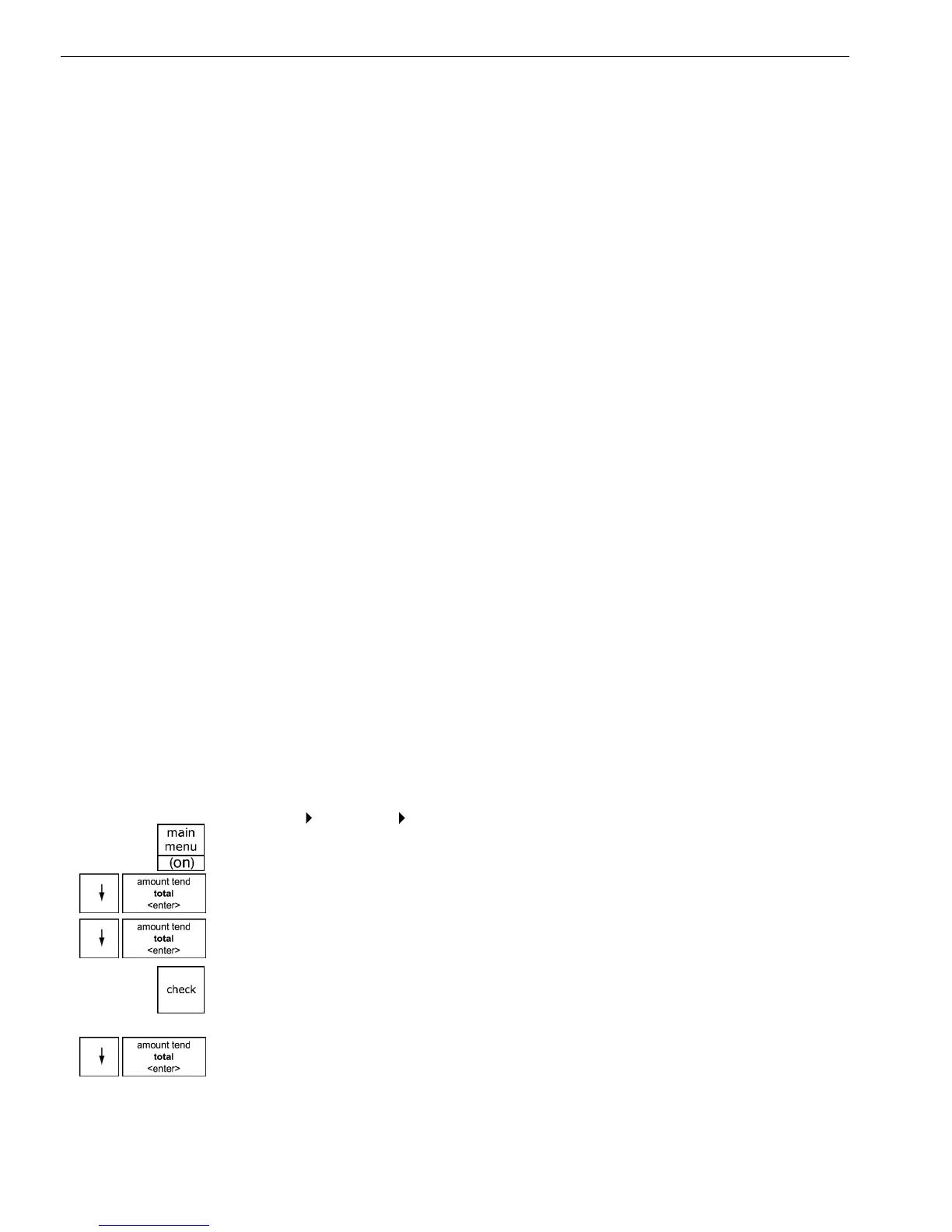
To print in the X Mode
Reports
X Report Electr. Journal
1 Press the Main menu (on) key.
2 Press the Arrow Down key to select R eports. Press the Amount Tend
Total <Enter> key.
3 Press the Arrow Down key to select X R eport. Press the Amount Tend
Total <Enter> key.
4 I f you are prompted for an X M ode Passcode, type the passcode number
and then press the Check key. I f you did not program an X M ode
Passcode, go to the next step.
5 Press the Arrow Down key to select E lectr. Journal. Press the Amount
Tend Total <Enter> key.
1000ML User's GuideahplA98



 To Next Page