.j
(Continued) DEPARTMENT STATUS
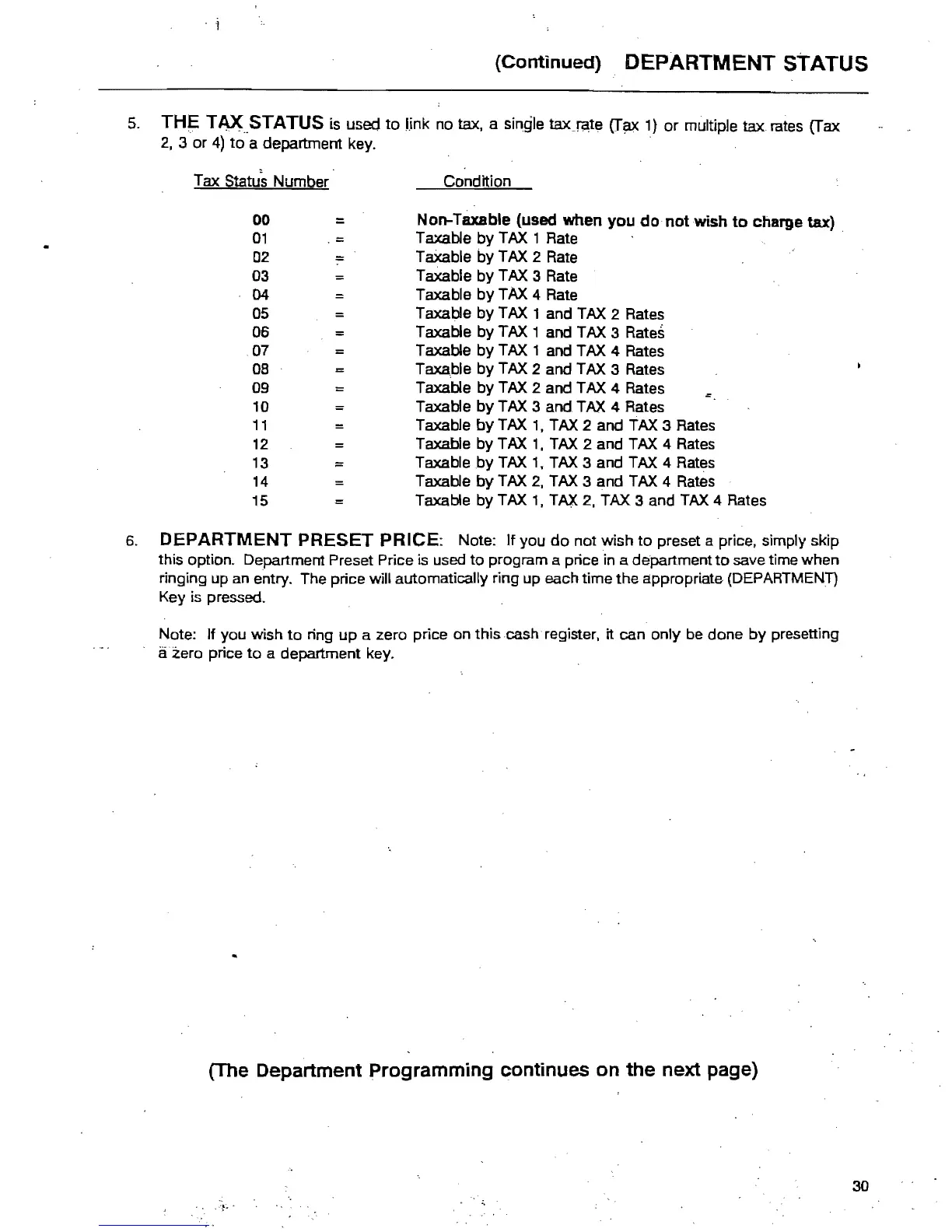
5.
THE
TAX.STATUS
is
used
to
I.ink
no
tax, a single
taxJl~te
(T~
1)
or
multiple tax rates (Tax
2,
3
or
4)
to
a department key. .
Tax Status Number Condition
00
=
Non-Taxable (used when you
do
not wish
to
charge tax)
01
Taxable
by
TAX 1 Rate .
02
=
Taxable
by
TAX 2 Rate
03
Taxable
by
TAX 3 Rate
04
Taxable
by
TAX 4 Rate
05
Taxable
by
TAX 1 and TAX 2 Rates
==
06
Taxable
by
TAX 1 and TAX 3 Rates
.07
Taxable
by
TAX 1 and TAX 4 Rates
08
:c:
Taxa.ble
by
TAX 2 and TAX 3 Rates
09
=
Taxable
by
TAX 2 and TAX 4 Rates
10
=
Taxable
by
TAX 3 and TAX 4 Rates
11
Taxable
by
TAX
1,
TAX 2 and TAX 3 Rates
12
Taxable
by
TAX
1,
TAX 2 and TAX 4 Rates
13
Taxable
by
TAX
1.
TAX 3 and TAX 4 Rates
14
=
Taxable
by
TAX
2.
TAX 3 and TAX 4 Rates
15
Taxable
by
TAX
1,
TAX 2. TAX 3 and TAX 4 Rates
6.
DEPARTMENT PRESET PRICE: Note: If you
do
not wish
to
preset a price, simply skip
this option. Department Preset Price
is used
to
program a price in a department
to
save time when
ringing up an entry. The price will automatically ring up each time
the
appropriate (DEPARTMENT)
Key
is
pressed.
Note: If you wish
to
ring up a zero price on this cash register. it can only be done
by
presetting
azero price
to
a department key.
(The Department
Programming
continues
on
the
next page)
30



 To Next Page