EasyManua.ls Logo

Royal 482NT - Page 82

Default Icon
83 pages
Print Icon
To Next Page IconTo Next Page
To Previous Page IconTo Previous Page
Loading...
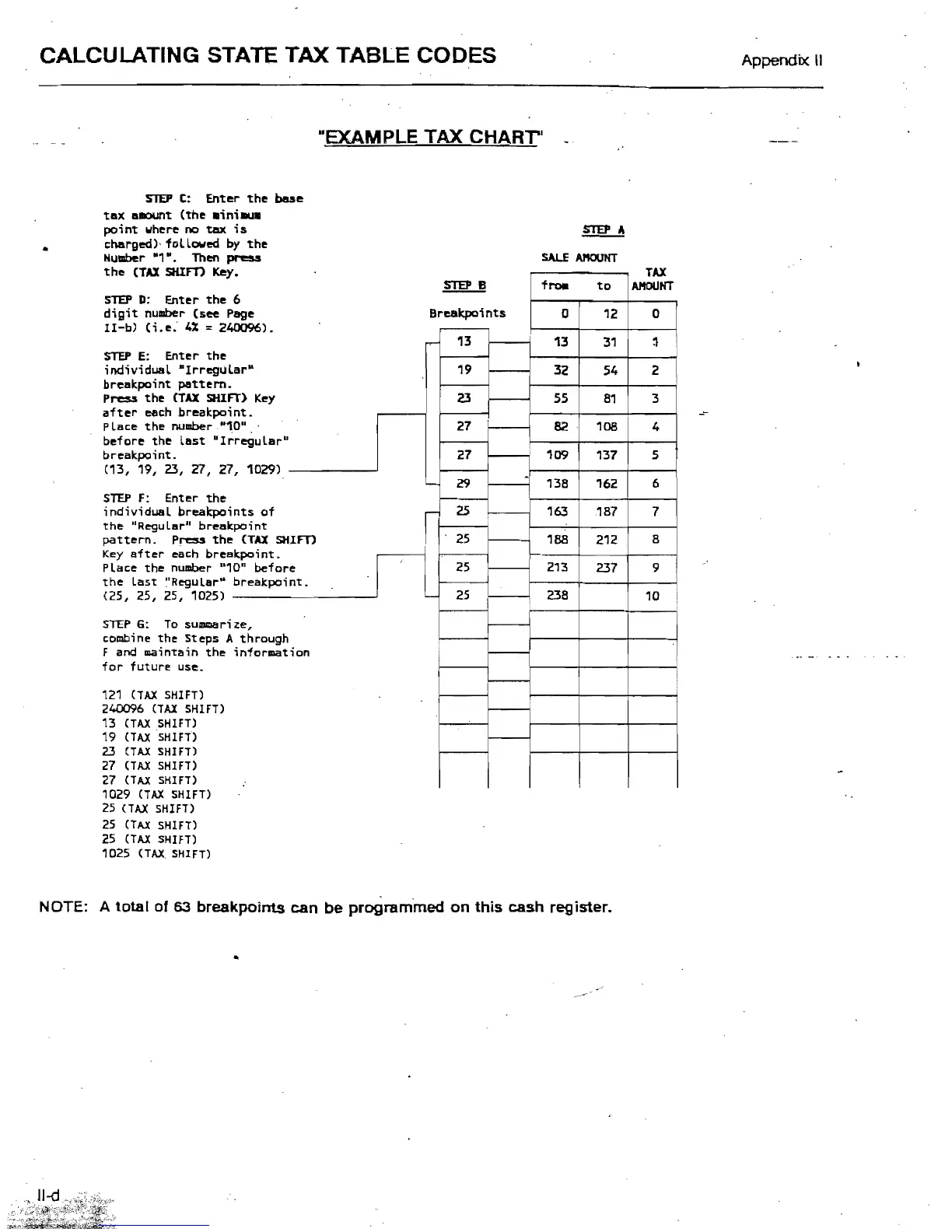
CALCULATING STATE TAX TABLE CODES
Appendix.
II
"EXAMPLE
TAX
CHARr'
STEP
c:
Enter
the
bese
tax
a~t
(the
aini.u.
point
where
no
tax
is
charged)' followed
by
the
Humber
"1".
Then
press
the
(TAX
SHIm
Key
.
TAX
froa
to
AMOUNT
STEP
D: Enter
the
6
digit
number
(see
Page
Brealqxlints
~
0
II-b)
(i.e.
4%
= 240096
).
0 12
~
13
31
~
I
-
STEP
E:
Enter
the
individual
MlrreguL
arK
32
54 2
breakpoint
pattern.
Press
the
(TAX
SHIFT
)
Key
-
55
81
3
-
after
each breakpoi
nt.
PlBce
the
number
·"1
0"
108 4
before
the
last
"Ir
regular"
breBkpoi
nt.
82
-
109 137
5
(13, 19, 23, 27,
27
, 1029)
f---
.
'-
138 6
162
f---
STEP
F:
Enter
the
i nd; vi dual brealqxli
nts
of
-
187
163 7
the
"Regular" break
point
pattern.
Press
the
(TAX
Slum
f---
8
Key
after
eBch
brea
kpoint.
P
lace
the
number
"1
0"
before
188 212
f---
213
237 9
the
last
"Regular"
breakpoint.
(25, 25, 25, 1025)
f---
'-
238 10
i
f---
STEP
G:
To
sUllllllari
:te,
r---
combine
the
Steps A through
F and maintain
the
information
f---
for
future
use.
i
f---
121
(TAX SHIFT)
240096
(TAX SHIFT)
-
13 (TAX SHIFT)
NOTE:
13
19
23
27
27
29
25
25
25
25
19 (TAX SHIFT)
-
23
(TAX SHIFT)
27
(TAX SHIFT)
27
(TAX SHIFT)
1029 (TAX SHIFT)
25
(TAX SHIFT)
25
(TAX SHIFT)
25
(TAX SHIFT)
1025 (TAX SHIFT)
A total
of
63
breakpoints
can
be
programmed
on
this
cash register.

Table of Contents

Related product manuals