Chapter 2 Installing System
RT4401-48A Installation Manual v3.0 28
Copyright © 2019, All Rights Reserved.
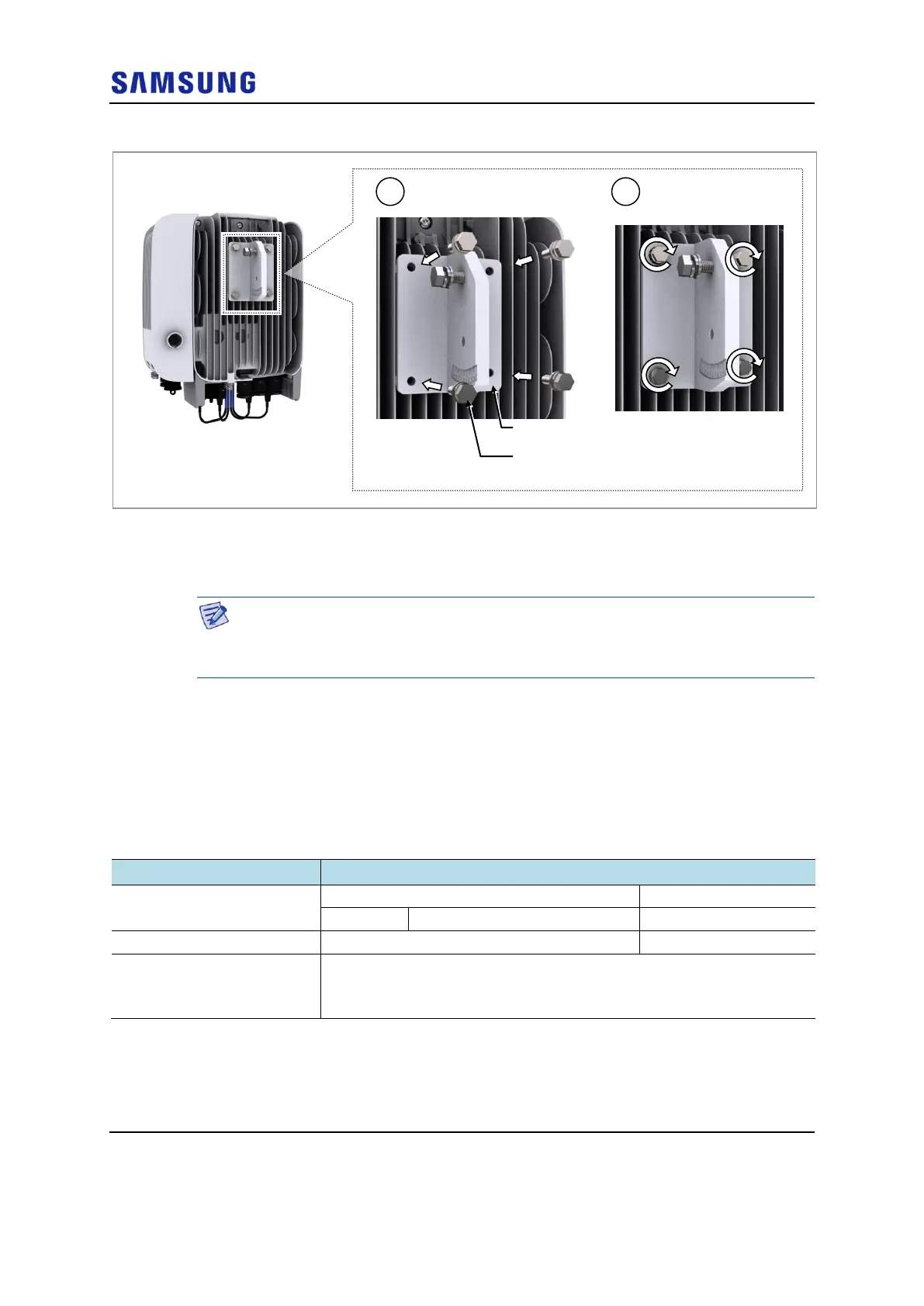
Figure 24. Fixing Unit Bracket (3)
Fixing Pole Type_1 Sector
This section describes the procedures for fixing the system on the pole.
The standard of the pole on which the mounting bracket can be attached using
steel bands is 50 A to 125 A. When installing on a pole of 125 A or more, the steel
band should be replaced.
Assembling Mounting Bracket
To assemble the mounting bracket for 1-sector, do the following:
Prerequisites
Before proceeding with assembling the mounting bracket for 1-sector, make sure
that you have the items mentioned in the table below:
Table 7. Parts and Tools for Fixing Mounting Bracket on the Pole
Torque Driver (20 to 90 lbfin)
Screw Driver Bit ('+', No. 3)
Antenna Alignment Tool
1 Pass the steel band through the fixing hole of the mounting bracket.
M6 Hex. Bolt
(Washer Assembly)


 To Next Page