Other Features Of Playlist Edit
Short-cut Playlist Creation
You may often find that you want to create a playlist that simply chains 2 or more patterns together,
with no repeats and no transposition.
If you are working from a default playlist, you can often do this just by setting the length required, but
if you need to use a different starting pattern number, or you already changed some of the other
playlist steps, there is a short-cut method to setting up a simple playlist with sequential patterns:
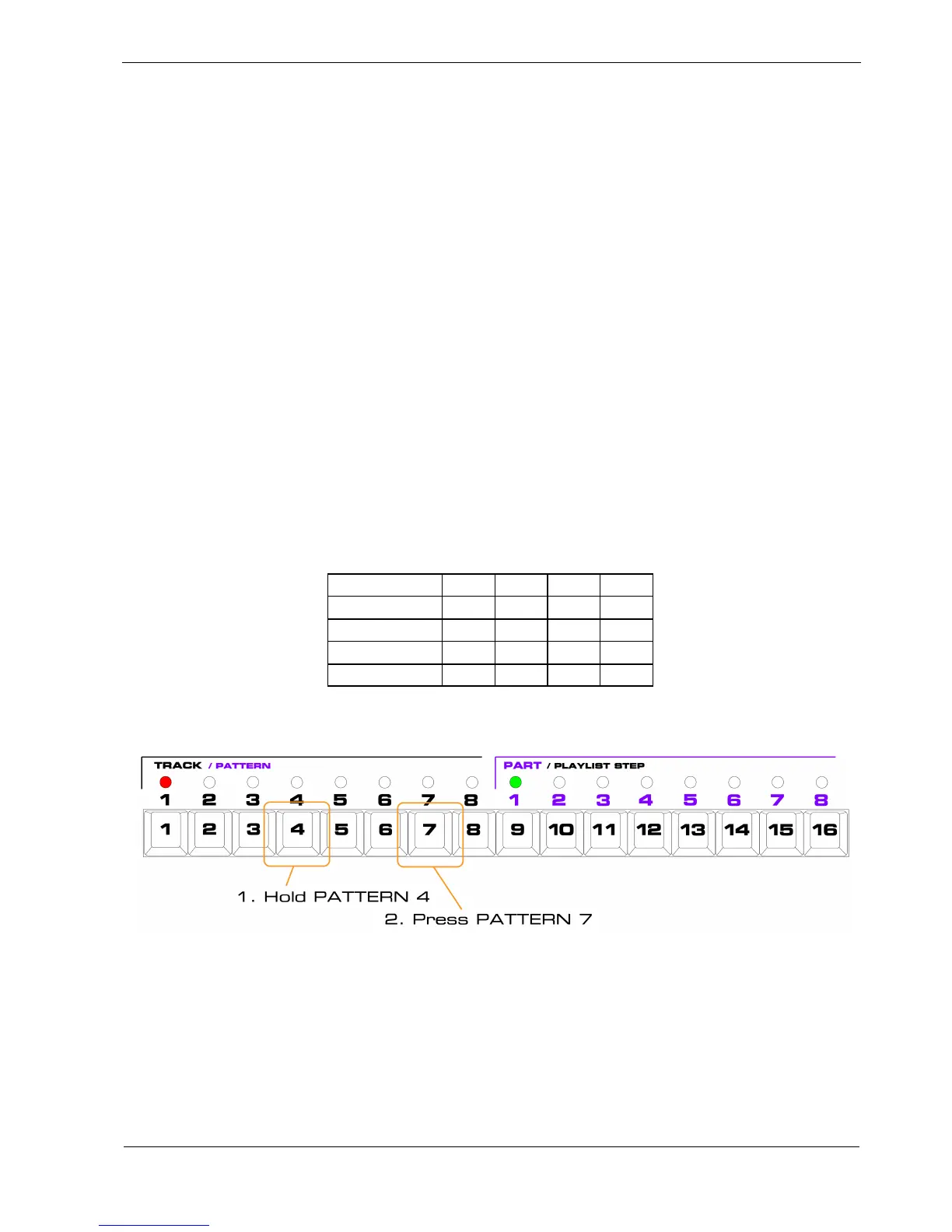
• hold the pattern key for the pattern you want the playlist to start on
• press the pattern key for the pattern you want to end on
When you do this, the playlist will be configured with the set of patterns you selected, in order, with
repeats set to 1, transpose set to 0, and sync set to “Ptrn”.
For example, let’s say you want to create a playlist with a length of 4 steps, like this:
Step 1 2 3 4
Pattern 4 5 6 7
Repeats 1 1 1 1
Transpose 0 0 0 0
Sync Ptrn Ptrn Ptrn Ptrn
You can do this in one step, like this:
As soon as you release the pattern keys, you will see the green PLAYLIST STEP LEDs indicate the
length has been set to 4.
Step through the playlist using edit view , and you’ll confirm that patterns are where you wanted them.



 To Next Page