A Longer Playlist
Now you can change the pattern on a single playlist step, let’s try something a little more
adventurous.
Let’s chain patterns 1 and 2 together so they play in turn on this track.
To do this, you need to:
• set the playlist length to 2 steps
• set playlist step 1 to play pattern 1
• set playlist step 2 to play pattern 2
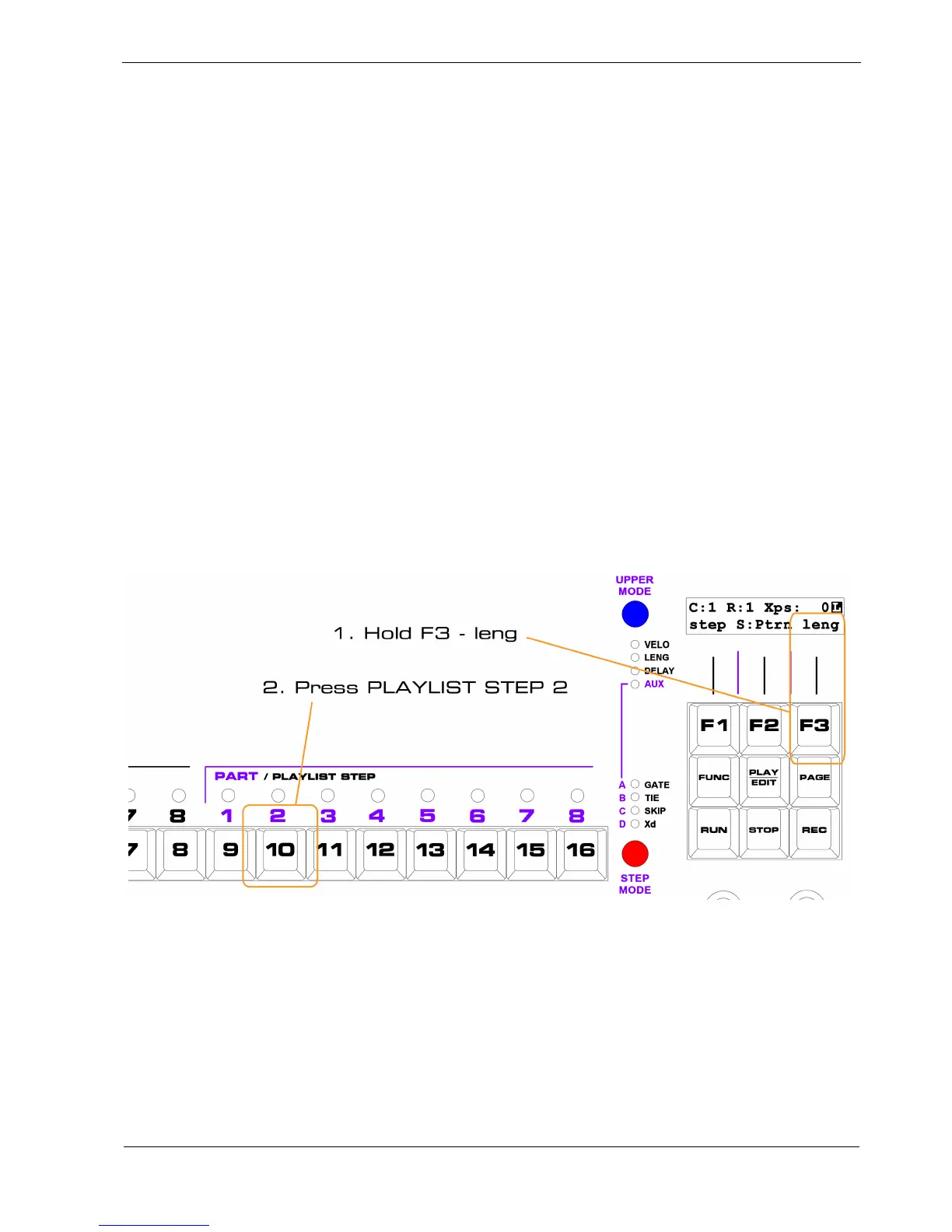
To set the length of a playlist:
• hold the “leng” soft-key, F3
• press the PLAYLIST STEP key for the last step in the playlist
In our example, you’ll use PLAYLIST STEP key 2 to set the length to 2, like this:
As soon as you set the length to 2, the PLAYLIST STEP 2 LED will light up green.
Remember – the number of green LEDs above the PLAYLIST STEPS indicates the length of the
playlist
You will also see the green LED above PLAYLIST STEP 1 continue to flash until the end of pattern 1,
which is playing on that step.
As soon as pattern 1 ends, PLAYLIST STEP 2 will start flashing green instead.



 To Next Page