Play Mode Pages and Soft-keys
Play mode has a number of different display pages.
Each page shows some different values or text labels on the display and has its own set of soft-key
assignments for F1, F2 and F3.
Some of the pages show information about the current bank or part status, with soft-keys for editing
these settings.
Others have soft-keys to access configuration options.
There are six pages in total.
Pages 1, 2 and 3 are for commonly used bank selection and part functions.
Pages 5, 6 and 7 are for less commonly used configuration options.
Page 4 is reserved for future expansion, that’s why there’s a gap.
Selecting Pages
To select a play mode page:
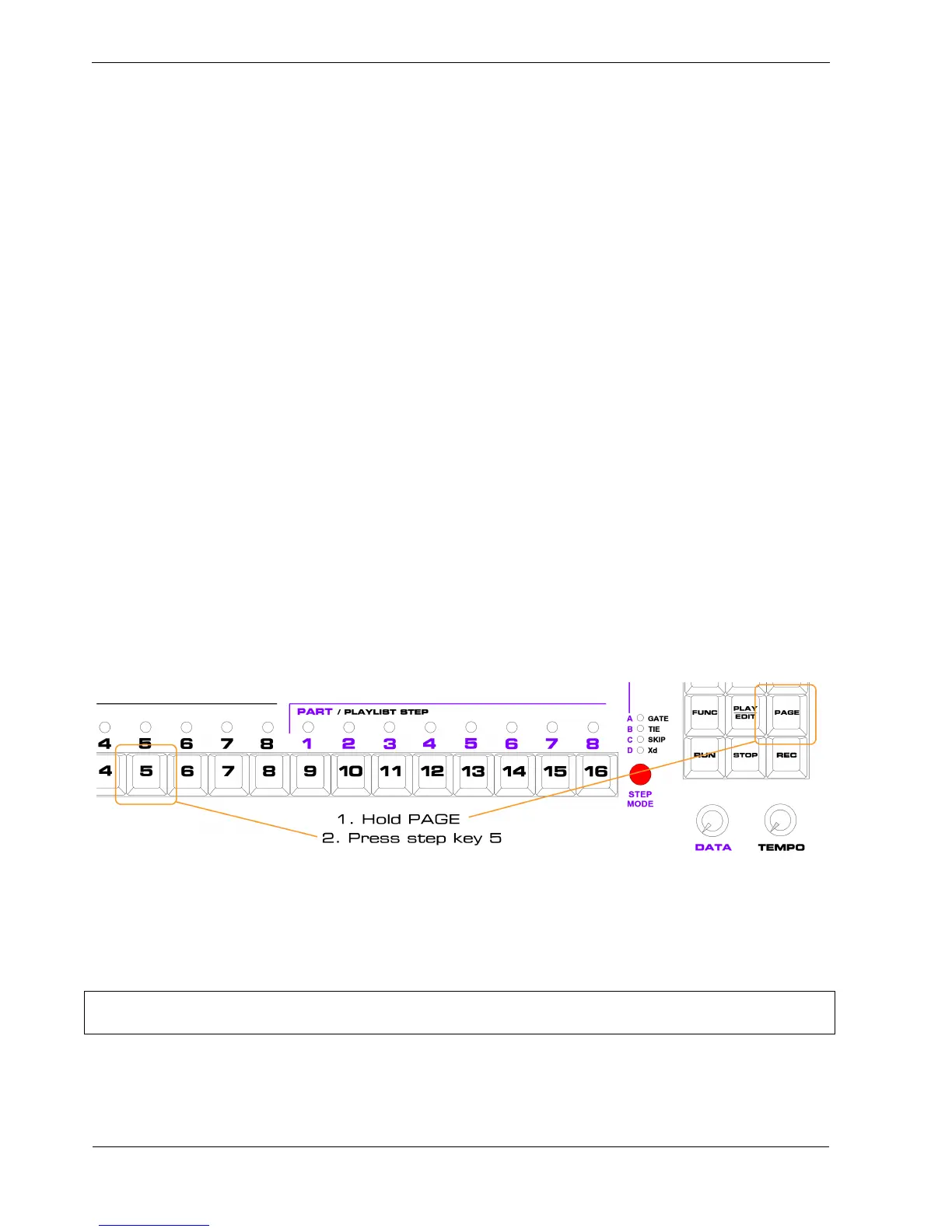
• hold the PAGE key, at the right hand side of the keypad
• press the step key for the required page number
For example, to select page 5, (for MIDI config options):
The display will change to show you the page 5 options, and the soft-keys F1, F2 and F3 take on their
new functions.
*TIP You can step through each group of three pages by pressing and releasing the PAGE key by itself,
or use FUNC+PAGE to switch to first page in the other group – handy if your other hand is busy.



 To Next Page