MX-3114N SIMULATION 6 – 30
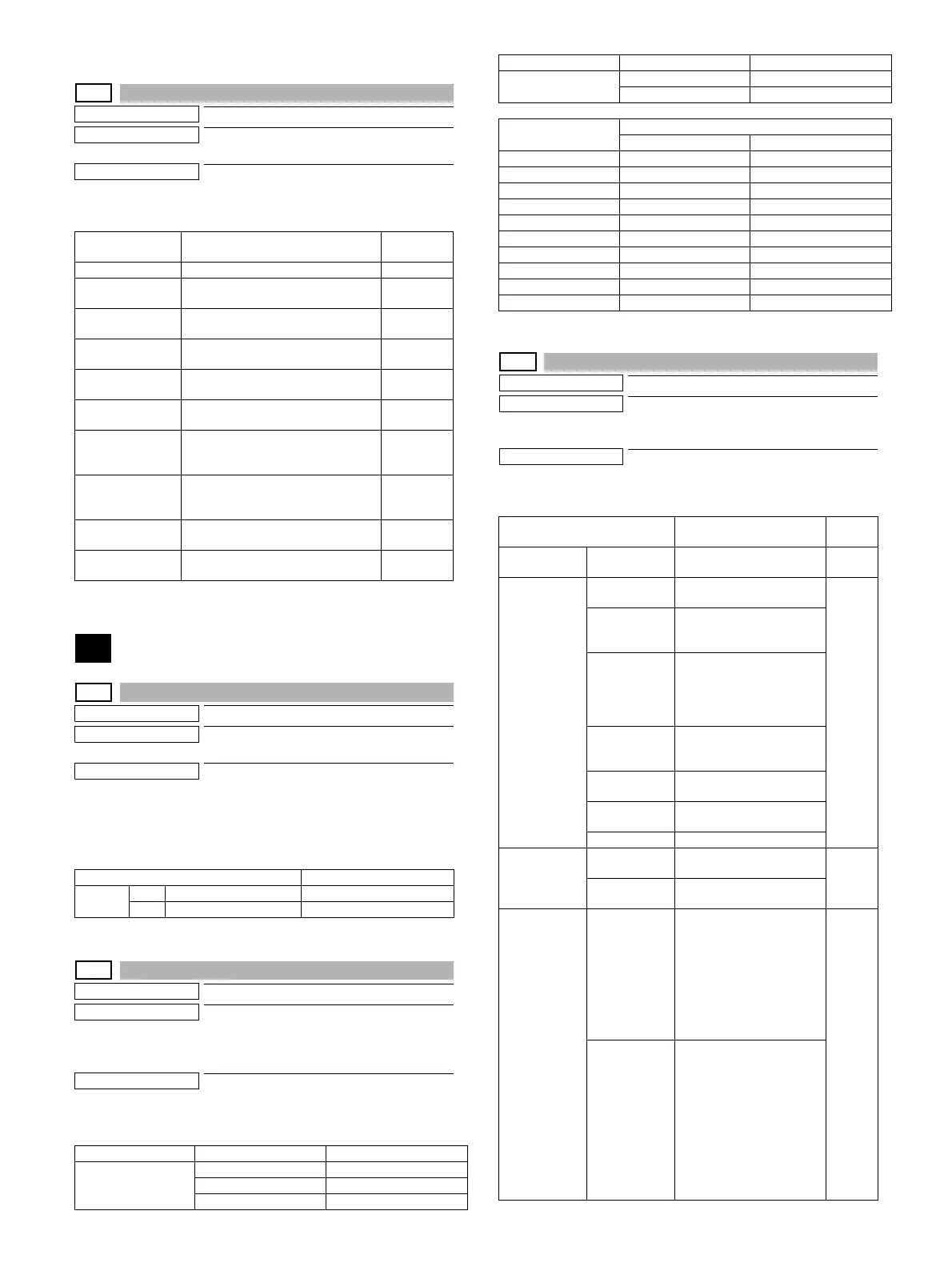
25-5
Purpose
Adjustment/Setting/Operation data check
Function (Purpose)
Used to display the toner density correction
data. (Not used in the market.)
Section
Process
Operation/Procedure
The toner density correction data are displayed.
26
26-1
Purpose
Setting
Function (Purpose)
Used to set Yes/No of installation of the
right paper exit tray.
Section
Paper exit
Operation/Procedure
1) Enter the set value with 10-key.
2) Press [OK] key. (The set value is saved.)
This setting is required to use the right paper exit tray unit.
26-2
Purpose
Setting
Function (Purpose)
Used to set the paper size of the Tandem
LCC. (When the paper size is changed, this
simulation must be executed to change the
paper size in software.)
Section
Paper feed
Operation/Procedure
Select a paper size and a weight system to be changed.
26-3
Purpose
Setting
Function (Purpose)
Used to set the specifications of the auditor.
(Setting must be made according to the
auditor use conditions.)
Section
Auditor
Operation/Procedure
Select an item to be set with the touch panel.
Item/Display Content Display
range
TCS OUTPUT Toner sensor output value 0 - 255
DELTA_TSG Toner density sensor control voltage
level correction value
-255 - 255
TSG_REF Toner density sensor control voltage
level reference value
0 - 255
TN_FALL_CNT_
JOB
Toner fall amount during a job (latest
average value)
0 - 255
TN_FALL_
JUDGE_CNT
Toner fall judgment threshold value
during a job
0 - 255
TN_FALL_MODE_
CNT
No. of times of job interruption toner
supply operation mode
0 - 255
TN_FALL_CNT_
INT
Latest average value of toner fall
amount in job interruption toner
supply operation
0 - 255
TN_FALL_CNT_
NEW
Latest average value of toner fall
amount when installing a new toner
cartridge
0 - 255
TCS_ERR_MODE
_CNT(+)
No. of times of TCS abnormality
detection mode (+) (Undertoner)
0 - 65535
TCS_ERR_MODE
_CNT(-)
No. of times of TCS abnormality
detection mode (-) (Overtoner)
0 - 65535
Item/Display Content
A 0 YES Paper exit tray: YES
1 NO Paper exit tray: NO
Item Setting value Content
Tray3
08.5x11
1A4
2B5
G/LBS SET
0GRAM
1LBS
Destination
Setting value
Tray3 G/LBS SET
U.S.A 8.5x11 LBS
CANADA 8.5x11 LBS
INCH 8.5x11 LBS
JAPAN B5 GRAM
AB_B A4 GRAM
EUROPE A4 GRAM
U.K. A4 GRAM
AUS. A4 GRAM
AB_A A4 GRAM
CHINA A4 GRAM
Item/Display Content
Default
value
BUILT-IN
AUDITOR
P10 Built-in auditor mode
(standard mode) operation.
P10
OUTSIDE
AUDITOR
NONE No external connection
vendor is used.
NONE
P VENDOR1 Coin vendor mode
(Only the copy mode can
be controlled.)
P VENDOR3 Vendor mode in which
signals for the intercard
connected to the PCU are
used for communication in
parallel I/F.
P OTHER Mode for an external
auditor connected to the
SCU.
VENDOR-EX
(*1)
Vendor I/F for EQUITRAC
VENDOR-EX
(MULTI) (*1)
VENDOR-EX + Multi job
cueing Enable mode
S_VENDOR Serial vendor mode
DOC ADJ ON Support for the auditor in
document filing print
OFF
OFF No support for the auditor in
document filing print
PF ADJ ON Continuous printing is
performed in the duplex
print mode.
If the remaining money
expires during continuous
printing, the sheets in the
machine are discharged
without being printed on the
back surfaces.
OFF
OFF Continuous printing is not
performed in the duplex
print mode. (The remaining
amount is checked for
printing every surface in all
the printing process.)
If the remaining money
expires during printing, the
sheet is discharged without
printing on the back
surface.
Item Setting value Content





 To Next Page