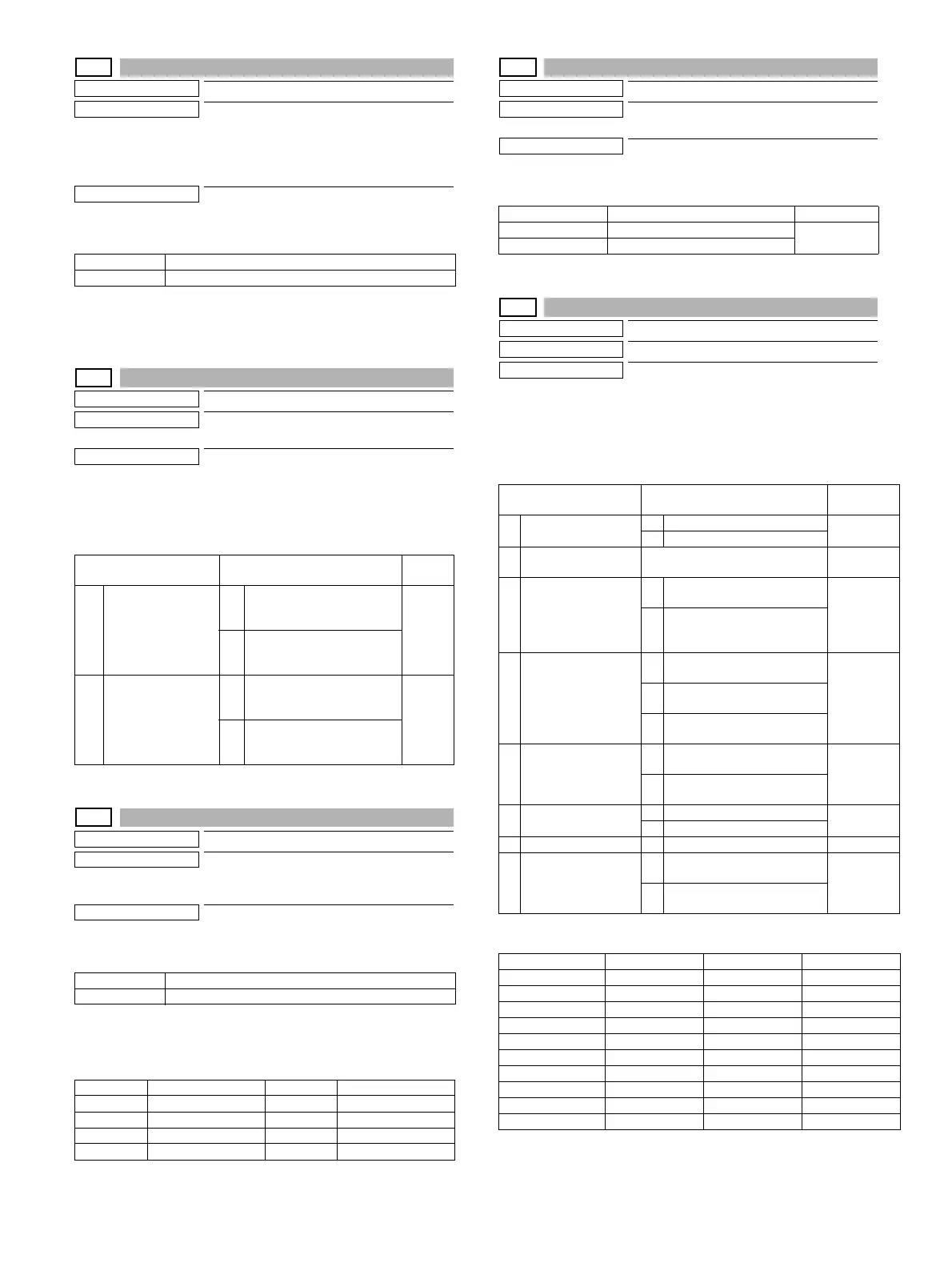
MX-3114N SIMULATION 6 – 33
26-35
Purpose
Setting
Function (Purpose)
Used to set the display mode of SIM 22-4
trouble history when a same trouble
occurred repeatedly. There are two display
modes: display as one trouble and display
as several series of troubles.
Section
Operation/Procedure
1) Enter the set value with 10-key.
2) Press [OK] key.
The set value in step 1) is saved.
26-38
Purpose
Setting
Function (Purpose)
Used to set Continue/Stop of print when the
maintenance life is reached.
Section
Operation/Procedure
1) Enter the set value with 10-key.
2) Press [OK] key.
The set value in step 1) is saved.
26-41
Purpose
Setting
Function (Purpose)
Used to set Enable/Disable of the magnifi-
cation ratio automatic select function (AMS)
in the center binding mode.
Section
Operation/Procedure
1) Enter the set value with 10-key.
2) Press [OK] key.
The set value in step 1) is saved.
<Default value of each destination>
26-49
Purpose
Setting
Function (Purpose)
Used to set the print speed of postcards
mode.
Section
Operation/Procedure
Select the copy speed mode with the touch panel. (Default: LOW)
26-50
Purpose
Setting
Function (Purpose)
Used to set functions.
Section
Operation/Procedure
1) Select a target item of setting with scroll key on the touch
panel.
2) Enter the set value with 10-key.
3) Press [OK] key. (The set value is saved.)
(*1) Default values for each destination of item A/B/D
(*2) Item B: COLOR MODE set value (OFF: Displayed/ON: Not dis-
played)
0 Only once display.
1 Any time display.
Item/Display Content
Default
value
A MAINTENANCE
LIFE OVER
(0: CONTINUE
1: STOP)
0 Setting of Print Continue/
Stop when the maintenance
life is over (Print Continue)
0
1 Setting of Print Continue/
Stop when the maintenance
life is over (Print Stop)
B FUSER WEB END
(0: CONTINUE
1: STOP)
0 Continue/Stop setting of print
when the fusing web is end
(Print Continue)
1
1 Continue/Stop setting of print
when the fusing web is end
(Print Stop)
0 AMS Disable
1 AMS Enable
U.S.A 0 (Disable) EUROPE 1 (Enable)
CANADA 0 (Disable) U.K. 1 (Enable)
INCH 0 (Disable) AUS. 0 (Disable)
JAPAN 0 (Disable) AB_A 0 (Disable)
AB_B 0 (Disable) CHINA 0 (Disable)
Item/Setting value Content Default value
LOW Postcard copy speed LOW LOW
HIGH Postcard copy speed HIGH
Item/Display Content Default
value
A BW REVERSE
0 BW reverse copy disable
Refer to
*1
1 BW reverse copy enable
BCOLOR MODE
2-color/single color copy mode
Enable/Disable setting
Refer to
*1/*2
C
FINISHER
FUNCTION
0
Finisher special paper the
number of paper exit is limited
0
Refer to
*3
1
Finisher special paper the
number of paper exit is
unlimited
D
COLOR
MODE(PRINTER)
0
All colors and monochrome
counters are displayed
Refer to
*1
1
All are displayed except for the
3-color print counter
2
Monochrome and full color
print counters are displayed
E FEED TRAY COLOR
0
Paper feed tray color display
ON during paper feed
0
1
Paper feed tray color display
OFF during paper feed
F LONG SIZE PRINT
0 Long size print disable
0
1 Long size print enable
G --- Not used
H WIRELESS SET (*1)
0
Wireless Lan connection
disable
0
1
Wireless Lan connection
enable
Destination Item A Item B Item D
U S A102
CANADA 1 0 2
INCH 1 0 2
JAPAN172
AB_B 1 0 2
EUROPE 1 0 2
U K002
AUS102
AB_A 1 0 2
CHINA 1 0 2





 To Next Page