MX-3114N SIMULATION 6 – 107
64-2
Purpose
Operation test/check
Function (Purpose)
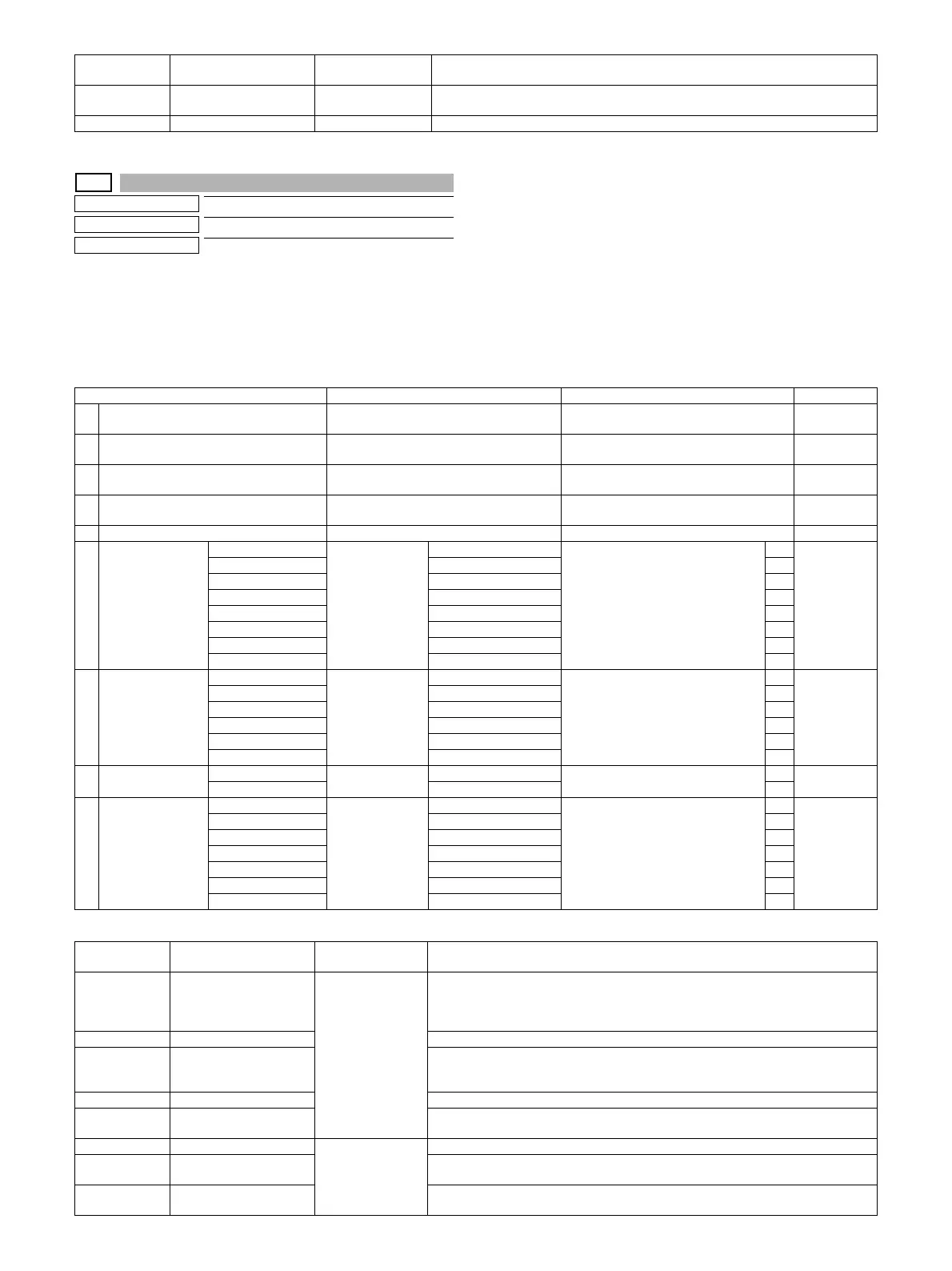
Test print. (Self print) (Monochrome mode)
Section
Operation/Procedure
1) Set the print conditions.
Select an item to be print condition with scroll keys.
Set the print conditions with 10-key.
2) Press [EXECUTE] key.
The test print (self print) is performed.
Print pattern of Item A
21 4-point dot print (main
scan)
LSU-ASIC • For every 1/4 of the main scanning direction paper size, print is made for each color.
• When N=0, print of all the background is made in 4 colors.
22 Slant line LSU-ASIC
Pattern No. Content
Pattern generating
section
NOTE
Item/Display Content Setting range Default value
A PRINT PATTERN
(1, 2, 9 - 11, 17 - 19, 21, 22)
Print pattern specification
(* For details, refer to the description below.)
1 - 58
(Printable only 1, 2, 9 - 11, 17 - 19, 21, 22)
1
B DOT1 (DOT1>=2 IF A: 2,11) Setting of print dot number (M parameter)
(Self print pattern: m by n)
1-255
(Pattern 2, 11: 2-255 except above: 1-255)
1
C DOT2 (DOT2>=2 IF A: 2,11) Setting of blank dot number
(N parameter) (Self print pattern: m by n)
0-255
(Pattern2, 11: 2-255 except above: 0-255)
254
D DENSITY (FIXED "255" IF A: 9) Used to specify the print gradation. 1-255
(Pattern 9: 255 Fixed except above:1-255)
255
E MULTI COUNT Number of print 1 - 999 1
F EXPOSURE
(2 - 8 IF A: 17 - 19)
THROUGH Exposure mode
specification
No process (through) 1-8
(Pattern 17-19: 2-8
except above: 1-8)
18
(STANDARD
DITHER)
CHAR/PIC Text/Printed Photo 2
CHAR/PRPIC Text/ Photograph 3
CHAR Text 4
PRINT PIC Printed Photo 5
PRINT PAPER Photograph 6
MAP Map 7
STANDARD DITHER Dither without correction 8
G PAPER MFT Tray selection Manual paper feed 1 - 6 1 2
(CS1)
CS1 Tray 1 2
CS2 Tray 2 3
CS3 Tray 3 4
CS4 Tray 4 5
LCC LCC 6
H DUPLEX YES Duplex print
selection
Yes 0 - 1 0 1
(NO)
NO No 1
I PAPER TYPE PLAIN Paper type Standard paper 1 - 7 1 1
(PLAIN)
HEAVY Heavy paper 2
OHP OHP 3
ENVELOPE Envelope 4
HEAVY2 Heavy paper 2 5
GLOSSY Glossy paper 6
HEAVY3 Heavy paper 3 7
Pattern No. Content
Pattern generating
section
NOTE
1 Grid pattern LSU-ASIC • When the print width is 100 or more and all colors are selected, print is made in the
three colors (CMY).
• Print is started at 4mm from the paper lead edge.
• Writing regardless of pound. The first one is fixed to LD1.
2 Dot print –
9 Each color 10% area (A4/
A4R) density print
• Each interval is 41.86mm (989dot).
• If m is not in the range of 1 - 13%, it is rounded.
• K print is started at 17mm from the paper lead edge.
10 8-color belt print
11 4-color dot print (sub scan) • For every 1/4 of the sub scanning direction paper size, print is made for each color.
• When N=0, print of all the background is made in 4 colors.
17 All background (halftone) Halftone (IMG-ASIC
rear process)
–
18 256 gradations pattern
(Other dither)
–
19 256 gradations pattern
(For text dither)
–





 To Next Page