MX-3114N SIMULATION 6 – 109
64-5
Purpose
Operation test/check
Function (Purpose)
Printer test print. (Self print) (PCL)
Section
Operation/Procedure
1) Set the print conditions.
Select an item to be print condition with scroll keys.
Set the print conditions with 10-key.
Select a target print color with [K] [C] [M] [Y] key.
2) Press [EXECUTE] key.
The test print (self print) is performed.
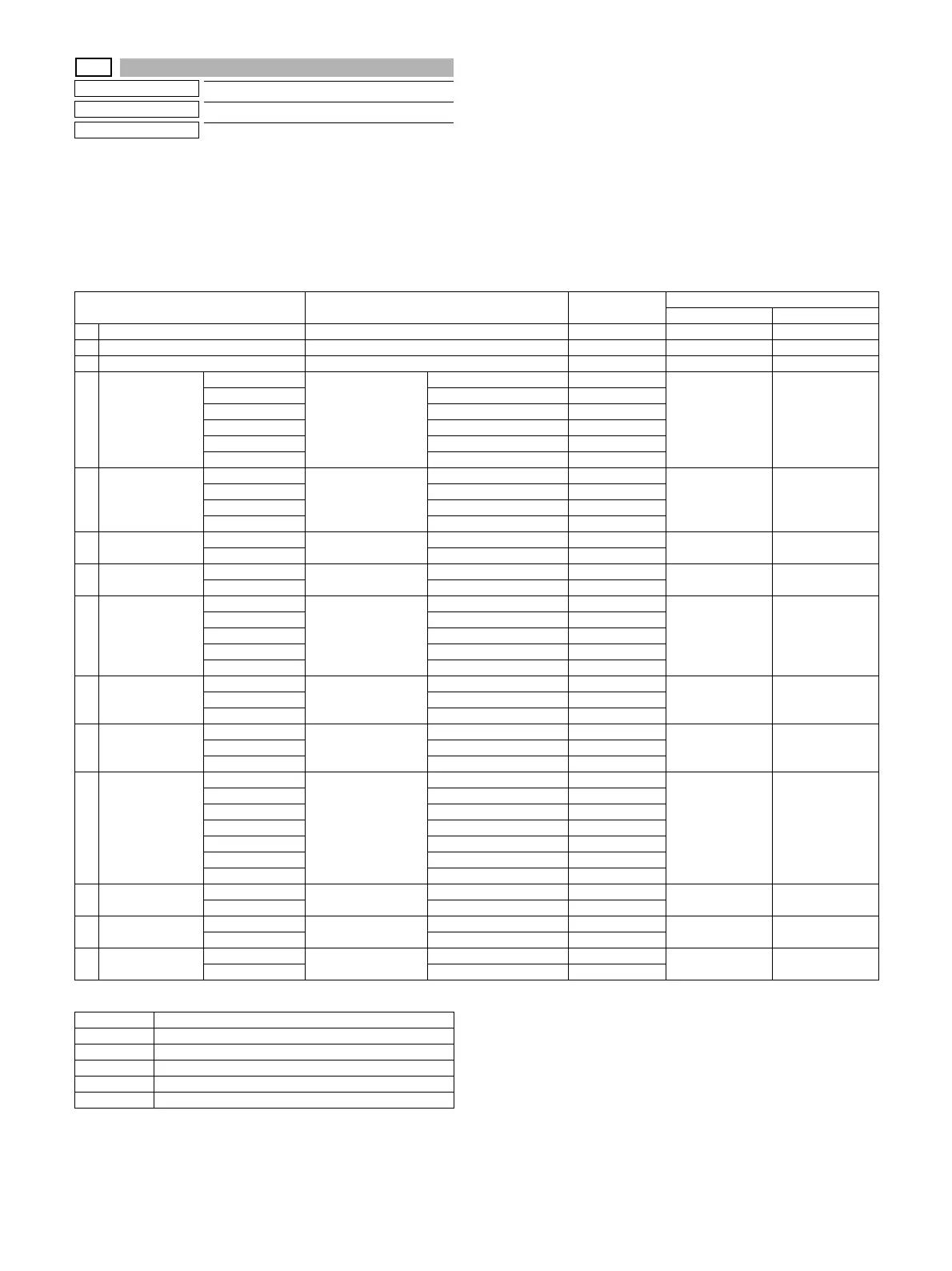
Print pattern of Item A
Item/Display Content Setting range Default value
23cpm 26/31cpm
A PRINT PATTERN Print pattern specification 1 - 5 3 3
B DENSITY Print gradation specification 1 - 255 255 255
C MULTI COUNT Number of print 1 - 999 1 1
D PAPER MFT Paper feed tray
selection
Manual paper feed 1 2
(CS1)
2
(CS1)
CS1 Tray 1 2
CS2 Tray 2 3
CS3 Tray 3 4
CS4 Tray 4 5
LCC LCC 6
E HALFTONE LOW(IMAGE) Halftone For Photo 0 3
(AUTO)
3
(AUTO)
HIGH(TEXT) For text 1
GLOSSY For glossy paper 2
AUTO Auto (for photo/text) 3
F QUALITY STANDARD Image quality setting Standard (600dpi, 1bit) 0 0
(STANDARD)
1
(HIGHQUALITY)
HIGHQUALITY High quality (600dpi, 4bit) 1
G DITHER STRAIGHT Specification of dither
correction
0: Straight 0 1 1
CALIB 1: Calibration 1
H PAPER TYPE PLAIN Paper type Standard paper 0 0
(PLAIN)
0
(PLAIN)
HEAVY Heavy paper 1
HEAVY2 Heavy paper 2 2
GLOSSY Glossy paper 3
HEAVY3 Heavy paper 3 4
I INTENT PERCEPTUAL Rendering indent Perceptual 0 0
(PERCEPTUAL)
0
(PERCEPTUAL)
COLORIMETRIC Color metric 1
SATURATION Saturation 2
JOUTPUT
PROFILE
SHARP Output profile Standard 0 0
(SHARP)
0
(SHARP)
STANDARD Photo image 1
GRAPHICS Graphics 2
K RGB SOURCE
PROFILE
SRGB RGB source profile SRGB 0 0
(SRGB)
0
(SRGB)
GAMMA1.6 Gamma 1.6 1
GAMMA1.8 Gamma 1.8 2
GAMMA2.0 Gamma 2.0 3
GAMMA2.6 Gamma 2.6 4
GAMMA3.0 Gamma 3.0 5
TONER SAVE For TONER SAVE 6
LGRAY
COMPENSATION
K Gray print method Print method K 0 0
(K)
0
(K)
KCMY KCMY 1
M PURE BLACK
PRINT
ON Black monochrome
print
set. 0 0
(ON)
0
(ON)
OFF not set. 1
N TONER SAVE
MODE
OFF Monochrome toner
save
not set. 0 0
(OFF)
0
(OFF)
ON set. 1
Pattern No. Content
1COLOR
2B/W
3 Continuous COLOR,B/W
4 Service chart (COLOR)
5 Service chart (B/W)





 To Next Page