System Conguration
This section provides information and guidelines to specify date and time settings, reboot and
power off, reset to factory defaults, and update your OMNINAS rmware.
Setting Date and Time
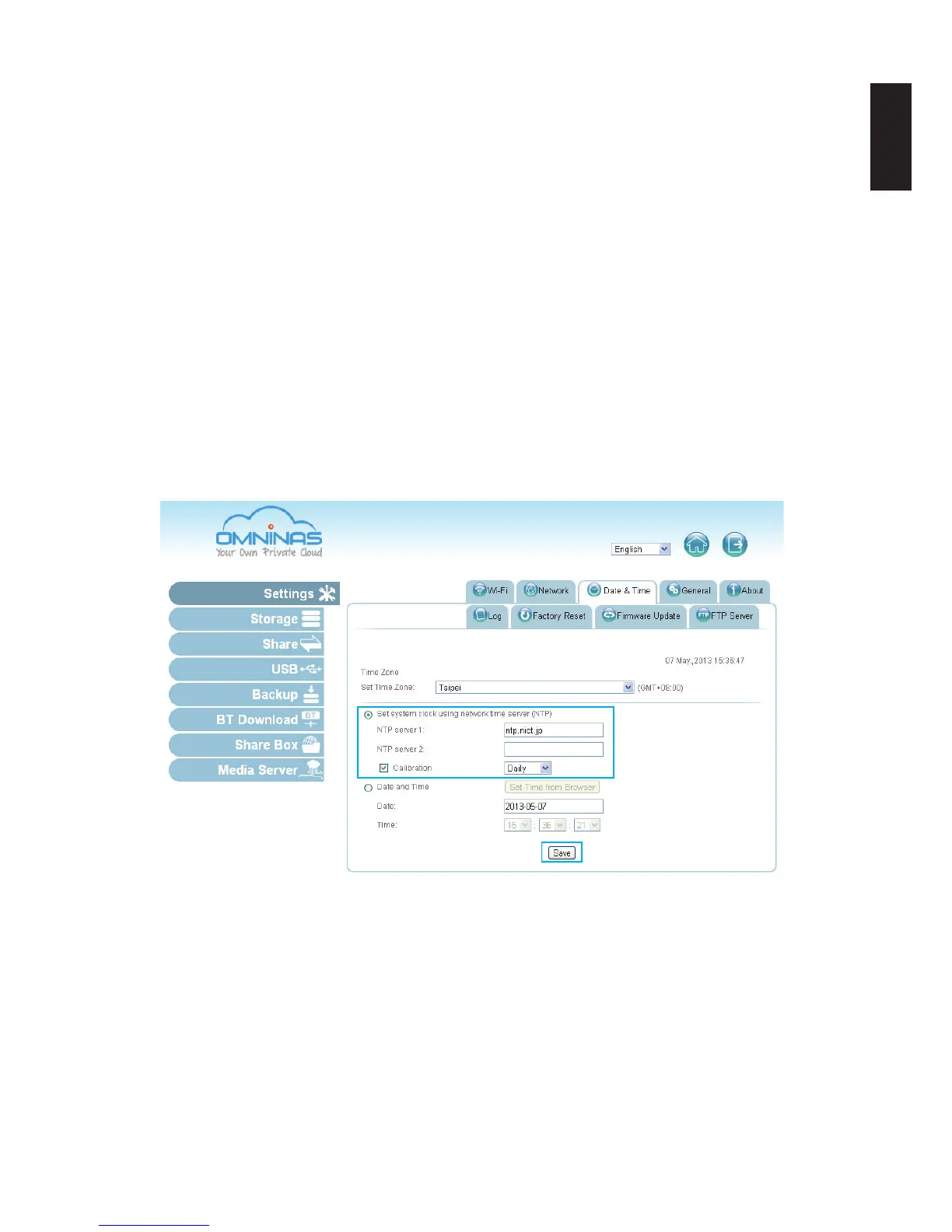
Change the date and time by using the Date & Time function. Set Time Zone allows you to
choose from a list of locations. Set the date and time either through the network time server
(NTP) or from a browser.
To set a Network Time Server (NTP)
1. Select Settings, and click the Date & Time tab.
2. Select Set system ... time server (NTP).
3. Enter the URL address of your selected NTP server(s) in the NTP server 1/2 elds.
4. Check Calibration to calibrate Daily, Weekly or Monthly.
5. Click Save to keep selected changes.
Date & Time Settings
Click Date and Time to set time from the browser.
1. Select Settings, and click the Date & Time tab.
2. Select Date and Time.
3. Click Set Time from Browser to automatically update Date and Time.
Or
4. Enter the Date by clicking on the drop-down menu and selecting the date.



 To Next Page